
Why Workflow Automation Won’t Sync athenaHealth with Google Calendar (And What Will)
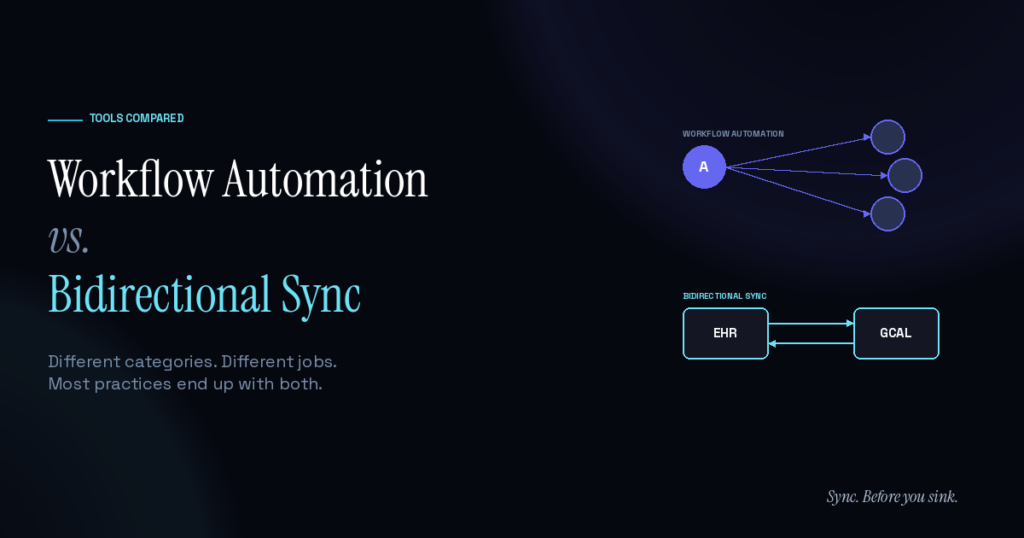
athenaHealth doesn’t ship a native two-way Google Calendar sync, so practices solve the problem in one of three ways: workflow automation tools, custom API integrations, or purpose-built bidirectional sync products. Each has a real use case. For most outpatient practices, the bidirectional sync path is the one that fits — and Sporo Health is built specifically for the athenaHealth + Google Calendar pair.
The conversation usually starts with a practice manager noticing that providers are quietly maintaining two calendars — athenaHealth for patient appointments, Google Calendar for everything else (surgeries, OOO, conferences, school pickups, team meetings). The two never talk to each other, the front desk only sees half the picture, and double-bookings start showing up. Searching for solutions returns three categories of tool that look superficially similar and actually solve different problems.
Knowing which one fits saves a few months of wrong-tool spend.
Why athenaHealth practices think about Google Calendar integration
Most physicians live in Google Calendar for personal logistics. It’s where their family commitments, conference travel, OR schedule, and team meetings sit. athenaHealth, meanwhile, is the system of record for clinical scheduling — patient appointments, provider templates, department-level rules. Both are accurate; neither is complete on its own.
The visibility gap is felt as a daily ops problem, but it ladders up to something bigger. According to the AMA’s 2025 physician AI survey, 57% of physicians identify reducing administrative burden through automation as the single biggest opportunity for new technology in their practice — outpacing every other category by a wide margin. Schedule infrastructure that quietly removes manual coordination is exactly that kind of automation.
When the front desk only has visibility into athenaHealth, they’re booking patients into a partial picture. A peer-reviewed analysis of patient no-show data cited an average cost of $196 per missed appointment (Kheirkhah et al.), with practice-level annual losses regularly running into six figures depending on specialty mix. Double-bookings from calendar mismatches sit on the same revenue line — usually invisible until they show up as patient complaints or compressed encounter time.
Closing the visibility gap is the goal. The question is how.
The three approaches athenaHealth practices use today
When practices look for ways to bridge the two systems, they typically evaluate three categories of tool:
- Workflow automation platforms. Examples: Keragon, Make.com, n8n. Built for routing events between many systems via no-code workflows. Strong in healthcare for tasks like appointment confirmations, reminder cadences, and intake form routing.
- Custom API integrations. Built in-house using athenaHealth’s athenaOne APIs and Google Calendar’s API. Full control, full responsibility. Typically a 6–12 week development project plus ongoing maintenance.
- Purpose-built bidirectional sync products. A category designed specifically for keeping two systems’ state aligned in real time. Sporo Health is the option built for the athenaHealth + Google Calendar pair specifically.
Each fits a specific kind of practice and a specific kind of problem. The mistake is assuming all three solve the same job.
When workflow automation makes sense
Workflow automation tools shine at event routing. When something happens in one system, the tool triggers an action in another — often across many systems in a single pipeline. For an athenaHealth practice, this is the right category for:
- Sending appointment confirmation texts when a patient books
- Logging activity in spreadsheets or analytics tools
- Routing intake form submissions to the EHR
- Multi-step orchestration: when a new patient books, do A, then B, then C
- Connecting three or more tools in a single workflow
Where workflow automation tends to get stretched is when practices try to use it specifically for keeping two systems’ state aligned over time. The tools are stateless by design — each workflow run handles a single event in isolation. Stitching together two one-way workflows works on demo day, but cancellations, reschedules, and race conditions tend to cause drift that the architecture wasn’t built to detect or correct. That’s not a knock on the tools — it’s outside their design intent.
For practices that need both event routing and calendar state sync, the cleanest pattern is to use workflow automation for the workflows it’s built for, and a separate tool for the sync layer.
When custom API builds make sense
Larger practices with internal development teams sometimes choose to build the integration themselves. This is the option with the most control: every behavior, every edge case, every UI choice is whatever the practice’s developers decide.
The tradeoff is cost. Custom integrations typically run $50K–150K up front for the initial build, plus ongoing maintenance whenever either API changes. Per athenaHealth’s developer documentation, their APIs come with rate limits, pagination requirements, and version upgrade cycles — all of which the practice’s dev team owns indefinitely.
Custom builds make sense for large groups (50+ providers) with specific workflow requirements that off-the-shelf tools don’t accommodate. For most outpatient practices, the math doesn’t justify it.
When purpose-built bidirectional sync makes sense
The third category exists because the first two don’t fit the specific job of bidirectional state reconciliation. Workflow automation is stateless by design. Custom builds are expensive and slow. Purpose-built sync products are designed from the start around one specific question: how do you keep two systems’ calendars aligned in real time, both directions, with deterministic conflict resolution and continuous drift correction?
For the athenaHealth + Google Calendar pair, Sporo Health is the option built around that question. The architecture reconciles state continuously, not just on event triggers. Conflict resolution rules are deterministic — athenaHealth is the system of record for patient appointments; Google Calendar is the system of record for provider blocks; the tool knows what to do when both change simultaneously. PHI never enters Google Calendar: the synced event contains time, duration, appointment type, and metadata only. No patient name, no provider name in event content, no department, no location, no free/busy state.
Setup is white-glove because the integration requires it. Sporo’s team meets with the practice to map provider templates, sign the BAA, and validate the data flow before going live. Most practices are live within 2–3 days from the discovery call.
For the calendar visibility problem most outpatient practices run into, this is the category that fits — and Sporo is the option built specifically for athenaHealth.
What to look for in any approach
Whichever path a practice takes, the same checklist applies:
- Signed BAA covering the data handling. Not optional.
- Default behavior keeps PHI out of Google Calendar. Patient names, clinical detail, and other identifiers should never reach a system outside the EHR’s BAA scope.
- Cancellations, reschedules, and edge cases handled natively. Not as bolt-on workflows that need to be maintained separately.
- Failures surface visibly. Silent drift is the most expensive failure mode in any sync architecture.
- Setup time matches the practice’s resources. A 6-week dev project and a 2-day white-glove install are different commitments.
The right tool isn’t the one with the most features. It’s the one whose design intent matches the practice’s actual problem.
Frequently Asked Questions
Q: Can workflow automation tools sync athenaHealth with Google Calendar? A: Workflow automation can move events between the two systems via one-way templates and is excellent for event routing — confirmations, reminders, multi-tool orchestration. What it isn’t built for is continuously reconciling state. For practices that need both, the cleanest stack uses workflow automation for routing and a separate tool for calendar sync.
Q: How long does Sporo Health’s sync take to set up? A: 2–3 days from the discovery call to live, including the BAA and credential handoff. Sporo’s team handles the integration directly with the practice — no IT project required.
Q: Could a practice build this themselves via athenaHealth’s APIs? A: Yes, and large groups with internal dev teams sometimes do. Typical cost: $50K–150K up front, plus ongoing maintenance.
Q: What data lands in Google Calendar? A: Appointment type, time, duration, and lightweight metadata only. No patient names, no provider names in event content, no department, no location, no free/busy state. PHI never enters Google Calendar.
Pick the path that matches the problem
Workflow automation, custom builds, and purpose-built sync products all have a place in the modern athenaHealth practice. The right path depends on the actual problem.
For the bidirectional-sync use case most outpatient practices run into, Sync. Before you sink. Sporo Health is built for it.
