
How to Prevent Double-Booking in athenaHealth: A Practice Manager’s Guide (2026)
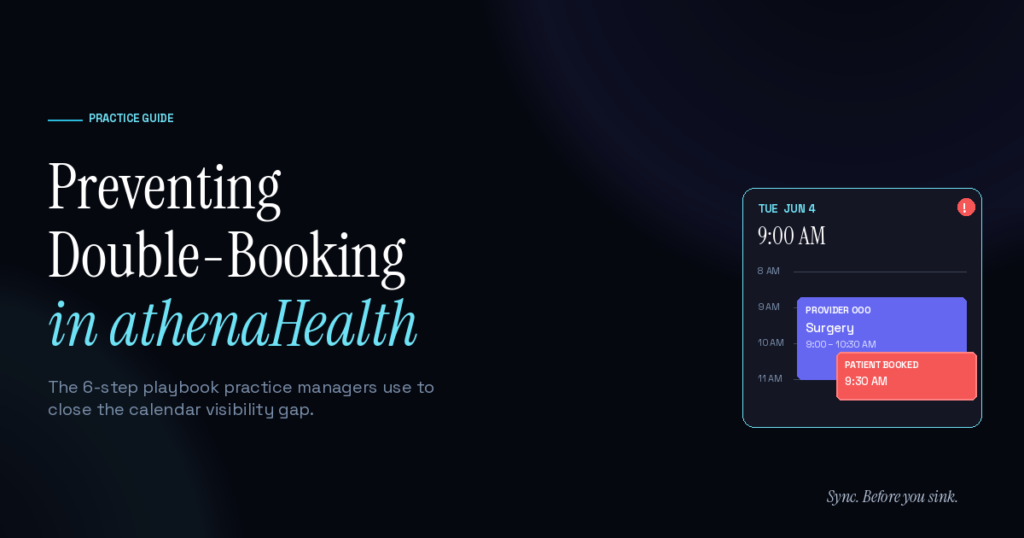
Double-bookings in athenaHealth happen because the front desk can’t see what’s already on the provider’s Google Calendar — surgeries, conferences, OOO. Preventing them takes three layers: clean provider templates in athenaHealth, real-time visibility between athenaHealth and the provider’s calendar of record, and a front-desk protocol for the gray areas. Most practices fix 80% of the problem by closing the calendar visibility gap.
Tuesday morning, 9:15am. A family medicine doc in San Antonio walks into clinic to find two patients waiting in his exam rooms — and a third sitting in the lobby. The front desk booked all three into a 90-minute window he’d marked off in Google Calendar three weeks ago for a case conference. He never told the front desk. athenaHealth never knew. Three patients, three apologies, one ruined morning.
According to MGMA’s December 2025 patient access report, no-shows and last-minute cancellations can consume roughly 14% of a medical group’s revenue on a given day, with revenue losses around $150,000 annually per physician in some models. Double-bookings sit alongside no-shows on that same revenue line — and they’re usually preventable.
Why does double-booking keep happening in athenaHealth practices?
athenaHealth tracks patient appointments, but it doesn’t know about anything happening outside it. Provider OOO, surgeries, school pickups, team meetings, conferences — these live in Google Calendar (or worse, in someone’s head). The front desk books based on what athenaHealth shows, and athenaHealth shows incomplete reality.
The gap between what athenaHealth thinks the provider is doing and what the provider is actually doing is where double-bookings live. Closing that gap is the entire game.
Most practice managers first try to solve this with policy: “providers, please email the front desk when you have something blocked.” That works at 1–2 providers and breaks at 3+. By 5 providers, the front desk is drowning in availability emails and still missing things.
What are the 6 most common scenarios that cause double-bookings?
These patterns show up across primary care, pediatrics, and specialty practices running on athenaHealth:
- Provider has a surgery or procedure scheduled outside athenaHealth. Common in OB/GYN and surgical specialties — the OR schedule lives in the hospital system, not the EHR.
- Provider takes a half-day for a personal commitment that wasn’t communicated. School events, family obligations, doctor’s appointments of their own.
- Multi-location practice loses track of which location the provider is at. Provider was at the south clinic Tuesday, north clinic Wednesday — front desk at south books a Wednesday slot anyway.
- Provider attends a conference or training and forgets to update athenaHealth. Block goes in Google Calendar; never makes it into the EHR template.
- Schedule template wasn’t updated when the provider changed their hours. Provider dropped Wednesdays months ago; template still shows them open.
- Patient gets rescheduled in athenaHealth but the provider’s mental model of their week didn’t update. Patient shows up; provider thought that slot was free.
Five of those six are calendar-visibility problems. Only #5 is a template configuration issue. The rest go away when the front desk can see what the provider sees.
How do you actually prevent double-booking in athenaHealth?
There’s a six-step playbook that works for practices from 2 to 25 providers:
- Audit your provider templates first. Run a report. Match each provider’s actual working hours, half-days, and OOO patterns against what athenaHealth shows. Outdated templates cause about 20% of double-bookings on their own.
- Establish a single source of truth for provider availability. If providers live in Google Calendar — which most do for personal commitments — that’s the source of truth. The front desk needs to see it.
- Make calendar updates the provider’s responsibility, not the front desk’s. Providers know their own commitments first. The protocol: if it’s not on the calendar, it doesn’t exist.
- Build a 24-hour confirmation protocol. End-of-day, the front desk reviews next-day appointments against provider availability. Ten minutes of work that catches most surprises.
- Use a bidirectional sync tool to close the visibility gap. This is where Sporo Health fits — the front desk’s view of athenaHealth and the provider’s view of Google Calendar stay in sync both directions.
- Track double-bookings when they happen and pattern-match. Log every incident: which provider, which scenario, what was the root cause. Patterns surface fast.
Steps 1, 3, 4, and 6 cost nothing but discipline. Steps 2 and 5 are infrastructure. Most practices do steps 1, 3, 4, and 6 well and still have double-bookings — which is the signal that the visibility gap is the binding constraint.
What does calendar sync between athenaHealth and Google Calendar solve?
Calendar sync solves about 80% of double-bookings — the ones caused by provider commitments invisible to the front desk. It doesn’t solve template misconfiguration, multi-location chaos, or outright front-desk error.
Here’s the breakdown:
| Cause of double-booking | Does sync fix it? |
|---|---|
| Provider has invisible commitment in Google Calendar | Yes |
| Provider OOO not communicated to front desk | Yes |
| Conference / training not in athenaHealth | Yes |
| Surgery scheduled outside athenaHealth | Yes (if it’s on Google Calendar) |
| Outdated provider template | No — fix the template |
| Wrong location assignment | Partial — sync helps surface the conflict |
| Front desk mis-clicks | No — that’s a training issue |
For a deep dive into how bidirectional sync actually works between the two systems, see Sporo Health’s guide on how to sync athenaHealth with Google Calendar.
What does a single double-booking actually cost your practice?
Per-incident, a double-booking typically costs $200–400 in either lost revenue (if the patient is rescheduled) or compressed encounter time (if the provider squeezes both in), plus patient satisfaction damage that doesn’t show up on a P&L until reviews or attrition do.
Run the math on a 5-provider practice averaging two double-bookings per provider per week. That’s 520 incidents a year — somewhere between $100,000 and $200,000 of avoidable cost. For a 10-provider group: roughly $400,000 a year.
MGMA’s 2025 industry analyses peg total scheduling-related revenue loss at roughly $150,000 annually per physician across all causes (no-shows, late cancellations, double-bookings). Calendar visibility alone won’t recover all of it — but it’s the cheapest lever in the toolkit.
How do you train your front desk to spot a double-booking before it happens?
Front desk staff are the last line of defense even with sync in place. Five habits that separate practices that double-book often from practices that rarely do:
- Always check the provider’s calendar of record before booking complex appointments. Even with sync, build the muscle.
- Watch for back-to-back high-acuity slots. New patient + procedure + new patient back-to-back is a red flag for the schedule, not just for the patient.
- Pre-clinic huddle. First five minutes of the day, walk through every provider’s schedule together. Catches what individual review misses.
- Confirm provider OOO weeks ahead. Don’t trust that the calendar is right; verify when stakes are high (vacations, conferences).
- Don’t rely on memory. The single biggest cause of preventable double-bookings is “I thought Dr. X was here Wednesday.”
Frequently Asked Questions
Q: How common are double-bookings in primary care practices? A: Industry data is thin, but practice managers anecdotally report 1–3 double-bookings per provider per week as typical. For a 5-provider practice, that’s 250–750 incidents annually. Practices with calendar sync usually report under 0.5 per provider per week.
Q: Is double-booking ever intentional in athenaHealth? A: Yes — strategic overbooking is a deliberate practice in some clinics with high no-show rates, where the front desk schedules two patients into one slot expecting one to no-show. This is different from accidental double-booking, which is what this guide addresses.
Q: Can athenaHealth alert me when a double-booking happens? A: athenaHealth’s scheduling logic prevents most simultaneous bookings within the system itself. The blind spot is conflicts with commitments outside athenaHealth — which is exactly the problem calendar sync solves.
Q: What’s the difference between accidental double-booking and intentional overbooking? A: Intentional overbooking is a strategy with predictable patient outcomes (the front desk knows two are scheduled and plans accordingly). Accidental double-booking is a scheduling failure where neither the patient nor the provider knows what to expect.
Q: Will calendar sync prevent every double-booking? A: No. Sync solves the visibility-gap subset (about 80% of cases). Template configuration errors and outright front-desk mistakes need separate fixes — better templates and better training.
Q: Does athenaHealth’s mobile app show provider availability in real time? A: athenaHealth’s mobile and web views show real-time appointment availability based on what’s inside athenaHealth. They can’t see provider commitments that live elsewhere unless those are synced in.
Q: How long does it take to fix the calendar visibility problem? A: Sporo Health’s bidirectional sync between athenaHealth and Google Calendar takes 2–3 days from discovery call to live, including the BAA. Practices typically see double-bookings drop within the first two weeks.
Stop losing revenue cycles to schedule mismatches
Most double-bookings are preventable, and most of the preventable ones come down to calendar visibility. Fix the visibility gap and the rest of the schedule discipline becomes manageable.
Sync. Before you sink. See how Sporo Health closes the gap between athenaHealth and Google Calendar in 2–3 days.

[…] (2) Risk of data errors. High-volume scheduling without automated coordination led to frequent schedule conflicts and double bookings. […]
[…] With bidirectional sync, an appointment created, moved, or canceled in athenaHealth updates Google Calendar, and an event moved in Google Calendar updates the athenaHealth slot — so the two never drift apart. This is the core mechanism behind preventing double-booking in athenaHealth. […]
[…] The moment someone forgets to update one side, the two calendars disagree — which is exactly when double-booking in athenahealth […]
[…] Three Ways to Connect athenaHealth and Google Calendar in 2026 – Sporo Health on How to Prevent Double-Booking in athenaHealth: A Practice Manager’s Guide (2026) […]
[…] routing discipline helps prevent athenahealth double-booking because an external commitment is not considered controlled until the corresponding bookable window […]
[…] broader prevent double-booking in athenahealth guide explains the surrounding visibility problem. Add these rules while onboarding new providers […]
[…] controlled exception is one control within the broader work to prevent athenahealth double-booking. It must never be used to hide an existing appointment or create a second representation of the […]
[…] the separate guide to preventing accidental double-booking in athenahealth when overlap is unintended. This guide addresses a deliberate, recurring capacity decision rather […]