
How Long Does athenaHealth + Google Calendar Sync Actually Take to Set Up?
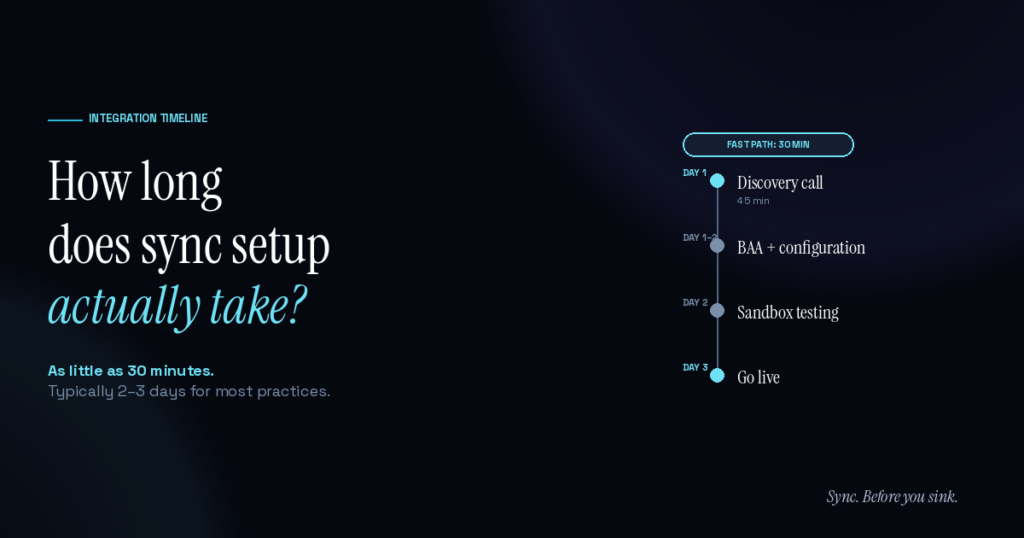
The honest answer: as little as 30 minutes for the simplest setups, 2–3 days from discovery call to live for most single-location practices, and 5–7 days for multi-location setups. Sporo Health’s bidirectional sync isn’t a self-serve “click here” experience — but it isn’t a 6-week dev project either. The middle path exists for a reason.
Practice managers comparing options usually want a simple number. The 2–3 day timeline is the simple number — but understanding what happens during those days (and what doesn’t) helps clarify why the alternatives take longer or break more.
Why isn’t it instant or self-serve?
athenaHealth scheduling isn’t generic. Every practice has its own provider templates, department configurations, multi-location structure, and scheduling rules. A self-serve tool that promises “click here to sync” either oversimplifies the configuration and breaks at edge cases, or pretends to handle complexity it doesn’t actually understand.
Bidirectional sync between athenaHealth and Google Calendar is different from one-way event routing. It requires mapping each provider’s athenaHealth identity to their Google Calendar, configuring conflict resolution rules, defining the sync window, and validating PHI handling. Doing this correctly takes a conversation. Doing it badly causes the silent-drift failures common to DIY workflow stitching.
What does the setup process actually look like?
For the simplest setups — single provider, single location, Google Workspace BAA already in place, clean athenaHealth templates — end-to-end configuration can run in as little as 30 minutes. Discovery, configuration, and live sync in one session. Most practices land in the 2–3 day window because real practices have multiple providers, templates to map, and BAA work to handle.
The typical 2–3 day path:
Day 1: Discovery call (45 minutes). Sporo’s team meets with the practice manager to map provider templates, departments, multi-location structure, and the scheduling rules that matter for the practice’s workflow. The output of this call is a configuration spec.
Day 1–2: BAA and configuration. The practice and Sporo sign a Business Associate Agreement covering the data handling. Sporo configures the athenaHealth API connection at the practice level via OAuth on the athenaOne API pathway. Provider-to-calendar mapping is built out based on the discovery call.
Day 2: Sandbox testing. Sporo runs the sync in both directions in a sandbox environment, validates that no PHI is leaving athenaHealth’s BAA scope, and confirms appointment-type metadata is mapping correctly. Edge cases (cancellations, reschedules, multi-day blocks) get tested explicitly.
Day 3: Go live. Once the practice signs off on sandbox results, Sporo flips the sync to production. Most practices see the first real bidirectional events flowing within minutes of going live.
Why does multi-location add time?
Multi-location practices have more provider-to-calendar mapping decisions to make. A provider who works at three locations has three different scheduling contexts in athenaHealth that need to map cleanly to their Google Calendar. The discovery call goes longer; the configuration phase has more cases to validate.
For practices with 5+ locations or 20+ providers, expect 5–7 days. The work itself isn’t harder; there’s just more of it.
How does this compare to other options?
| Approach | Setup time | Maintenance |
|---|---|---|
| Custom dev build via athenaOne APIs | 6–12 weeks | Ongoing |
| Stitched workflow automation | 2–8 hours | Constant (breaks at edge cases) |
| Sporo Health bidirectional sync | 30 min – 3 days | None on practice side |
| Switching to an EHR with native sync | 6–12 months | New EHR maintenance |
The mid-tier setup time is the tradeoff for an integration that actually handles state reconciliation correctly. According to a peer-reviewed analysis of medical scheduling, no-show costs average $196 per missed appointment — meaning even the 2–3 day setup recovers value quickly at modest practice volumes.
What slows setup down (and how to avoid it)?
A few patterns extend setup beyond the typical 2–3 days:
- Missing BAA on the practice’s Google Workspace account. Practices that haven’t signed Google’s BAA need to handle that before sync can go live. Per HHS guidance on business associate agreements, this is a precondition for PHI-adjacent data handling.
- Outdated provider templates inside athenaHealth. If templates have drifted from reality, the sync surfaces the mismatch immediately. Some practices want to clean up templates before going live; others sync first and clean templates after. Either works, but the cleanup time isn’t included in the 2–3 day estimate.
- Multi-step admin approval. Larger practices with IT governance sometimes take a week to get internal approval. The setup work itself is still 2–3 days; the calendar time is longer.
Frequently Asked Questions
Q: Can I get a sync running faster than 2–3 days? A: Yes. For single-provider single-location practices with a Google Workspace BAA already in place and clean athenaHealth templates, end-to-end setup can run in as little as 30 minutes. The 2–3 day estimate is the realistic baseline for most practices because most practices have multiple providers, complex templates, or BAA work to do first.
Q: What does the practice need to provide during setup? A: A signed BAA, athenaHealth admin authorization, and a 45-minute discovery call. That’s it. No developer time, no IT project.
Q: How long does the sandbox testing phase take? A: Typically 4–6 hours of Sporo’s team time, with practice review during the same window. The practice doesn’t have to dedicate full-day attention — they review results and sign off when ready.
Q: What happens after go-live? Is there ongoing maintenance from the practice? A: No maintenance from the practice. Sporo’s team monitors the sync, handles API updates from either side, and surfaces any issues in a dashboard.
Q: How long does it take to onboard a new provider after the initial setup? A: 15–30 minutes per new provider. Provider-to-calendar mapping is the only new work needed.
Q: What if I have urgent needs and can’t wait 2–3 days? A: For single-provider practices with clean templates and a Google Workspace BAA already signed, Sporo can sometimes complete a full setup in 30 minutes. Most practices have at least one prerequisite that adds a day, but the team will move at the pace the practice can move.
The middle path is the practical path
Thirty minutes for the simple case, two to three days for most, a week for multi-location. None of those is a project, and none of them is months. For most outpatient athenaHealth practices, that’s the right tradeoff.
Sync. Before you sink. Click this link to book a call today.

[…] your end — onboarding is white-glove, and the BAA is signed up front. For a deeper breakdown, see how long an athenaHealth Google Calendar sync takes to set up. Compare that to the multi-week build a custom integration would […]