
How to Connect athenaHealth to Google Calendar: A 2026 Guide for Medical Practices
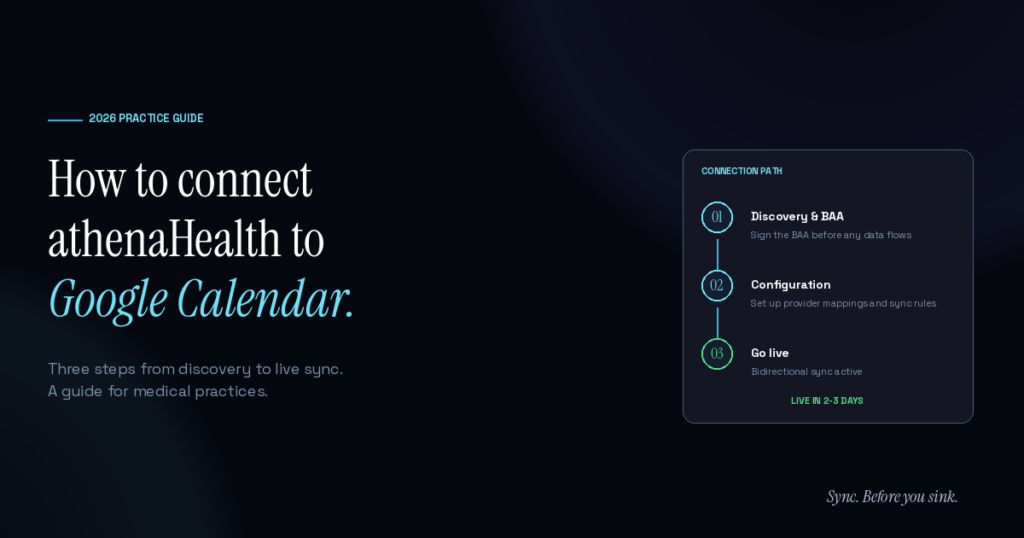
To connect athenaHealth to Google Calendar, medical practices must use a secure third-party integration, as athenaHealth does not offer a native two-way Google Calendar sync. By deploying a HIPAA-compliant, bidirectional sync using athenaOne APIs, appointment slots in athenaHealth and events in Google Calendar are automatically updated in both directions within seconds.
If you manage a busy clinic, you already know why this matters. A doctor schedules a personal commitment on their phone, assuming they’ve blocked off their time. Meanwhile, the front desk—who can only see the EHR—books a complex patient into that exact slot. Chaos ensues.
Connecting these systems is about stopping that exact scenario. Here is how practice managers are solving the calendar disconnect in 2026.
Does athenaHealth have a native Google Calendar sync?
No, athenaHealth does not provide a native, built-in way to sync directly with Google Calendar. While the athenaOne platform is incredible for managing internal clinical workflows and revenue cycles, it operates in a silo. It does not naturally talk to the outside calendar tools where physicians actually manage their daily lives, board meetings, or academic duties.
Because of this gap, practices usually fall back on manual data entry. Front desk teams are forced to double-enter schedule changes across both platforms. It is tedious, error-prone, and a massive time drain.
In fact, according to the AMA’s 2025 physician survey, administrative burden remains a critical pain point, with 57% of physicians desperately wanting solutions that cut down on redundant paperwork. When you rely on humans to act as the bridge between two software systems, mistakes happen, and patient throughput suffers.
Why do physicians experience double-booking without this integration?
Physicians experience double-booking because their professional lives are tracked in the EHR, while their personal and corporate commitments live on external calendars. When those two systems are blind to each other, a scheduling collision is practically guaranteed.
Think about a standard Tuesday at a multi-provider clinic. A physician accepts a last-minute telehealth consultation or a lunch meeting and drops it onto their personal calendar. Because the front desk cannot see that update, the scheduling template in athenaHealth still looks wide open. They book a patient. The physician eventually walks into the clinic to find they are supposed to be in two places at once.
This friction frustrates doctors and damages the patient experience. The MGMA December 2025 patient access report highlights that optimizing provider schedules is a top priority for medical groups right now. You can learn more about how clinics are fixing this in our guide on how to prevent double-booking in athenaHealth.
How do you establish a HIPAA-compliant bidirectional sync?
To establish a secure bidirectional sync, a practice connects a specialized integration service between the athenaHealth developer APIs and their enterprise calendar system. A standard Business Associate Agreement (BAA) is always signed before a single piece of data flows.
You cannot just plug a medical database into a consumer calendar app and hope for the best. Security and HIPAA compliance are the baseline.
A purpose-built bridge monitors both platforms via a rolling 30-day sync window. When a change happens in either system, the integration pushes the update in under 5 seconds. The sync stays perfectly consistent in both directions even during simultaneous edits by the doctor and the front desk.
What patient data actually transfers between systems?
When connecting the two platforms, zero patient-identifying data ever enters Google Calendar. The integration relies strictly on lightweight operational metadata to block out the time, leaving all sensitive clinical details safely behind in the EHR.
A major concern for any healthcare ops lead is making sure PHI doesn’t accidentally leak onto a provider’s phone. To adhere to strict Google Workspace HIPAA support guidelines, the sync only pushes what is absolutely necessary to hold the slot.
Here is exactly what syncs and what stays hidden:
| Data Type | Stays in athenaHealth | Syncs to Google Calendar |
|---|---|---|
| Patient Name & DOB | Yes | No |
| Clinical Notes & History | Yes | No |
| Start Time & Duration | Yes | Yes (to block the time) |
| Appointment Type/Metadata | Yes | Yes |
Google Calendar simply displays a blocked event showing the provider as busy. It protects patient privacy while giving the front desk an accurate view of provider availability. For more on the compliance side, review our breakdown of HIPAA-compliant scheduling workflows.
How long does it take to connect athenaHealth to Google Calendar?
Setting up the connection typically takes as little as 30 minutes for a single provider, 2–3 days for a standard clinic, and 5–7 days for multi-location medical groups. It is not the massive, disruptive IT build that many practice managers fear.
Because a platform like Sporo Health handles the complex API plumbing in the background, your internal IT team doesn’t have to build anything from scratch. You don’t have to alter your existing scheduling templates or change how your front desk operates.
Once the initial discovery is complete and the BAA is signed, the integration simply maps your athenaHealth department IDs to the correct calendar feeds and turns on the sync.
What is the financial impact of disconnected medical scheduling?
Disconnected medical scheduling increases no-show rates and forces last-minute cancellations, costing the average clinic roughly $196 per missed appointment. Empty gaps in the schedule aren’t just an annoyance—they actively drain your RCM.
When double-bookings occur, front desk staff have to scramble to reschedule one of the overlapping appointments. Often, that bumped patient doesn’t return, resulting in a lost visit. According to a peer-reviewed PMC no-show cost analysis, those losses compound rapidly. If a clinic has just a handful of scheduling overlaps a week, the annual revenue leakage is massive.
Automating the calendar connection protects your time slots. If you are looking to reduce your clinic’s no-show rate, keeping your providers’ schedules brutally accurate is step one.
Frequently Asked Questions
Q: Can we use a free Google Calendar account for this?
A: No. To maintain compliance, you need an enterprise Google Workspace account. You must sign a BAA with Google, as well as a BAA with your integration partner, before linking any clinical systems.
Q: Will the front desk staff have to learn new software?
A: Not at all. Your front desk team continues to live entirely inside athenaHealth. They manage appointments the exact same way they always have; the calendar sync just happens silently in the background.
Q: Does the sync cover appointments months in advance?
A: The sync utilizes a rolling 30-day window. This keeps the system incredibly fast and ensures absolute accuracy for the most critical upcoming clinical blocks, without bogging down your EHR with unnecessary data requests.
Q: What happens if a doctor deletes an event on their phone?
A: Because it is a true bidirectional sync, the change reflects instantly. If the doctor removes a blocked event from their Google Calendar, that time slot opens back up in athenaHealth within seconds, allowing the front desk to fill it with a patient visit.
Q: Do patients ever see the doctor’s personal calendar events?
A: Absolutely not. Patients only interact with the front desk or the patient portal. The underlying calendar sync is strictly an operational tool for your staff and providers.
Stop the Scheduling Chaos
Running a modern medical practice is hard enough without fighting your own scheduling software. When your EHR and your daily calendar don’t communicate, you are practically inviting double-bookings, frustrated doctors, and a stressed-out front desk.
Sporo Health is the first purpose-built, bidirectional sync designed specifically to solve this exact problem. We bridge the gap between athenaHealth and Google Calendar so your team can trust the schedule again.
Sync. Before you sink.
Ready to learn how to sync athenaHealth with Google Calendar without the dev project? Schedule a 30-minute discovery call to see it in action.
