
Physician Personal Calendar Conflicts in athenahealth Scheduling: An Availability-Precedence P
For practice managers asking how to prevent physician personal calendar conflicts in athenahealth scheduling, the answer is to accept only approved availability signals—not every event. Define eligible calendars, blocking statuses, intervals, recurrence rules, and owners; preserve private details; route booked-care overlaps to human review; then verify the approved state in athenahealth and Google Calendar or Outlook.
How to prevent physician personal calendar conflicts in athenahealth scheduling
Use an approved signal contract, and never let an external event silently overwrite booked patient care. Separate a clinical booking from an availability signal: athenahealth is the authority for booked patient appointments, while an approved provider calendar may propose that unbooked time be closed. Verify appointment state, provider, department or location, and interval against the official athenahealth appointment API reference or the authorized documentation for your implementation.
Write four rules before enabling routine personal-calendar blocks:
- Calendar scope: name every provider calendar that may affect booking; all other calendars are excluded.
- Status scope: define the exact unavailable states that close capacity and the states that do not.
- Time scope: set the scheduling horizon, time zone, all-day policy, location relevance, and recurrence treatment.
- Authority: name who may edit the external event, approve an exception, change booked care, and verify closure.
The broader prevent double-booking in athenahealth guide explains the surrounding visibility problem. Add these rules while onboarding new providers to athenahealth scheduling, then reapprove them whenever calendar ownership, location assignments, or scheduling responsibilities change.
Which personal calendar events should block physician availability?
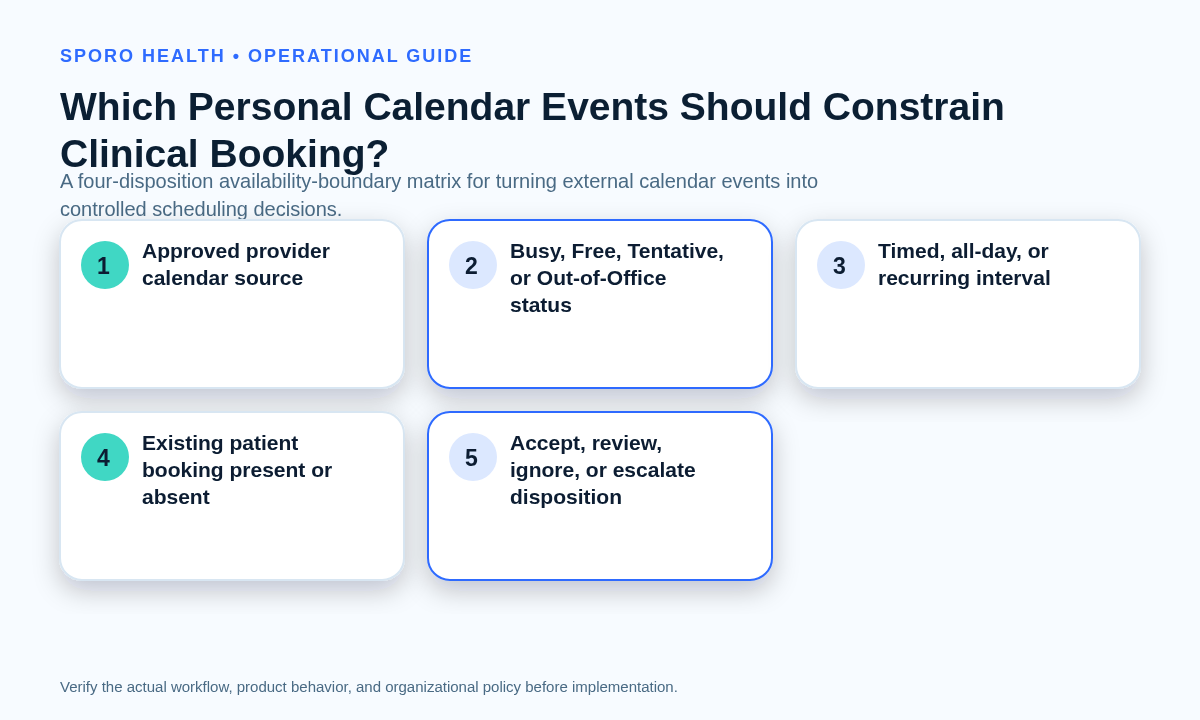
A commitment should block booking only when it comes from an approved provider calendar, falls within the scheduling horizon, uses the practice-approved unavailable status, and does not overlap booked care requiring human resolution. Classify every signal into one of four dispositions instead of treating event existence as proof of unavailability.
| Disposition | Use when | Required action | Closure evidence |
|---|---|---|---|
| Accept automatically | Approved calendar, provider, status, interval, location, and horizon; no booked-patient overlap. | Close only the eligible capacity and retain the accountable owner. | Matching interval and provider state in both systems. |
| Review | Tentative status, all-day scope, location-specific impact, unusual recurrence, or uncertain time zone. | Queue the signal for an authorized scheduling owner before capacity changes. | Recorded decision, owner, reason, and verified result. |
| Ignore as nonblocking | Free or transparent status, excluded calendar, outside horizon, irrelevant location, or canceled occurrence. | Leave clinical capacity unchanged; record only if needed for testing or audit. | Negative test showing that no unintended block appeared. |
| Escalate | Booked-patient overlap, ambiguous ownership, competing coverage duty, or conflict with structural provider hours. | Freeze the interval and route it to the named decision owner. | Approved resolution and two-system verification. |
The availability-boundary matrix should record calendar source, provider, availability status, timed or all-day scope, recurrence and occurrence identity, location relevance, effective interval and time zone, authorized editor, resulting athenahealth action, decision owner, and verification evidence.
How can availability be preserved without exposing personal details?
Move the minimum operational availability record, not the physician’s personal context. Scheduling teams generally need to know who is unavailable, the effective interval, affected location, approved status, and accountable owner—not why the physician is unavailable.
The operational record should contain provider identity, approved calendar identity, start and end, time zone, timed or all-day scope, recurrence or occurrence identifier, availability status, location relevance, disposition, and owner. Keep the private title, description, attendees, attachments, meeting links, and unrelated location detail outside the scheduling workflow unless a documented exception specifically requires a field.
Google distinguishes event-detail visibility from free/busy access: a private event marked Busy can appear as a busy block without exposing its details, while a private event marked Free may not appear to viewers with that permission level. See Google’s calendar-sharing permission documentation. Privacy therefore does not prove blocking, and blocking does not require broad detail visibility.
Use the minimum necessary calendar data governance worksheet if privacy, IT, and operations owners need to approve the fields individually. This signal contract is an operational control, not a legal or compliance determination.
What happens when a personal commitment overlaps booked patient care?
Neither system should decide silently; freeze further changes, route the conflict to the authorized owner, and verify the approved outcome. A newly added commitment may justify coverage, patient rescheduling, or revision of the personal event, but automation should not choose among those operational consequences.
Use this conflict-precedence ladder:
- Booked patient appointments: protect them from automatic deletion, movement, or concealment while impact is assessed.
- Coverage obligations: preserve assigned call, procedure, or cross-location responsibility until its owner approves a replacement.
- Approved personal commitments: close remaining unbooked capacity when the signal contract is satisfied.
- Structural provider hours: do not let one external event expand or rewrite the baseline template; route that change to the template owner.
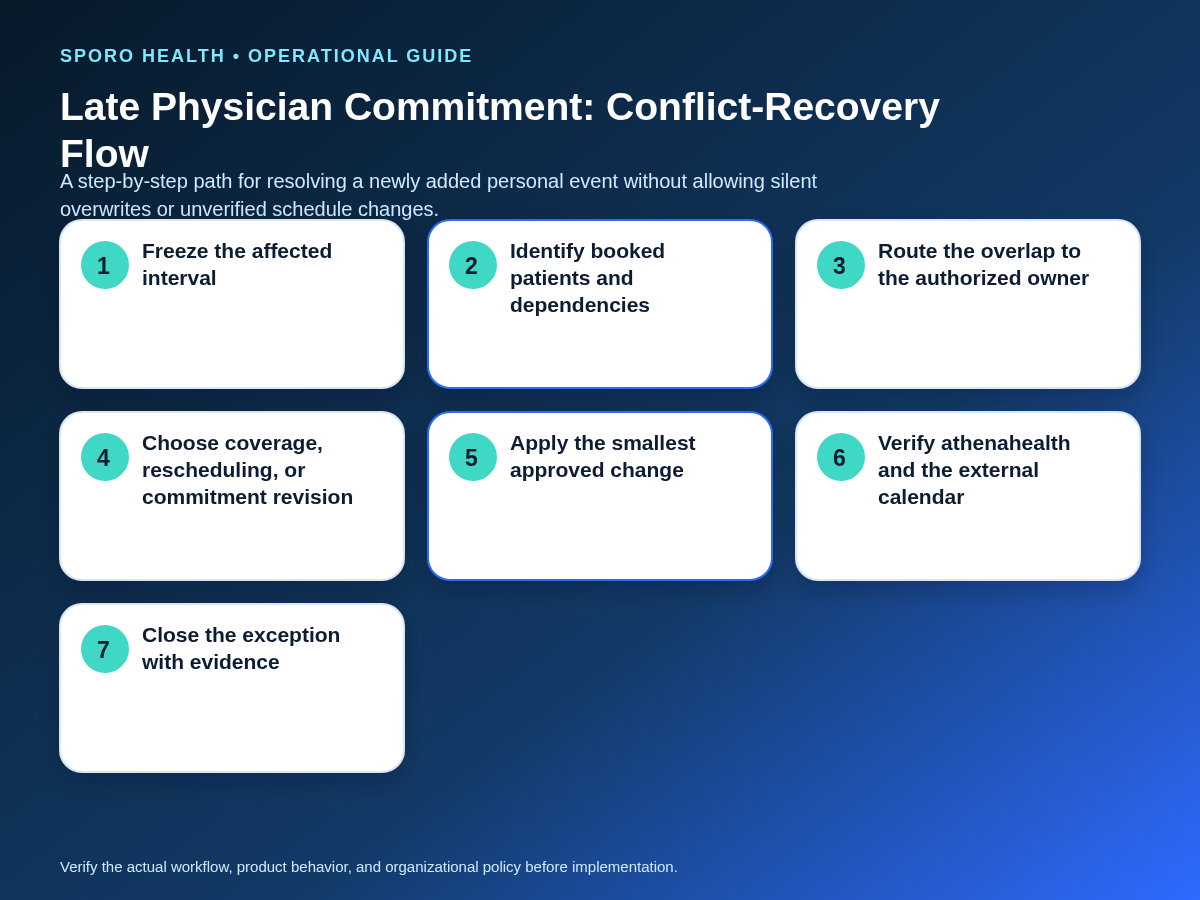
For a late-added commitment, follow this recovery flow:
- Freeze automated edits to the affected interval.
- Scan for booked patients, locations, travel buffers, coverage dependencies, and adjacent recurring occurrences.
- Confirm the provider, calendar owner, event status, effective time zone, and intended occurrence.
- Route the overlap to the owner authorized to choose coverage, rescheduling, or commitment revision.
- Apply the smallest approved change without altering unaffected dates or locations.
- Verify the patient appointment and availability state in athenahealth and the external calendar.
- Close the exception with the decision, timestamps, owner, and evidence.
If the event represents a formal or extended absence rather than a routine commitment, use the dedicated physician out-of-office availability-control workflow.
How should Google Calendar and Outlook be validated?
Use one operational policy, but execute separate platform tests because the event fields and native availability behaviors are not identical. Never infer connected-system behavior from how an event looks in one calendar interface.
What should the Google Calendar test prove?
Prove that calendar scope, blocking status, privacy, recurrence exceptions, all-day intervals, and time zones produce the intended athenahealth result. Google’s event model separates transparency, where opaque events block time and transparent events do not, from visibility, which controls access to details. It also represents moved recurring instances with their original start identity and treats canceled recurring occurrences separately. Review the Google Calendar Events resource.
Google’s native appointment-schedule feature checks secondary calendars only when they are selected for conflict review, reinforcing the need to test inclusion explicitly rather than relying on display or subscription alone. See Google’s multi-calendar availability guidance. The related Google Calendar sharing controls for medical practices provide additional staff-visibility context.
What should the Outlook test prove?
Prove that the approved Outlook calendar and its Show As state—not merely its sensitivity label—control the expected booking action. Microsoft Graph models showAs values such as Free, Tentative, Busy, and Out of Office separately from sensitivity values such as Personal or Private; it also distinguishes series masters, occurrences, exceptions, canceled states, all-day events, and time zones. See the Microsoft Graph event resource.
Microsoft’s native personal-calendar connection says only events from the primary personal calendar appear in work or school availability, so secondary calendars require their own connected-workflow test. See Microsoft’s personal-calendar availability guidance. Microsoft also notes that classic Outlook all-day events default to Free unless Show As is changed, another reason to test rather than assume. See Microsoft’s Outlook event-status guidance. Complete a Microsoft 365 preflight for an athenahealth Outlook integration before applying the playbook broadly.
Sporo’s current Google Calendar product page and Outlook product page describe external calendar blocks reflecting back into athenahealth. Treat those statements as vendor claims: the public pages do not define the complete eligibility logic for status, secondary calendars, privacy, recurrence exceptions, all-day events, or time zones, so require a demonstration using the test deck below.
Which negative tests should every provider-calendar pair pass?
Test the states that should not block, should hide details, or should trigger review—not only the normal Busy-event path. A successful standard event does not prove that exceptions, exclusions, or late overlaps are controlled.
| Test | Expected policy result | Evidence to capture |
|---|---|---|
| Free or transparent event | Clinical capacity remains open solely on the basis of this event. | Before-and-after availability in both systems. |
| Tentative event | Review or accept according to the written practice rule; never assume. | Disposition, owner, and resulting interval. |
| Private Busy event | Eligible time may block while title and description remain outside staff workflow. | Blocked interval plus detail-visibility check. |
| All-day event | Follow the approved all-day rule; avoid an unintended full-day block. | Date boundaries, status, and time zone. |
| Excluded secondary calendar | No booking effect. | Calendar identity and unchanged capacity. |
| Moved recurring occurrence | Old interval reopens when appropriate; new interval is evaluated independently. | Series, original occurrence, and moved occurrence. |
| Canceled occurrence | Only the canceled occurrence reopens; unaffected instances remain correct. | Occurrence identity and neighboring dates. |
| Time-zone boundary | The same effective interval appears in athenahealth and the external calendar. | Stored zone, displayed zone, start, and end. |
| Late event over booked care | No silent overwrite; the interval enters the escalation workflow. | Frozen state, owner decision, and final verification. |
How should the availability-boundary control be measured?
Measure whether the rule set catches genuine conflicts without creating false blocks or unresolved exceptions. Track results by provider-calendar pair so one reliable connection does not conceal an untested or misconfigured calendar.
- Late-conflict rate: external commitments that overlap already-booked care divided by commitments reviewed.
- Pre-booking catches: valid commitments that closed capacity before a conflicting patient booking occurred.
- False blocks: accepted blocks later found to be Free, excluded, canceled, irrelevant, or otherwise nonblocking.
- Owner-acceptance time: median time from escalation creation to acknowledgment by the authorized decision owner.
- Reopened exceptions: cases closed once but reopened because recurrence, location, status, or interval remained wrong.
- Tested connection coverage: provider-calendar pairs passing the complete negative-test set divided by all pairs in scope.
Use the scorecard to find unclear policy, training needs, connection gaps, and recurring exception types. It should not be treated as a promise of operational outcomes.
How do you put the playbook into practice?
Start with a small set of provider-calendar pairs, approve the boundary matrix, run every negative test, and expand only after the evidence is reviewed. Assign one policy owner, one scheduling decision owner, one technical verifier, and a backup for each role. Recheck the matrix after provider, calendar, location, time-zone, or integration changes.
For product evaluation, review Sporo Health’s healthcare automation overview, then compare Sporo’s athenahealth and Google Calendar connection with Sporo’s athenahealth and Outlook connection. The athenaConnect Marketplace listing for Sporo Health is another evaluation destination. Ask the vendor to demonstrate each disposition and negative test using your proposed calendar scope.
This controlled boundary is how to prevent physician personal calendar conflicts in athenahealth scheduling without granting blanket authority to every personal event.
Frequently asked questions
How do you prevent physician personal calendar conflicts in athenahealth scheduling?
Prevent physician personal calendar conflicts by accepting only events that satisfy the approved calendar, status, interval, horizon, and ownership rules. If an event overlaps booked care or has ambiguous scope, route it to a named owner and verify the final state in both systems.
Should a private calendar event automatically block physician availability?
No—a private label controls detail visibility, not necessarily whether the time blocks. The practice must also test the event’s availability status, included calendar, permissions, and connected-system behavior.
Should Free or Tentative events affect physician booking availability?
Free events should not close capacity solely because they exist; Tentative events should follow a written practice rule rather than an assumption. Test both states separately in Google Calendar and Outlook.
What should happen when a personal event is added after a patient is booked?
Freeze the interval and prevent further automated changes while the authorized owner reviews affected patients, coverage, location, and timing. Apply the smallest approved change, then verify athenahealth and the external calendar.
How should recurring personal calendar blocks be tested?
Test the series master, an unchanged occurrence, a moved occurrence, and a canceled occurrence as separate cases. Confirm the old interval reopens when appropriate and the exception keeps its intended status and time zone.
Which provider calendars should be included in availability checks?
Include only provider calendars that the practice has approved for availability decisions, and test each provider-calendar pair. A displayed, subscribed, or connected calendar should not be assumed to constrain booking until its behavior is proven.
Sources
- Google Calendar Events resource
- Google Calendar sharing permissions
- Google multi-calendar availability guidance
- Microsoft Graph event resource
- Microsoft personal-calendar availability guidance
- Microsoft Outlook event-status guidance
- athenahealth appointment API reference
- Sporo Google Calendar product page — vendor claims
- Sporo Outlook product page — vendor claims

3 Comments
Comments are closed.

[…] eligible calendars and precedence before applying this narrower lifecycle. The broader physician personal-calendar conflict rules provide that surrounding signal […]
[…] purpose, availability status, ownership, exact date scope, and effect on booked care. The broader availability-precedence playbook for physician personal calendars can define which commitments have authority; this guide adds the date-only […]
[…] physician personal-calendar conflict rules for event-level commitments, and use the provider-location signal authority guide when a calendar […]