
Google Calendar Sharing for Medical Practices: Who Can See What (and What They Shouldn’t) in 2026
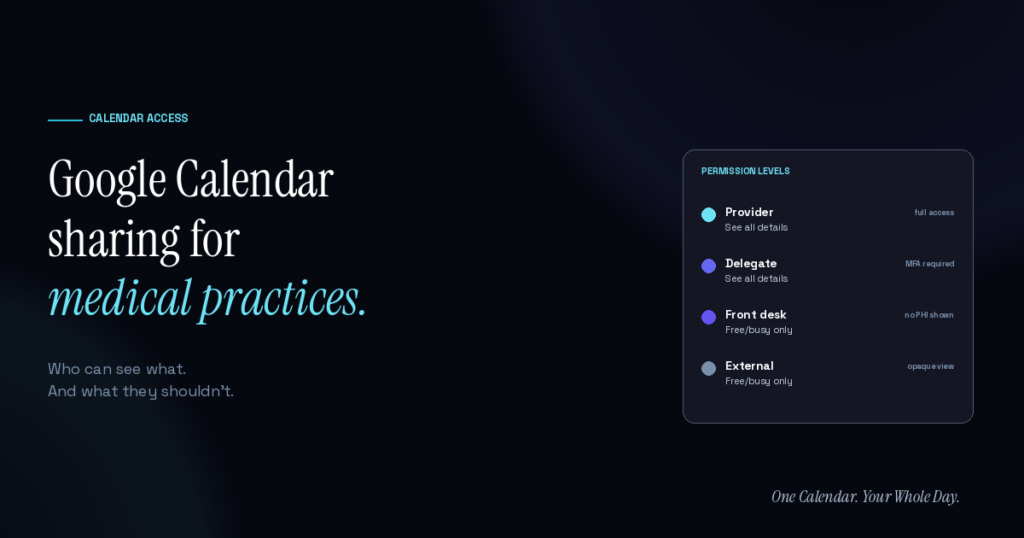
Google Calendar sharing for medical practices needs three things to work safely: role-based permission tiers, disciplined event-title conventions that keep protected health information (PHI) out of visible fields, and audit logs that show who accessed what. The recommended setup for most athenaHealth-based practices uses four sharing tiers — provider (full access), delegate (full access with multi-factor authentication), front desk (free/busy only), and external (opaque view or no access) — plus a written policy about what appears in event titles.
The mistake most practices make is treating Google Calendar sharing for Medical Practices as an all-or-nothing decision. Providers want their assistants to see their schedule; assistants need it to do their jobs; but the wrong default sharing configuration can inadvertently expose PHI to people who shouldn’t have that level of access. The fix is not to prohibit sharing — it’s to configure sharing at the right granularity.
In this article
- Why Google Calendar sharing matters for HIPAA compliance
- Sharing levels Google Calendar offers
- Which sharing level each role should get
- What should never be in a Google Calendar event title
- How to audit shared calendars
- Mobile device sync and personal devices
- The safest sharing pattern with athenaHealth bidirectional sync
- Frequently Asked Questions
Why does Google Calendar sharing for Medical Practices matter for HIPAA compliance?
A shared calendar is a shared data surface. Whatever’s in an event — the title, the description, the attendees, the location — becomes visible to whoever the calendar is shared with, at the permission level you grant them.
Two concrete failure modes practices hit regularly:
- Event titles containing patient names or clinical detail. “Colonoscopy — John Smith” in a provider’s calendar becomes visible to every delegate, every device the calendar syncs to, and every family member who might glance at a shared iPad.
- Over-permissioned delegates. A medical assistant with “See all details” access to a provider’s calendar has access to everything on it — legitimate scheduling data plus any personal appointments, private notes, or non-work commitments the provider tracks there.
Both are avoidable with two disciplines: keep PHI out of event titles, and grant the minimum permission level each role actually needs.
What level of Google Calendar Sharing for Medical Practices does Google offer?
Google Calendar supports four distinct sharing permission levels within a Google Workspace tenant. From most to least permissive:
- Make changes and manage sharing. Full control. Can edit events and further share the calendar with other people. Reserved for the calendar owner and possibly one trusted admin.
- Make changes to events. Can add, edit, and delete events, and see all event details. Appropriate for delegates who actively schedule for the provider.
- See all event details. Read-only access to full event content. Appropriate for staff who need to know what’s on the schedule but don’t manage it.
- See only free/busy (hide details). Shows blocked time with no content. Appropriate for cross-team visibility without exposing what the time is for.
For medical practices, the tier that gets underused is #4 — free/busy only. It solves the “the front desk needs to know when the provider is unavailable” problem without exposing why.
Google Calendar Sharing for Medical Practices: Which sharing level should each role get?
The right mapping of Google Calendar sharing for medical practices:
| Role | Recommended access | Why |
|---|---|---|
| Provider (calendar owner) | Full ownership | Their calendar, their commitments |
| Executive assistant / delegate scheduler | Make changes to events | Needs to actively schedule; MFA should be required |
| Front desk staff | See only free/busy | Needs to know when to book, not what the block is |
| Practice manager | See only free/busy (typically) | Same reasoning as front desk unless scheduling role |
| External team members | See only free/busy or nothing | Rarely need visibility into medical schedule |
| Partner providers | See only free/busy | Cross-coverage decisions need availability, not content |
The default sharing setting in most Google Workspace tenants is more permissive than this. Auditing existing calendar shares against this recommended pattern is a quick way to reduce PHI exposure surface.
What should never be in a Google Calendar event title?
The event title is the most visible field on a shared calendar. It shows up in list views, notifications, mobile widgets, and preview panes. Whatever’s in the title effectively has the lowest permission barrier in the system.
Never in event titles:
- Patient full names
- Patient initials in an identifiable pattern (some practices use “JS” for John Smith — still identifiable in small practices)
- Specific procedures that reveal condition (e.g., “prostate biopsy,” “abortion consultation,” “HIV test”)
- Diagnoses or clinical context
- Medication administration details
- Sensitive appointment reasons in behavioral health, addiction medicine, OB/GYN, or other high-sensitivity specialties
Acceptable in event titles:
- Generic appointment type (“Appointment,” “Consultation,” “Follow-up”)
- Time-block labels (“Morning clinic,” “Afternoon procedures”)
- Non-patient blocks (“Lunch,” “Team meeting,” “OOO”)
The rule of thumb: if the event title would identify a patient to anyone who could theoretically see the calendar, it’s too specific.
How should shared calendars be audited?
Regular Google Calendar sharing for medical practices audits catch drift before it becomes a compliance issue. Recommended cadence:
- Quarterly: Review all calendar shares for each provider. Confirm each delegate still needs access, each permission level is still appropriate, and no external sharing has crept in.
- On personnel change: Immediately remove access for departing staff, adjust access for role changes.
- On practice-wide policy update: Push updated sharing conventions to all providers.
Google Workspace’s admin console supports calendar-sharing audit logs — the raw data is available; the question is whether someone reviews it regularly. According to HHS guidance on business associates, covered entities are responsible for reasonable safeguards over PHI, which explicitly includes access controls and audit review.
What about mobile device sync and personal devices?
The often-missed dimension of Google Calendar sharing for medical practices is that shared calendars sync to whatever device the person with access uses. A delegate with “See all event details” access sees those details on their personal phone. That phone becomes a PHI-adjacent device.
Mitigations that work:
- Require MFA for anyone with edit access to a provider’s calendar. Reduces the risk of credential-theft-based exposure.
- Consider mobile device management (MDM) for staff phones that access work calendars. Enterprise mobility features control what happens if a device is lost.
- Keep PHI out of event titles. Even if a device gets compromised, generic event titles limit the exposure.
According to the AMA’s 2025 physician AI survey, 57% of physicians prioritize reducing administrative burden through automation. Well-configured calendar sharing removes friction for legitimate access while limiting exposure — the same principle as automation, applied to permissions.
What’s the safest sharing pattern when calendars sync bidirectionally with athenaHealth?
The safest architecture keeps PHI inside athenaHealth and pushes only minimal metadata to Google Calendar. When bidirectional sync between athenaHealth and Google Calendar is running, the data flowing into Google Calendar events is limited to appointment type, time, and duration — no patient names, no clinical detail, no location specifics.
This isn’t just an operational preference; it’s the compliance-safest configuration. Any Google calendar sharing for medical practices scenario downstream of a metadata-only sync has significantly less exposure risk than a scenario where full appointment details land in Google Calendar events.
For practices considering how bidirectional sync affects their sharing patterns, Sporo Health’s sync architecture is built around this principle — the calendar becomes a schedule surface, not a PHI store.
Frequently Asked Questions
Q: What’s the difference between calendar delegation and calendar sharing?
A: Delegation is a specific Google Calendar feature that lets someone act on your behalf (respond to invites, create events as you). Sharing is broader — granting varying levels of view/edit access. Delegation is a form of sharing but with more capabilities. Both need to be configured with the minimum-necessary principle in mind.
Q: How do I audit which of our providers have their calendars shared with which staff?
A: Google Workspace admin console → Reports → Audit and investigation → Calendar log events. Filter by “Access Change” events to see historical sharing changes. Cross-reference against current staff to identify shares that should be revoked.
Q: Should providers use separate calendars for personal and work?
A: Yes, generally. Most providers benefit from a work calendar (subject to practice sharing conventions) and a personal calendar (private). Keeping them separate limits PHI exposure and gives providers control over their non-work visibility.
Q: What happens to calendar sharing when a staff member leaves the practice?
A: The offboarding process should include: (1) removing their access from all shared calendars, (2) reviewing their own calendar for any PHI that needs to be transferred or scrubbed, (3) revoking their Google Workspace account per practice policy. Without an explicit offboarding step for calendar access, shares can persist indefinitely.
Q: Are family members allowed to see a provider’s calendar?
A: Only if the provider explicitly shares it with them, and only their personal calendar — never a work calendar containing patient scheduling data. Providers should not share their work calendar with family members, even at “free/busy only” tier, because the block density and patterns can still reveal patient information indirectly.
Q: What if a provider needs to share their schedule with a partner practice for coverage?
A: Use free/busy only access, or a dedicated shared “coverage” calendar that contains only the specific blocks relevant to coverage (not the full appointment schedule). This gives the coverage partner what they need without exposing the full patient panel.
Sharing well is a small operational discipline with a big compliance payoff
Google Calendar sharing for medical practices done well takes 30 minutes to set up and quarterly reviews to maintain. Sharing done poorly creates PHI exposure that grows with every staff addition, every new device, and every calendar view.
For athenaHealth practices, the additional protection is architectural: keep PHI in athenaHealth, sync only metadata to Google Calendar, and configure Google Calendar sharing at role-appropriate permission levels. Sporo Health’s bidirectional sync is built for this pattern. One Calendar. Your Whole Day.

[…] for people and groups, while administrators can have additional visibility. Use the practice’s Google Calendar sharing permissions for medical practices as a preventive companion, then verify the live configuration against Google’s current sharing […]