
Calendar Integration Outage Plan for Medical Practices: A Recovery Runbook
A calendar integration outage plan for medical practices should name one incident owner, declare one trusted schedule, stop unlogged dual entry, capture every outage-window change, reconcile that bounded window, and reopen only after local tests pass. Practice managers, healthcare IT administrators, operations leaders, and integration owners should assign these decisions before a disruption—not improvise them while physician calendars may be stale.
This is operational guidance for an integration disruption, not full EHR downtime or medical, legal, or compliance advice.
What should a calendar integration outage plan for medical practices do first?
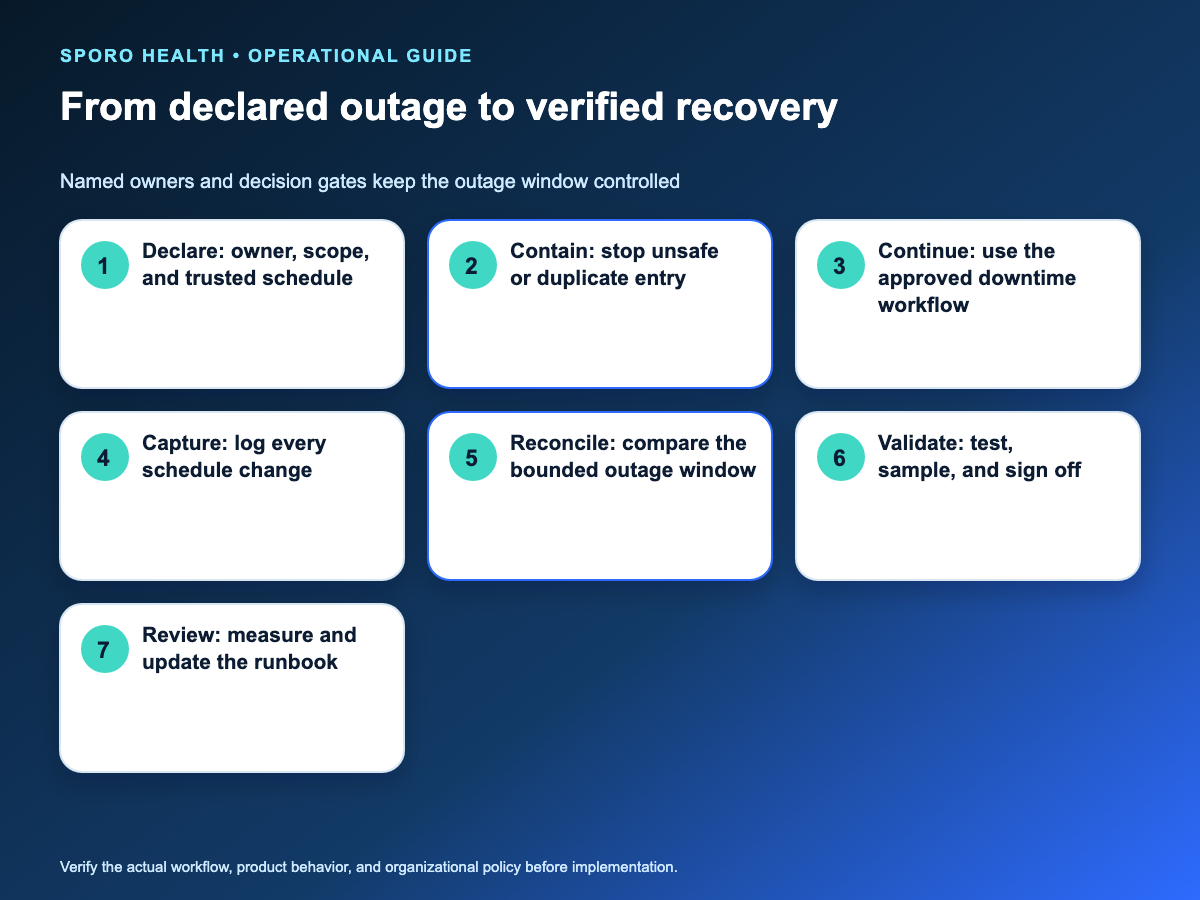
Declare one operational owner, record the suspected start and scope, and tell staff which schedule is temporarily authoritative. Do this before troubleshooting changes the evidence. This adapts the written roles and outage-declaration approach in the ONC SAFER Contingency Planning guide to a calendar connection.
The owner can widen or close the incident, coordinate notifications, and govern recovery; individual schedulers should not make separate assumptions about whether a calendar is current.
| Stage | Accountable owner | Exit gate |
|---|---|---|
| Declare | Incident lead | Scope and trusted schedule recorded |
| Contain | Integration owner | Dual entry stopped; staff alerted |
| Continue | Scheduling lead | Fallback writer and escalation path named |
| Capture | Schedulers | Every outage-window change logged |
| Reconcile | Integration and scheduling leads | Backlog and ledger dispositioned |
| Validate | Operations owner | Tests, comparison, and sign-off complete |
Make these responsibilities part of routine athenahealth scheduling ownership, audit, and measurement practices, so the outage plan has named people before it is needed.
How can a practice tell a broad outage from a local sync failure?
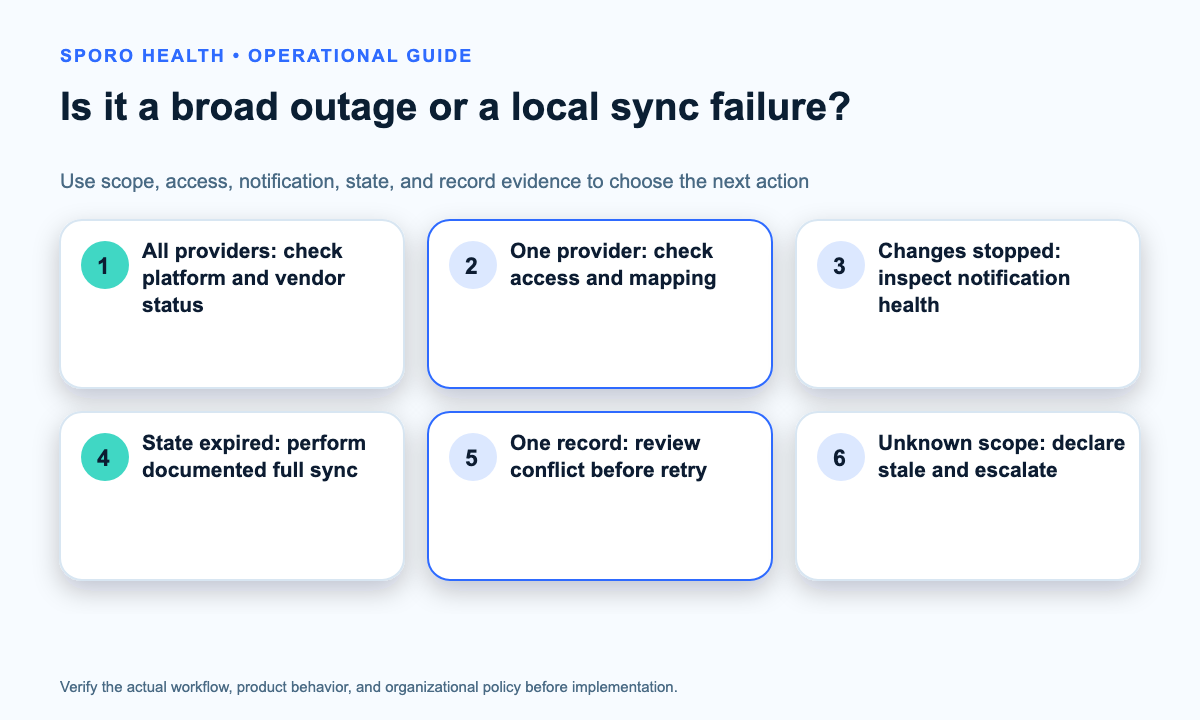
Compare scope, time, platform status, access, notification health, sync state, and one known record. Several provider-calendar pairs failing at the same time suggests a shared dependency; one pair or one record points first to authorization, mapping, state, or conflict.
Use common athenahealth scheduling problems and where they get fixed to separate routine record issues from an incident affecting previously aligned schedules.
Which service-status and error signals should the incident owner check?
Check the athenahealth stack, external calendar service, and integration evidence, then run a local test. Consult the athenahealth status page, Google’s Workspace service-status dashboard, or tenant-aware Microsoft 365 service health. Clear status does not prove a specific pair is current.
| Pattern | Supporting signal | First action | Decision gate |
|---|---|---|---|
| Shared incident | Several pairs fail; status incident | Declare scope; open vendor path | Local tests pass |
| Authorization | Access or reauthorization error | Route to authorized admin | Access tested |
| Transient | Rate limit, Retry-After, supported server error | Use bounded backoff | Retry succeeds or budget ends |
| Expired state | Invalid token, 410, syncStateNotFound | Use documented full-sync recovery | New checkpoint compared |
| Notification | Expired, removed, or missed subscription | Renew; retrieve missed changes | Reconciliation verified |
| Record conflict | Duplicate, precondition, or competing edit | Refetch and review | Disposition recorded |
Google says notification channels expire and must be replaced in its Calendar push-notification guidance. Microsoft documents reauthorization, removed-subscription, and missed-notification recovery in its change-notification lifecycle guidance.
What evidence should staff capture before escalation?
Capture a reproducible incident packet without credentials or unnecessary patient information. It should support diagnosis while staff use the fallback.
- Record detection time, time zone, suspected start, and last verified success.
- List affected pairs with approved identifiers and, if available, one unaffected pair.
- Save status, error reason, correlation identifier, and timestamp—never tokens or passwords.
- Describe one reproducible change using only approved troubleshooting information.
- Attach status evidence, case number, and escalation authorizer.
Which calendar integration failures should be retried, investigated, or escalated?
Retry only errors the platform documents as transient; investigate permanent, access, state, and conflict errors before another write. Google’s Calendar API error guide separates these conditions, while Microsoft says Graph clients should honor Retry-After for 429 throttling and otherwise use exponential backoff. Staff should not turn a retry policy into repeated manual clicks.
| Signal | Default disposition | Operational meaning |
|---|---|---|
| Rate limit or transient server error | Bounded retry | Back off; stop at the retry budget |
| Invalid request | Investigate | Correct before resending |
| Credentials or reauthorization | Authorized admin | Use the approved access flow |
| Duplicate or precondition | Conflict review | Refetch before deciding |
| Invalid sync or delta state | Integration owner | Use documented full sync |
| Repeated unknown or wider scope | Escalate | Preserve evidence; stop unverified writes |
How should scheduling teams work while synchronization is unavailable?
Use one predesignated schedule, label the other calendar stale, and log every outage-window change. If authority is undefined, pause ambiguous cross-system updates and escalate the decision.
This containment step complements the practice-manager playbook for preventing athenahealth double-booking: during degradation, the goal is controlled evidence and one writer, not faster duplicate entry.
- Post a stale-calendar notice naming the owner, declaration time, trusted schedule, and next update.
- Limit edits to authorized staff; never create shared emergency credentials.
- Use the secondary calendar only as context; verify urgent ambiguity through approved channels.
- Log every change, failed attempt, and competing edit immediately.
Build the ledger around athenahealth appointment-sync states for creates, reschedules, and cancellations; that older Sporo page is workflow context, not evidence of current recovery behavior.
| Field | What to record | Guardrail |
|---|---|---|
| Sequence and time | Row number, timestamp, time zone | Preserve original |
| Provider-calendar pair | Approved internal identifiers | No names or free text |
| Change type | Create, move, cancel, conflict, mapping change | Controlled list |
| Authoritative action | System, stable reference, old/new time | No clinical notes |
| External state | Missing, stale, duplicate, conflict, unknown | Observation only |
| Disposition | Matched, corrected, excluded, owner initials | Verify before closing |
HHS says covered entities generally need policies limiting PHI use, disclosure, and requests to the minimum necessary for the purpose, subject to exceptions. The practice’s privacy and security team should approve ledger fields, access, retention, and disposal.
How should the practice reconcile changes after service returns?
Freeze the outage boundary, recover the affected sync state, compare the authoritative schedule with the ledger, and give every changed record a final disposition. A vendor or platform “resolved” message starts validation; it does not finish it.
In what order should creates, reschedules, cancellations, and competing edits be checked?
Check cancellations first, reschedules second, unmatched creates third, and competing edits last with an accountable reviewer. This reduces accidental recreation and split reschedules; adapt the order to documented vendor semantics.
- Freeze the outage boundary; preserve the ledger and platform evidence.
- Resolve cancellations and old reschedule states before new or moved events.
- Match creates by stable reference, pair, time, and duration—not title alone.
- Route conflicts, duplicates, mapping changes, and uncertain ownership to review.
Google’s incremental synchronization guidance says an invalid token requires clearing the client replica and performing a full sync—not deleting the live calendar. Microsoft documents changes through event delta queries; its delta overview notes possible replays and resets.
What restoration checks must pass before normal scheduling resumes?
Require platform evidence, healthy access and change detection, known backlog disposition, representative end-to-end tests, bounded mismatch review, and operations-owner sign-off. The ONC SAFER System Management guide supports interface testing, representative cases, named approvers, and post-change monitoring; no single signal is sufficient.
- Relevant service health is clear for the affected scope; tenant advisories are understood.
- Access, mapping, notifications, and current sync or delta state are healthy.
- Backlog is empty, quarantined, or itemized with owners and actions.
- Create, move, cancel, and block tests preserve expected time and ownership.
- Ledger and bounded comparison show no unexplained duplicate, orphan, or stale event.
- Scheduling and integration leads record recovery, exceptions, and reopening approval.
Which recovery measures should the integration owner review?
Measure detection, scope, staleness, work, mismatches, and recurrence from the incident’s own baseline. These measures reveal where the runbook failed without inventing universal targets.
| Measure | Definition | Use |
|---|---|---|
| Time to detect | Declaration minus earliest supported failure | Assess monitoring |
| Affected pairs | Distinct pairs in confirmed scope | Separate local/shared failure |
| Oldest unverified change | Age of earliest open item | Track schedule uncertainty |
| Reconciliation work | Items and staff minutes by role | Plan staffing |
| Mismatches | Duplicates, orphans, stale times, missing cancellations, wrong mappings | Target tests |
| Repeat cause | Cause class linked to prior incidents | Check corrective action |
ONC recommends monitoring downtime, keeping test logs, and checking whether follow-up prevents recurrence. Use consistent definitions; do not turn a small sample into a reliability percentage.
How should the practice test and maintain the runbook?
Exercise it at least annually as a practical baseline, then retest after a material integration change, ownership change, or real incident. The ONC SAFER Contingency Planning guide recommends at least annual EHR downtime drills; use that proportionately for this narrower calendar connection.
The cadence should reflect the practice’s risk, change rate, and contingency program. Regularly review the interface inventory, and use the physician sync checklist for failure, audit, and recovery requirements to identify pre-exercise questions.
- Simulate a rate limit; verify bounded retry, visibility, and escalation.
- Simulate lost access or notifications; verify authorized recovery.
- Expire a nonproduction checkpoint; verify full-sync recovery and duplicate checks.
- Run creates, moves, cancellations, and a conflict through capture, reconciliation, testing, and sign-off.
Frequently asked questions
- How can a practice tell whether an external provider calendar is stale or merely delayed?
- Treat it as unverified until a known change appears within the documented normal window and a second end-to-end test passes. Public status supports diagnosis; only local pair evidence proves currency.
- Which calendar sync errors should be retried, and which need human review?
- Retry documented transient rate limits or supported server errors with bounded backoff. Route authentication, invalid-request, expired-state, duplicate, precondition, and competing-edit errors to an authorized owner.
- What schedule should a physician trust while calendar synchronization is unavailable?
- Trust only the schedule named in the approved outage policy. Mark other calendars stale or informational until the ledger is reconciled and restoration checks pass.
- Should staff update athenahealth, the external calendar, or both during an outage?
- Update only the predesignated authoritative schedule unless the approved procedure says otherwise. Log every necessary change; unlogged dual entry creates conflicts and complicates recovery.
- How should cancellations and reschedules made during an outage be recorded?
- Record time, provider-calendar pair, change type, authoritative record reference, prior and new times when relevant, staff initials, and disposition. Exclude unnecessary PHI.
- How can a practice prevent duplicate or orphaned events when synchronization resumes?
- Bound the outage window, preserve stable references, reconcile cancellations before related moves or creates, and review conflicts before overwriting. Confirm vendor replay and deduplication behavior.
- What evidence is enough to declare a calendar integration restored?
- Require clear service health, working access and sync state, known backlog disposition, representative create-reschedule-cancel tests, bounded reconciliation, and recorded operations-owner sign-off.
- How often should a medical practice test its calendar integration outage runbook?
- Test at least annually, plus after material integration or ownership changes and real incidents. Record findings, assigned fixes, and verification dates.
Put the runbook into practice
A calendar integration outage plan for medical practices works when staff can name the trusted schedule, complete the ledger, and justify reopening. Start with one test pair and record gaps as corrective actions.
Review Sporo Health scheduling-integration resources and vendor descriptions for athenahealth and Google Calendar sync or athenahealth Outlook calendar integration. Verify monitoring, retry, backlog, conflict, and recovery behavior directly.
Also review Sporo Health on the athenaConnect Marketplace. Bring the restoration gates and unresolved product questions to the vendor conversation.
Sources
- ONC SAFER Contingency Planning
- ONC SAFER System Management
- HHS Minimum Necessary Requirement
- athenahealth status
- Google Calendar API errors
- Google Calendar incremental synchronization
- Google Calendar push notifications
- Google Workspace service status
- Microsoft Graph throttling
- Microsoft Graph lifecycle notifications
- Microsoft Graph event delta queries
- Microsoft Graph delta-query overview
- Microsoft 365 service health

One comment
Comments are closed.
[…] and the exact checks used to declare recovery. Finish active containment through the calendar integration outage recovery runbook, and use the athenahealth calendar sync failure triage matrix for live signal classification. The […]