PHI in a Shared Provider Calendar: A Medical Practice Incident-Response Checklist
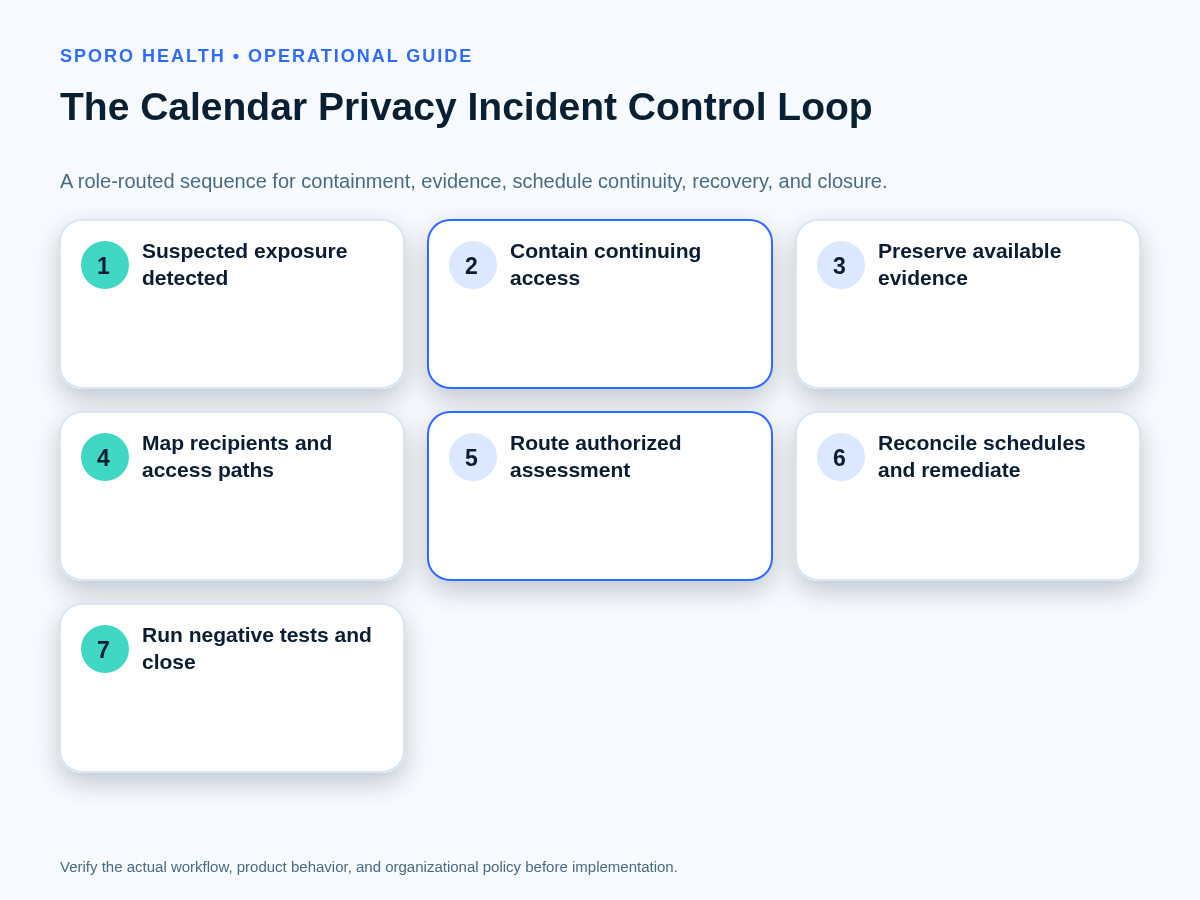
A medical practice calendar privacy incident response checklist should tell practice privacy leaders to contain continuing access, preserve available evidence, notify the designated privacy or security incident owner, and keep athenahealth as the scheduling reference while scope is established. Staff should not decide breach status themselves or delete first; they should record what is known, what remains uncertain, and who owns each next action.
This playbook is an operational aid, not a substitute for legal advice or the practice’s documented incident, breach-notification, evidence-hold, and workforce procedures. Use only authorized tools and collect only information permitted by policy and applicable law.
What should happen first after suspected PHI exposure?
Contain continuing access, preserve available evidence, and notify the designated privacy or security incident owner before destructive cleanup. HHS states that regulated entities must identify and respond to suspected or known security incidents, mitigate harmful effects to the extent practicable, and document incidents and outcomes in its HIPAA Security Rule summary.
- Open the incident record. Record discovery time, reporter, affected calendar, event identifier if available, provider, organizer, and current owner.
- Stop unapproved changes. Tell staff not to forward invitations, add guests, edit descriptions, contact recipients, or delete the event unless the incident owner directs them.
- Capture volatile facts. Preserve available timestamps, sharing settings, guest lists, group names, application identities, notification details, and audit searches in an authorized repository.
- Assign temporary authority. Name who may change the calendar, who protects active schedules, who gathers evidence, and who conducts the authorized assessment.
- Set the next review time. Urgent containment should not become an undocumented, indefinite calendar freeze.
Which calendar exposure paths should the investigation map?
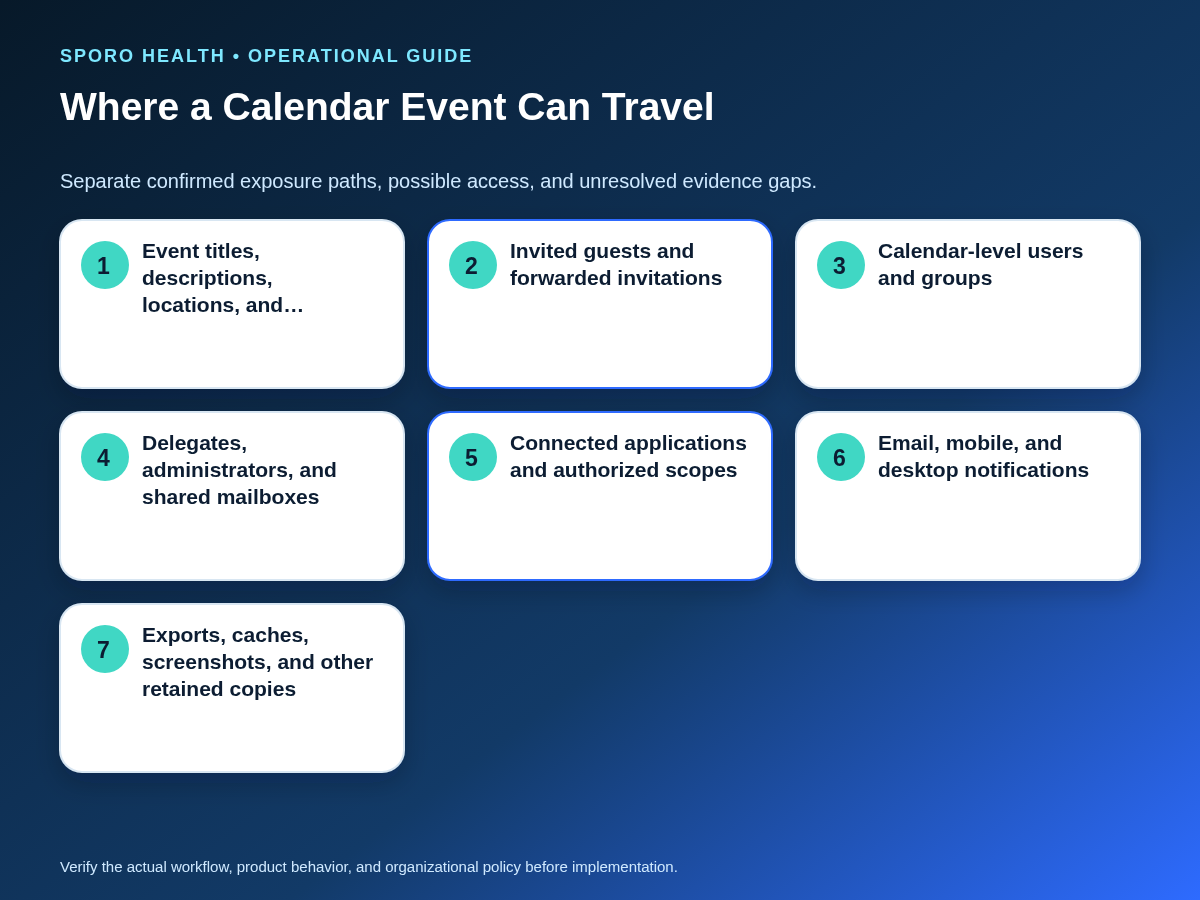
Map every plausible route from the exposed event fields to a person, account, application, notification, device, or retained copy without assuming that every route was used. Classify each path as confirmed, possible, ruled out with evidence, not applicable, or unknown.
Start with the event itself, then expand beyond the visible guest list. The exposure-path inventory should cover:
- Event titles, descriptions, locations, conferencing details, and attachments.
- Invited guests, forwarded invitations, rooms, resources, and distribution paths.
- Calendar-level users, organization-wide settings, public access, and groups.
- Delegates, shared mailboxes, administrators, and inherited permissions.
- Connected applications, service accounts, OAuth grants, and authorized scopes.
- Email, mobile, desktop, browser, and reminder notifications.
- Exports, cached data, screenshots, printed copies, and other retained material.
Google documents distinct calendar sharing levels for people and groups, while administrators can have additional visibility. Use the practice’s Google Calendar sharing permissions for medical practices as a preventive companion, then verify the live configuration against Google’s current sharing documentation. Keep “could access” separate from evidence of viewing, changing, receiving, or retaining the information.
How should the safest containment action be chosen?
Choose the narrowest reversible action that stops continuing exposure without unnecessarily destroying evidence or disrupting patient scheduling. The incident owner should weigh exposure, identity compromise, evidence preservation, notification behavior, and schedule continuity together.
| Action | Favor it when | Required guardrail |
|---|---|---|
| Restrict calendar-level visibility | A share, group, public setting, or organization-wide permission creates continuing access. | Capture the before-and-after permission state and expand groups to their relevant membership. |
| Remove a guest or invitation path | A specific unauthorized recipient can still reach the event. | Do not treat removal as proof that invitation emails, notifications, exports, or screenshots disappeared. |
| Revoke delegation or contain an identity | A delegate, administrator, shared account, or compromised identity remains active. | Check indirect access, active sessions, related mailbox rights, and other calendars within the approved scope. |
| Constrain an application or pause sync | An application token or automated write path could spread exposure or overwrite evidence. | Preserve configuration and identifiers, establish a scheduling fallback, and define who may restore service. |
| Redact or cancel the event | Exposed content must be removed while a schedule block or operational notice remains necessary. | Use approved replacement text and reconcile the resulting event state with athenahealth. |
| Delete the event | The incident owner authorizes deletion after necessary evidence is preserved and continued existence adds risk. | Document what deletion affects and why it cannot prove that every copy or notification was removed. |
Do not pause synchronization merely because an incident exists. Pause or constrain it when the automated path is implicated, its credentials may be compromised, or further writes could propagate exposed data. Otherwise, isolating the affected calendar, guest, permission, or event may create less operational risk.
What belongs in a calendar-specific evidence worksheet?
The worksheet should connect the exposed data, unauthorized population, available indications of acquisition or viewing, mitigation, uncertainties, and reviewer decisions in one traceable record. HHS identifies the nature and extent of PHI, the unauthorized person, whether PHI was acquired or viewed, and mitigation as factors in an authorized breach assessment; an event title or recipient count alone cannot settle the classification. See the HHS Breach Notification Rule guidance.
- Object and time: calendar ID, event ID, organizer, recurrence, creation, modification, discovery, and containment timestamps.
- Exposed content: exact fields involved, attachments, identifiers, and whether content changed during the incident window.
- Potential reach: guests, groups, delegates, administrators, applications, notification destinations, and external domains.
- Activity evidence: searches performed, identifiers used, time zones, results, exports, screenshots, and known coverage limits.
- Mitigation: permissions revoked, identities contained, recipient actions requested, event remediation, and residual-copy handling.
- Schedule impact: affected providers, locations, sessions, appointments, temporary controls, and reconciliation owners.
- Decision history: accountable reviewer, facts considered, unknowns, required follow-up, classification, and closure acceptance.
Evidence preservation and approved deletion should follow the practice’s policy. The calendar event retention governance guide can help distinguish preservation, holds, routine retention, and authorized disposition after the immediate exposure is controlled.
How do Google Calendar and Microsoft 365 checks differ?
Investigate Google Calendar and Microsoft 365 separately because their sharing roles, private-item behavior, administrative paths, application permissions, and audit records are not interchangeable. Use the same incident record, but maintain separate platform checklists.
| Control area | Google Calendar | Microsoft 365 and Outlook |
|---|---|---|
| Human access | Review specific people, groups, organization or public access, access levels, event guests, resources, and administrator visibility using Google’s sharing model. | Review calendar sharees, delegates, folder permissions, mailbox-level access, groups, meeting routing, and private-item rights using Microsoft’s sharing and delegation model. |
| Private items | A private event is not a universal containment control. Google notes that invited guests, resources, event times, and the creator can remain relevant depending on the path; see Google event-visibility guidance. | Microsoft defines roles with different private-event visibility, and a delegate can be explicitly granted access to private items. Verify the effective role rather than relying on the Private label. |
| Audit evidence | Current Calendar log documentation lists attributes such as calendar ID, event ID, actor, target, access level, notification details, and user agent. Google also documents potential lag and a finite availability period in its retention and lag guidance. | Microsoft mailbox auditing can record actions such as creation, updates, permission changes, folder access, and item access depending on configuration and sign-in type. Audit retention varies with licensing and policy. |
| Application access | Inventory the client, consented identity, calendars reached, and OAuth scope. Google recommends selecting the narrowest appropriate Calendar API scope. | Keep human calendar permissions separate from delegated and app-only Microsoft Graph consent. Microsoft’s permissions overview explains that the access contexts differ. |
For routine permission design outside an active incident, consult the Outlook Editor and Delegate permission comparison. During an incident, verify the affected mailbox, client path, role, application identity, time range, and audit coverage directly.
How should schedules be maintained during containment?
Keep athenahealth as the authoritative scheduling reference, control uncertain external-calendar edits, and record every temporary fallback change that will require reconciliation. Privacy containment and schedule operations should share an incident identifier without copying unnecessary PHI into the continuity ledger.
| Ledger field | Required entry |
|---|---|
| Incident window | Last trusted timestamp, discovery time, containment time, and current review horizon. |
| Affected scope | Provider, department, location, calendar, recurrence, and schedule dates requiring control. |
| athenahealth state | Authoritative appointment or availability state and the time it was verified. |
| External-calendar state | Visible event, missing event, redacted event, access restriction, or uncertain status. |
| Temporary rule | Who may edit, which booking channel remains open, and how staff verify availability. |
| Reconciliation item | Change made during containment, accountable owner, due time, result, and evidence. |
If synchronization is paused, record the last trusted event or mapping state and every create, reschedule, cancellation, block, or permission change made during the pause. Do not restore automation until an authorized owner approves the access state and operations has a bounded reconciliation plan.
What proves that calendar incident recovery is complete?
Recovery is complete only when inappropriate access is removed, approved content remediation is finished, schedules are reconciled, representative negative tests pass, residual copies are addressed, and the incident owner accepts documented closure. A changed permission or deleted event is only one input to that decision.
- Verify direct, group, delegate, mailbox, administrative, and application access after remediation.
- Confirm approved redaction, cancellation, replacement, deletion, or preservation for every affected object.
- Record how invitation emails, notifications, exports, cached material, screenshots, and other possible copies were addressed or left uncertain.
- Compare every affected athenahealth schedule with the intended provider, time, location, appointment, and availability state.
- Run negative tests showing that removed identities cannot see or change the relevant content and that an unauthorized application path no longer succeeds.
- Obtain closure acceptance from the designated incident owner, with unresolved obligations assigned and dated.
Use a provider calendar access recertification workflow to test residual access after emergency changes. Then use the minimum-necessary calendar data governance worksheet to reduce the event fields and access boundaries implicated by the root cause.
Measure containment time as the first verified stop of continuing exposure minus discovery time. Also track affected objects and identities, residual-access findings, open schedule-reconciliation exceptions, negative tests passed versus attempted, and recurrence by root-cause category. Trends should drive corrective work, not performance claims.
How should integration controls be evaluated after closure?
Use current product documentation to frame questions for a controlled review, not as evidence that a particular incident is resolved or legally classified. Start with the Sporo Health homepage, then review the athenahealth-to-Google Calendar product page, the athenahealth-to-Outlook product page, and Sporo Health’s athenaConnect Marketplace listing.
Ask any integration vendor to demonstrate how authorized administrators identify calendar mappings, constrain access, preserve event identity, stop a connection, reconcile changes made during containment, and verify restoration. Confirm every expected control in the practice’s own configuration before relying on it.
Frequently asked questions
Should staff delete the shared calendar event first?
Staff should not automatically delete the calendar event first. They should follow the incident owner’s direction and preserve identifiers, timestamps, permissions, recipients, and available logs before destructive cleanup when doing so does not prolong exposure.
Does marking a calendar event private close the exposure?
Marking an event private does not by itself close an exposure. Existing recipients, delegates, administrators, applications, notifications, exports, or cached copies may require separate investigation and remediation.
Does removing a guest or calendar share recall every copy?
Removing a guest or calendar share should not be treated as proof that every notification or retained copy was recalled. The incident scope must record what was revoked, what could persist, and what remains unknown.
Can an empty audit-log search prove nobody viewed the information?
Audit logs can support an investigation, but an empty search does not automatically prove that nobody viewed the information. Coverage, retention, privileges, event type, client path, searched identifiers, and permitted investigation methods must also be checked.
Who decides whether the calendar disclosure is a reportable breach?
Authorized privacy or legal reviewers should make the fact-specific classification under the practice’s incident process. Staff should report facts and preserve evidence rather than infer the outcome from the event title, number of recipients, or a single log search.
When should calendar sync be paused during a privacy incident?
Pause or constrain synchronization when continued automated access or writes could extend exposure, overwrite evidence, or spread uncertain changes. Keep it running when the affected path can be isolated safely and pausing would create greater schedule-continuity risk; document the decision and owner.
How do you put a medical practice calendar privacy incident response checklist into use?
Assign incident roles, evidence locations, containment authority, continuity rules, recovery tests, and escalation contacts before an exposure occurs. Rehearse the checklist with a synthetic event that contains no PHI, confirm that authorized reviewers can reach the necessary platform records, and test the two-system continuity ledger. Update the playbook after platform, permission, integration, retention, or organizational changes.
Sources
- HHS: Summary of the HIPAA Security Rule
- HHS: Breach Notification Rule
- Google Workspace: Calendar log events
- Google Calendar: Share your calendar
- Google Calendar: Change event visibility
- Google for Developers: Calendar API scopes
- Google Workspace: Data retention and lag times
- Microsoft Learn: Share or delegate an Outlook calendar
- Microsoft Learn: Manage mailbox auditing
- Microsoft Learn: Manage audit log retention policies
- Microsoft Learn: Microsoft Graph permissions overview