Changing a Booked Appointment Type in athenahealth: A Dependency-Revalidation Workflow
To answer how to change a booked appointment type in athenahealth, practice managers should treat the request as a dependency change, not a label edit. Confirm the approved destination type, compare its duration, provider, department, location, visit mode, resources, instructions, linked appointments, and connected-calendar needs with the current booking, then choose edit in place, reschedule, cancel and rebook, or hold and escalate.
athenaOne screens, permissions, and practice configuration vary. This playbook defines transaction and verification controls rather than unverified click paths. Scheduling staff should not infer clinical suitability; approval for the destination type must come from the role named in practice policy.
How to change a booked appointment type in athenahealth
Start by freezing the requested scope and confirming who approved the destination type. athenahealth’s public appointment catalog describes booked appointment updates such as appointment-type and department changes, while listing appointment types and appointment reasons as separate resources. Treat the type as a configured scheduling object rather than assuming it is interchangeable with the stated reason for the visit. See athenahealth’s appointment documentation.
- Identify the exact booked appointment and current status.
- Confirm the requested destination type and approval source.
- Compare every old-type and new-type dependency.
- Select one of four dispositions: edit, reschedule, cancel and rebook, or hold.
- Verify the destination state and prove that no old-state residue remains.
What should staff capture before making the change?
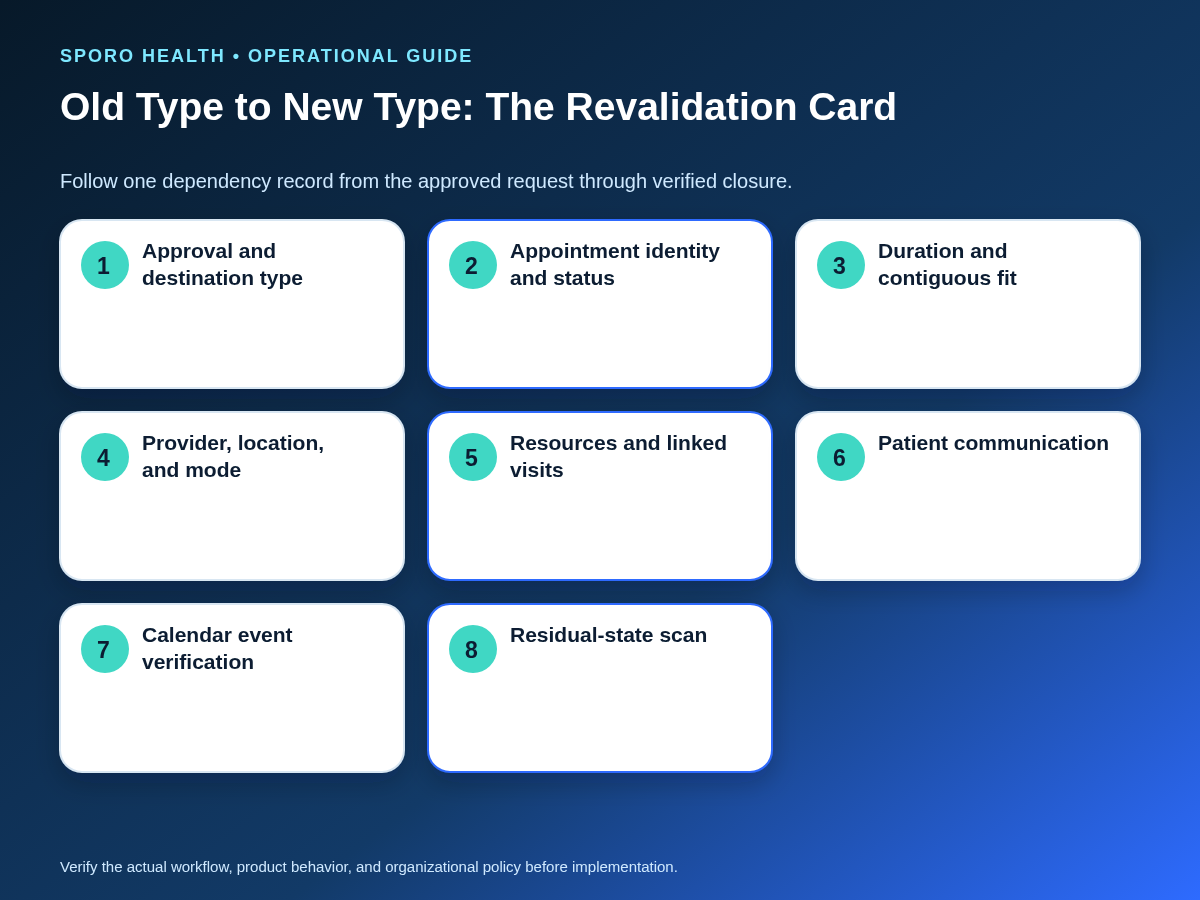
Record enough before-state evidence to reconstruct the booking and test the requested destination. The transaction card should identify the appointment, approval, status, interval, provider, department, location, mode, resources, linked work, patient instructions, booking channel, and connected-calendar event.
| Dependency | Current state | Destination test |
|---|---|---|
| Identity and authority | Appointment ID, patient, current type, status | Approved new type, approver, permitted staff action |
| Time and capacity | Date, start, end, duration, adjacent bookings | Required duration and contiguous capacity |
| Service fit | Provider, department, location, visit mode | Each remains eligible for the new type |
| Operational resources | Room, equipment, support role, linked appointments | Added dependencies are available; removed ones are released |
| Patient workflow | Instructions, reminders, preparation, booking channel | Changed logistics are communicated through the approved process |
| Calendar representation | Event identity, time, location or mode, availability state | One correct event remains after closure |
If the destination type adds rooms, equipment, or support roles, use the practice’s multi-resource appointment coordination controls rather than treating those reservations as informal notes.
Which transaction path should staff choose?
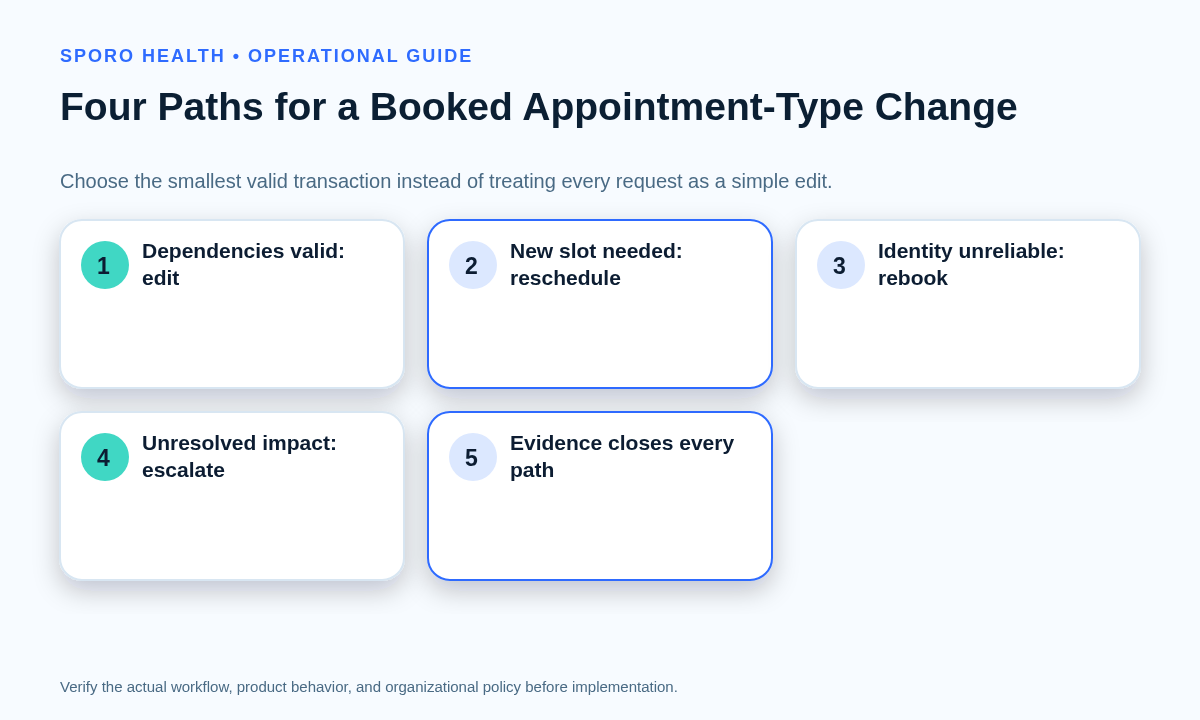
Choose the least disruptive path that leaves a valid booking and reliable evidence. The deciding question is not whether the type field can be edited; it is whether the current record and interval can support the entire approved destination bundle.
| Disposition | Use when | Closure evidence |
|---|---|---|
| Edit in place | Time, duration, provider, department, location, mode, resources, and links all remain valid. | Same appointment identity; all derived fields and calendar state verified. |
| Reschedule | The new type is approved, but the current interval or resource set cannot support it. | Valid destination slot; old slot released; patient and calendars updated. |
| Cancel and rebook | The original transaction cannot reliably preserve the required identity, slot, channel, or dependency set. | New booking verified; original canceled; no duplicate reminders, holds, or events. |
| Hold and escalate | Approval, clinical suitability, active-care status, capacity, or downstream impact is unresolved. | Named owner, protected interval if needed, decision deadline, and no unauthorized change. |
When the type change becomes a time change or cancellation, apply the broader front-desk reschedule and cancellation workflow to control handoffs and source cleanup.
How should duration and slot fit be verified?
Recalculate the booked interval from the destination type’s approved requirements instead of assuming duration changes automatically. Compare the required interval with adjacent appointments, provider capacity, resource availability, and any time that will be newly consumed or released.
- Longer destination type: confirm uninterrupted capacity through the new end time and recheck every required resource.
- Same-length type: still verify provider, department, location, mode, instructions, and resources.
- Shorter destination type: confirm the new end time and decide intentionally whether released capacity becomes bookable.
- No valid fit: do not compress the type or overlap another commitment; reschedule, rebook, or escalate.
For practices with type-specific intervals, the appointment-duration control for specialty clinics provides a deeper method for governing longer and shorter bookings.
How should staff execute the smallest approved change?
Apply one controlled transaction, then recheck every field that may derive from the destination type. athenahealth publishes separate appointment event topics for schedule, update, reschedule, and cancel activity, reinforcing the need to record which transaction actually occurred. See the athenahealth event-notification topics.
- Restate the approved destination type and chosen disposition.
- Capture the before state, including appointment and calendar identifiers available to the practice.
- Perform only the authorized athenaOne transaction.
- Reopen the appointment and verify type, interval, provider, department, location, mode, resources, links, and instructions.
- Communicate changed time, location, mode, preparation, or access details through the practice’s approved patient process.
- Have the assigned verifier compare the final state with the transaction card before closure.
How should Google Calendar or Outlook be verified?
Verify the surviving event’s identity, date, start, end, availability state, location or mode, and the absence of a stale or duplicate event. Do not close the request merely because one calendar view looks plausible.
Google’s event resource exposes fields including start, end, location, status, and transparency in its Calendar event update documentation. Its recurring-events guide distinguishes a series from an individual instance and explains that modifying one instance creates an exception. Microsoft Graph similarly supports event updates to start, end, location, recurrence, and showAs fields in its event update reference, while its instance-list reference returns occurrences and exceptions for a series master.
| Verification point | Pass condition |
|---|---|
| Identity | The event corresponds to the intended appointment, occurrence, and provider calendar. |
| Interval | Date, start, end, and time zone match the verified booking. |
| Representation | Availability, location, mode, and approved type label or metadata are correct where configured. |
| Residual scan | No duplicate, stale former-type event, orphaned hold, or wrong-series occurrence remains. |
Which appointment-type changes require an exception path?
Hold the routine workflow whenever the request reaches active care, changes occurrence scope, or introduces an unverified provider, location, mode, resource, or booking-channel dependency. Assign an owner and protect the current booking until the exception is resolved.
- Checked-in appointment or started encounter
- Stop and route the request to the authorized operational and clinical owners before changing a record tied to active care.
- Recurring or sequential plan
- Confirm whether one occurrence, future occurrences, or the complete plan is affected. Verify linked appointments and unaffected occurrences.
- Patient self-scheduled booking
- Check whether the destination type is valid for the original channel and whether reminders, instructions, or portal presentation must change.
- Late same-day request
- Recheck patient communication, preparation, resource readiness, and downstream collisions before editing.
- Visit-mode change
- Use the in-person and telehealth conversion workflow to validate physical or virtual readiness.
- Provider or location change
- Apply the controls for moving a booked appointment to another provider or the cross-location patient reschedule workflow.
How should practice managers measure appointment-type changes?
Measure whether changes reach a verified final state without correction, residue, collision, or aging exceptions. Define each denominator before setting targets, then review results by destination type, provider, location, channel, and disposition.
| Measure | Working definition |
|---|---|
| First-pass verification | Changes closed without reopening or correction divided by verified changes. |
| Type-change rework | Changes requiring another scheduling transaction divided by completed changes. |
| Residual mismatch rate | Changes with stale fields, holds, links, or calendar events divided by changes scanned. |
| Patient-facing correction rate | Changes requiring corrected logistics or instructions divided by patient-notified changes. |
| Downstream collisions | Adjacent slot, provider, room, equipment, or linked-appointment conflicts caused or exposed. |
| Exception age | Elapsed time from hold or escalation to authorized disposition. |
| Complete-evidence rate | Changes closed with approval, before state, final verification, communication, and residue scan. |
Where do connected-calendar options fit?
Connected calendars can support visibility and verification, but they do not approve appointment types or replace practice-owned scheduling rules. Review Sporo Health, the current athenahealth and Google Calendar product page, the athenahealth and Microsoft Outlook product page, and the Sporo Health athenaConnect Marketplace listing. Treat capability statements as vendor claims and verify the actual mapping, data choices, permissions, and contract before relying on them.
How should practice managers put the workflow into use?
Turn the dependency envelope, four-disposition matrix, interval-fit check, and residual scan into one required transaction card. The practical answer to how to change a booked appointment type in athenahealth is to make the smallest approved change that leaves every dependency valid, communicate changed logistics, and close only after the new state is correct and the old state is gone.
Frequently asked questions
Is an appointment type the same as an appointment reason?
No. Treat appointment type and appointment reason as separate configured concepts unless the practice has documented the exact mapping and verified how a change affects scheduling and patient-facing workflows.
Can front-desk staff approve a new appointment type?
Only when a written practice policy grants that authority. Schedulers should not infer clinical suitability or substitute a type that requires review by a provider or another authorized role.
Does changing the appointment type automatically change the duration?
Do not assume it does. Verify the booked interval after the change, confirm contiguous capacity for a longer type, and handle any released time intentionally for a shorter type.
Should every appointment-type change be canceled and rebooked?
No. Use the least disruptive path that preserves a valid booking and reliable identity, but cancel and rebook when the current record or slot cannot support the approved destination type.
What if the patient is already checked in or an encounter has started?
Stop the routine scheduling workflow and route the request to the authorized operational and clinical owners before changing a record tied to active care.
Can one occurrence in a recurring or sequential appointment plan change type?
It may, but staff should treat it as an occurrence-level exception and verify linked appointments, dependencies, and unaffected occurrences before changing the occurrence or the wider series.
Sources
- athenahealth: Appointments API Solutions
- athenahealth: Event Notifications Subscription Topics
- Google Calendar API: Events update
- Google Calendar API: Recurring events
- Microsoft Graph: Update event
- Microsoft Graph: List event instances
- Sporo Health: athenahealth and Google Calendar
- Sporo Health: athenahealth and Microsoft Outlook