Hybrid In-Person and Telehealth Scheduling in athenahealth: A Session-Control Playbook
To manage in-person and telehealth schedules in athenahealth, multi-location practice managers should control each provider session by mode, service location, appointment type, dependencies, and change authority. Keep one authoritative patient-booking record, use Google Calendar or Outlook as supporting visibility unless another role is explicitly approved, and verify every mode conversion before releasing the appointment or affected capacity.
How to manage in-person and telehealth schedules in athenahealth
A controlled hybrid schedule gives every bookable interval an approved visit mode, service location, provider, appointment type, required resources, and verification owner. A calendar label, video link, or open-looking interval should never substitute for that complete operating state.
athenahealth’s current athenaOne Service Description explains that practices manage provider schedules through templates specifying appointment types, times, frequencies, providers, and departments. Its athenaTelehealth overview describes an embedded workflow extending from appointment scheduling through the visit and billing. The practice still needs its own rules for dividing capacity, approving conversions, and resolving conflicting representations.
Should telehealth and in-person visits use dedicated blocks or interleaving?
Use dedicated blocks when changing mode also changes staffing, rooms, equipment, patient preparation, provider location, or the reliability of the transition. Interleave only when one team can support both modes and complete a defined readiness check before the next appointment.
| Decision factor | Prefer dedicated blocks | Consider interleaving |
|---|---|---|
| Staffing | Different intake, technical-support, or rooming roles are required. | The same trained team supports both modes without delaying either workflow. |
| Physical resources | Rooms, equipment, or site-specific support must be reserved. | No exclusive physical resource is needed for the virtual interval. |
| Provider location | The provider must travel or change to a private, equipped workspace. | The provider remains in one suitable workspace. |
| Patient preparation | Modes use materially different check-in or instruction paths. | Instructions and access checks can be confirmed before the session. |
| Transition variability | Setup time is unpredictable or frequently fails. | A repeatable transition check fits inside the approved envelope. |
The federal hybrid-care strategy guide recommends defined switching protocols, scheduling procedures, dedicated virtual time where useful, and appropriate office resources. Treat those as design inputs, then use local operating evidence to decide whether a session may safely mix modes.
What should a hybrid mode-and-location registry include?
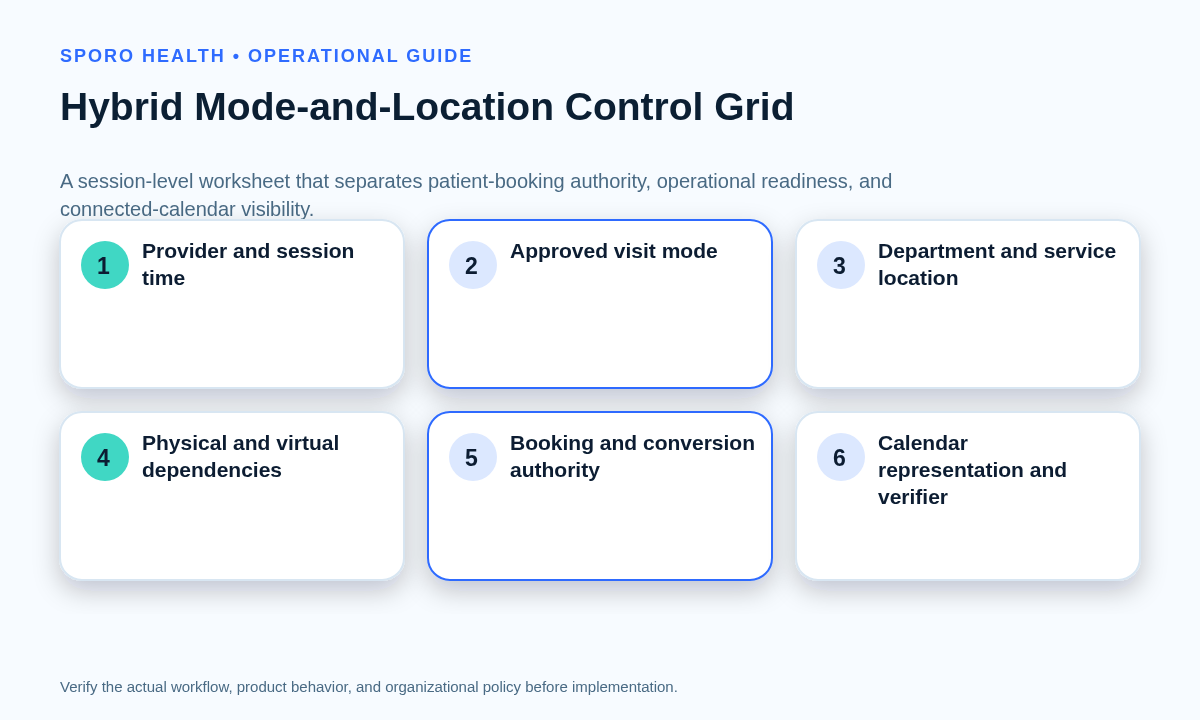
The registry should identify the complete session-level control state rather than merely naming a provider or clinic. One row should cover one recurring or bounded provider session.
Use the registry to separate provider-location signals from booking authority and to allocate provider capacity across clinic locations without making virtual or physical capacity bookable in the wrong context.
| Control group | Required fields |
|---|---|
| Session identity | Provider, day and time envelope, athenahealth department, physical site or virtual service, and approved mode. |
| Booking configuration | Appointment types, bookable channels, authoritative record, external calendar, and busy/free representation. |
| Dependencies | Room, device, workspace, support role, patient instructions, check-in path, and transition rule. |
| Authority | Booking authority, conversion authority, exception owner, verifier, and escalation path. |
| Evidence | Effective dates, approval reference, last test, known exception, and next review date. |
How much transition time should separate telehealth and in-person visits?
Do not set one universal buffer; calculate a transition envelope from the dependencies that must be completed before the next appointment. If the evidence cannot support that envelope, keep the interval unavailable or reschedule the affected visit.
Related controls can help teams protect provider travel time between locations and coordinate appointments that depend on multiple resources.
| Dependency | Question to answer | Closure evidence |
|---|---|---|
| Travel | Must the provider move between sites or to a remote workspace? | Approved route and protected interval. |
| Room turnover | Must a room be released, reset, or reassigned? | Room status and responsible role. |
| Device readiness | Must camera, audio, network, or other equipment change? | Completed device check. |
| Staff handoff | Does another team assume intake or support? | Accepted handoff. |
| Virtual check-in | Can access or technical issues be resolved before start time? | Patient access path confirmed. |
| Provider location | Is the next workspace private and operationally ready? | Location verified. |
How should staff convert an appointment between in-person and telehealth?
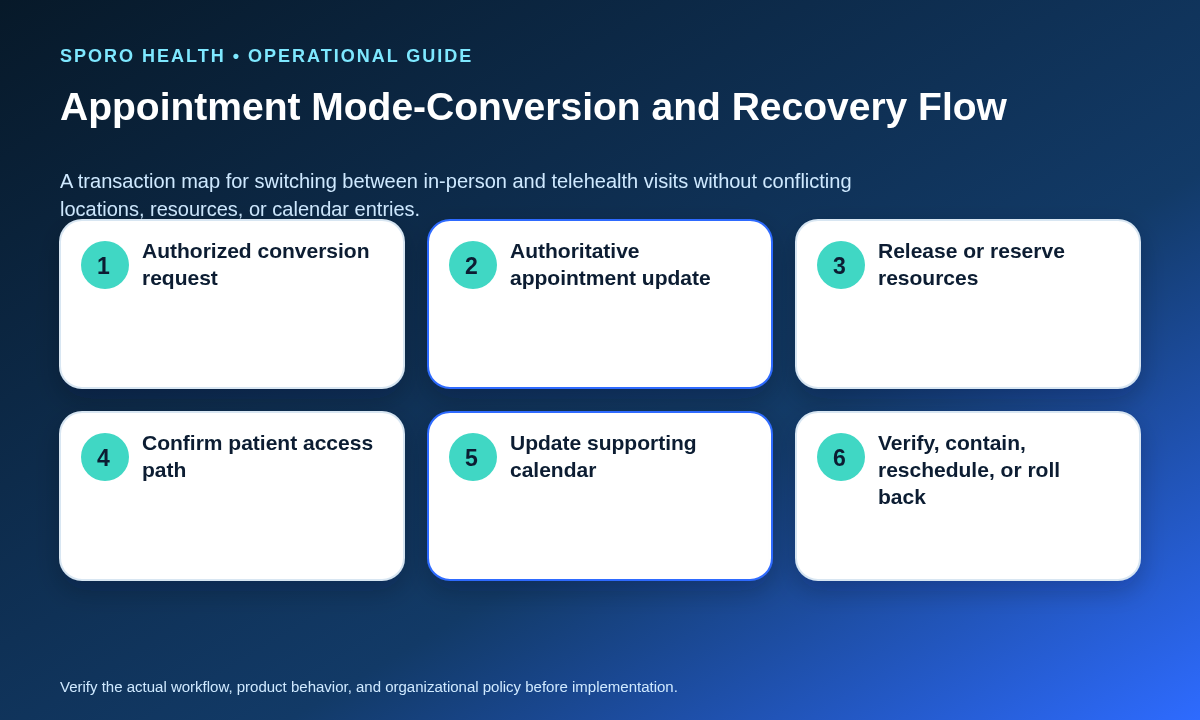
Convert the appointment as one controlled transaction, beginning with authorized suitability and ending only after every representation and dependency matches. Do not treat a phone call, calendar edit, or newly added meeting link as a completed conversion.
- Receive the request and identify who may authorize the mode change.
- Confirm the authorized owner has approved the new mode for that appointment.
- Update the authoritative patient-booking record, including mode, department, service location, and appointment type as applicable.
- Release unneeded rooms, equipment, or site capacity, or reserve the resources required by the new mode.
- Deliver the approved patient access path, preparation instructions, and troubleshooting route.
- Update the supporting Google Calendar or Outlook representation without creating a second booking authority.
- Verify the final appointment, resources, patient instructions, provider interval, and external-calendar state before closure.
A telehealth-to-in-person conversion follows the same sequence but adds physical capacity and arrival dependencies. When the change also moves the appointment time, apply the same discipline used to process reschedules and cancellations with transaction-level verification. If any required dependency fails, contain the interval rather than leaving an uncertain slot open.
How should Google Calendar or Outlook represent hybrid appointments?
External calendars should show only the practice-approved operational representation and should not independently prove that an appointment is ready or authorized. Document which calendar is used, what fields appear, whether the event blocks time, and who verifies changes.
The Google Calendar Events resource distinguishes fields such as location, conference data, event visibility, and transparency. The Microsoft Graph event resource separately represents location, multiple locations, online-meeting information, and show-as status. These fields can describe different parts of a hybrid appointment, so a meeting link, location value, or busy state should not be interpreted as the complete patient-booking transaction.
Use consistent, minimally informative labels under the practice’s approved data policy. Test an in-person appointment, a telehealth appointment, both conversion directions, cancellation, rescheduling, and an external-calendar delay or failure.
What proves that a hybrid appointment is ready?
Readiness requires matching evidence for the booked mode, provider interval, service location, resources, patient access, and supporting calendar state. Review these elements as a set rather than accepting one green indicator.
- The authoritative appointment shows the approved mode and appointment type.
- The provider is assigned to the correct department and physical or virtual service location.
- Required rooms, equipment, workspace, and support roles are ready.
- The patient has the approved joining or arrival instructions.
- The transition envelope from the prior appointment remains feasible.
- Google Calendar or Outlook matches the intended interval and representation.
HHS guidance on planning telehealth workflows identifies scheduling, staffing, check-in, reminders, technology, and patient access as connected processes. Its patient-preparation guidance also recommends explaining how patients will connect and what they should do when connection problems occur.
How should a practice recover when mode or location records disagree?
Contain the affected interval, preserve the authoritative appointment, assign one recovery owner, and correct the smallest safe scope. Compare every representation before deciding whether to proceed, reschedule, or roll back.
| Failure | Immediate action | Closure test |
|---|---|---|
| Overlapping modalities | Stop further booking and identify the approved appointment. | One usable provider interval remains. |
| Wrong-location booking | Protect the appointment while confirming the feasible location. | Patient, provider, department, and resources match. |
| Missing access instructions | Assign outreach and hold uncertain virtual capacity. | Delivery and patient access path are confirmed. |
| Unavailable room or device | Find an authorized substitute or reschedule. | Replacement dependency is reserved and verified. |
| Late conversion | Recheck suitability, transition time, resources, and patient contact. | All transaction steps close before the visit. |
| Conflicting calendars | Preserve the authoritative booking and reconcile the external event. | Times, mode representation, and busy state match. |
Notify patients and staff only through approved channels, retain the recovery owner until closure, and widen the review if the same mismatch appears in adjacent appointments or recurring sessions.
What metrics reveal hybrid scheduling mismatches?
Use rates with explicit denominators so leaders can distinguish an isolated exception from recurring session drift. Keep operational measures separate from clinical outcomes, financial claims, or vendor performance promises.
| Measure | Formula | What it reveals |
|---|---|---|
| Mode-location mismatch rate | Mismatched reviewed appointments ÷ all reviewed appointments. | Whether booked mode and service location remain aligned. |
| Failed conversion rate | Failed conversion attempts ÷ all conversion attempts. | Whether the transaction workflow closes reliably. |
| Readiness gap rate | Sessions missing required evidence ÷ hybrid sessions reviewed. | Whether appointments appear ready without complete proof. |
| Aged exception share | Open exceptions beyond the practice threshold ÷ all open exceptions. | Whether unresolved problems are accumulating. |
| Recurring session drift rate | Unapproved session deviations ÷ recurring session instances reviewed. | Whether the approved pattern is eroding over time. |
Segment results by provider, department, location, mode, session design, and conversion direction. Use a practice-defined review threshold rather than an unsupported universal target.
How should the practice pilot and govern the standard?
Start with a bounded provider-session cohort and expand only after staff can execute, verify, and recover representative hybrid scenarios. Include dedicated and interleaved sessions if both are proposed.
- Approve the registry, authorities, transition envelopes, and readiness evidence.
- Test routine booking, both conversion directions, cancellation, rescheduling, missing instructions, unavailable resources, and calendar disagreement.
- Review every pilot exception with the scorecard denominators and assigned owners.
- Expand, redesign, or pause according to documented evidence.
For recurring hybrid patterns, choose between a baseline template and a bounded schedule change rather than allowing repeated exceptions to become an undocumented shadow schedule.
Put hybrid schedule control into daily operation
A reliable answer to how to manage in-person and telehealth schedules in athenahealth is to control the entire session state—not merely the appointment label. Assign mode and location before capacity opens, calculate transitions from actual dependencies, convert appointments as complete transactions, and retain one owner until mismatches are verified closed.
If connected-calendar visibility is part of the operating model, learn more about Sporo Health, review Sporo’s athenahealth and Google Calendar product page and Sporo’s athenahealth and Microsoft Outlook product page, or inspect Sporo Health’s athenaConnect Marketplace listing. Treat each description as a vendor claim and request a witnessed test using the practice’s own registry, conversion, failure, and recovery scenarios.
Frequently asked questions
Should telehealth and in-person visits use separate schedule blocks?
Use separate blocks when modes require different staffing, rooms, equipment, patient preparation, or provider locations. Interleave only when the same team can support both modes and the transition check can finish before the next appointment.
Can a meeting link prove that a telehealth appointment is ready?
No. A meeting link is only one representation. Readiness also requires the approved mode, provider interval, patient access instructions, virtual check-in path, required technology or support, and matching authoritative booking.
Who should be allowed to convert an appointment between modes?
Only a role named in the mode-and-location registry should authorize the conversion. Scheduling staff may execute the approved transaction, but clinical suitability and policy-dependent decisions should remain with the practice’s authorized owner.
How much transition time is needed between telehealth and in-person visits?
There is no universal buffer. Set a dependency-based rule for travel, room turnover, device or workspace change, staff handoff, virtual check-in, and provider location; keep the interval unavailable when the rule cannot be satisfied.
Should Google Calendar or Outlook be the authoritative patient schedule?
Usually no. Keep one authoritative patient-booking record and use the external calendar for approved visibility or availability functions unless the practice has explicitly documented, tested, and governed another authority model.
How do you prevent provider double booking across telehealth and clinic locations?
Control capacity at the provider-session level, not by labels alone. Verify mode, service location, appointment type, physical and virtual dependencies, transition feasibility, and the final external-calendar state before releasing a slot.
Sources
- athenaOne Service Description — current scheduling and Schedule Builder documentation.
- athenaTelehealth — current athenahealth telehealth workflow overview.
- Developing a strategy for hybrid care — workflow, scheduling, dedicated-time, and resource guidance.
- Planning your telehealth workflow — staffing, scheduling, check-in, technology, and access considerations.
- Helping patients prepare for their telehealth appointment — connection and preparation guidance.
- Google Calendar Events resource — event, location, conference, visibility, and transparency fields.
- Microsoft Graph event resource — location, online-meeting, and show-as fields.