
Provider Calendar Offboarding for athenahealth Practices: A Schedule-Continuity Checklist
A provider calendar offboarding checklist for athenahealth practices should treat access revocation, calendar ownership, integration disconnection, and schedule handoff as four separate controls. Practice managers should inventory every provider identity and future scheduling obligation, choose the correct departure path, assign named owners, perform changes in a controlled sequence, and verify appointments, blocks, recurring events, delegates, and permitted edit paths before closing the case.
What is the provider calendar offboarding checklist for athenahealth practices?
It is a controlled workflow that ends unauthorized access without abandoning the provider’s future schedule responsibilities. It should cover athenahealth access, external calendar identities, owned and delegated calendars, integration mappings, recurring events, availability blocks, appointments, and the people who will manage each item after departure.
One coordinator should own the case, but not every decision. Access, calendar administration, scheduling operations, retention, provider communication, and verification need named owners. HHS audit criteria describe termination procedures for ending access to electronic protected health information and also address privilege changes when job duties change, supporting separate paths for departures and role changes. See the HHS HIPAA audit protocol.
This is an operational checklist, not a legal, privacy, or records-retention determination. Apply the practice’s approved policies and authorized review process.
Which provider calendar offboarding path applies?
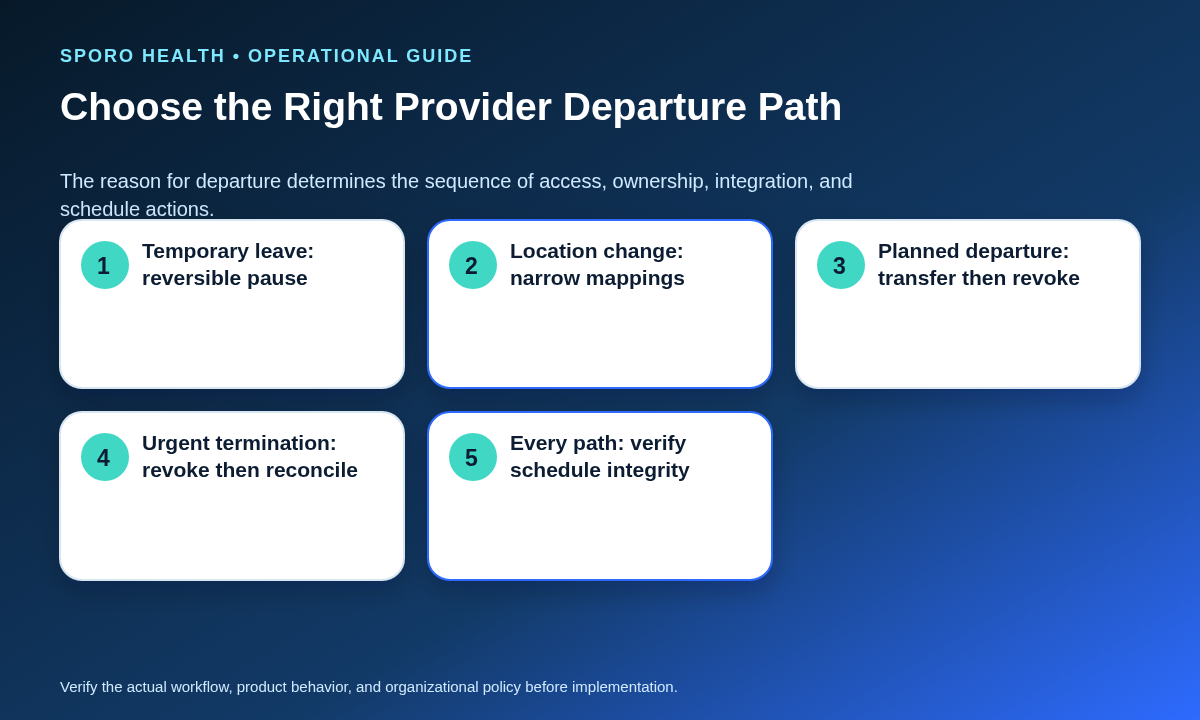
Choose among temporary leave, a location or department change, a planned departure, and an urgent termination before changing any account. The path determines whether access is paused, narrowed, transferred before cutoff, or revoked first and reconciled under controlled administration.
When a provider remains with the organization but leaves one site, use established multi-location scheduling controls to avoid removing access and mappings that are still needed elsewhere.
| Path | Access sequence | Calendar and integration action | Schedule-continuity evidence |
|---|---|---|---|
| Temporary leave | Choose a reversible pause or approved restriction. | Preserve ownership; pause or narrow mappings only as required. | Start and return dates, coverage owner, blocked availability, and return review. |
| Location or department change | Remove only obsolete roles and privileges. | Update affected provider, department, location, and calendar mappings. | Samples from retained and removed locations show the intended access and availability. |
| Planned departure | Inventory and transfer first; revoke personal access at the authorized cutoff. | Resolve ownership, delegates, recurring events, integrations, and future obligations. | Every control has an owner, result, timestamp, and exception status. |
| Urgent termination | Revoke personal access first. | Keep required assets under controlled administrative custody while owners reconcile them. | Cutover-window changes are logged and both systems are reconciled before closure. |
How do you build the calendar asset and identity worksheet?
Create one row for every identity, asset, connection, and future schedule obligation, then assign an owner and required evidence. The worksheet is the lifecycle counterpart to new-provider scheduling onboarding: it reveals dependencies that a simple account list will miss.
| Asset or control | Questions to record | Accountable owner | Completion evidence |
|---|---|---|---|
| athenahealth identity | Which user, provider, department, location, and scheduling privileges apply? | Access administrator | Approved disablement or privilege-change record |
| Calendar account | Is it organizational, shared, delegated, or personal? | Calendar administrator | Account status and authorized custodian |
| Ownership and delegation | Which calendars, events, mailboxes, delegates, and resources depend on the provider? | Calendar administrator | Before-and-after owner and access list |
| Integration identity | Which provider ID, calendar ID, authorization subject, and mapping are connected? | Integration owner | Disconnected, paused, or remapped result |
| Future schedule | Which appointments, open slots, blocks, and locations require action? | Scheduling owner | Disposition report and exception list |
| Recurring events | Who organizes the series, and are rooms or shared resources reserved? | Calendar administrator | Transferred, canceled, preserved, or recreated status |
| Retention decision | What policy, contract, hold, or operational need governs retained data? | Authorized privacy or records owner | Documented decision and custodian |
Which controls must stay separate?
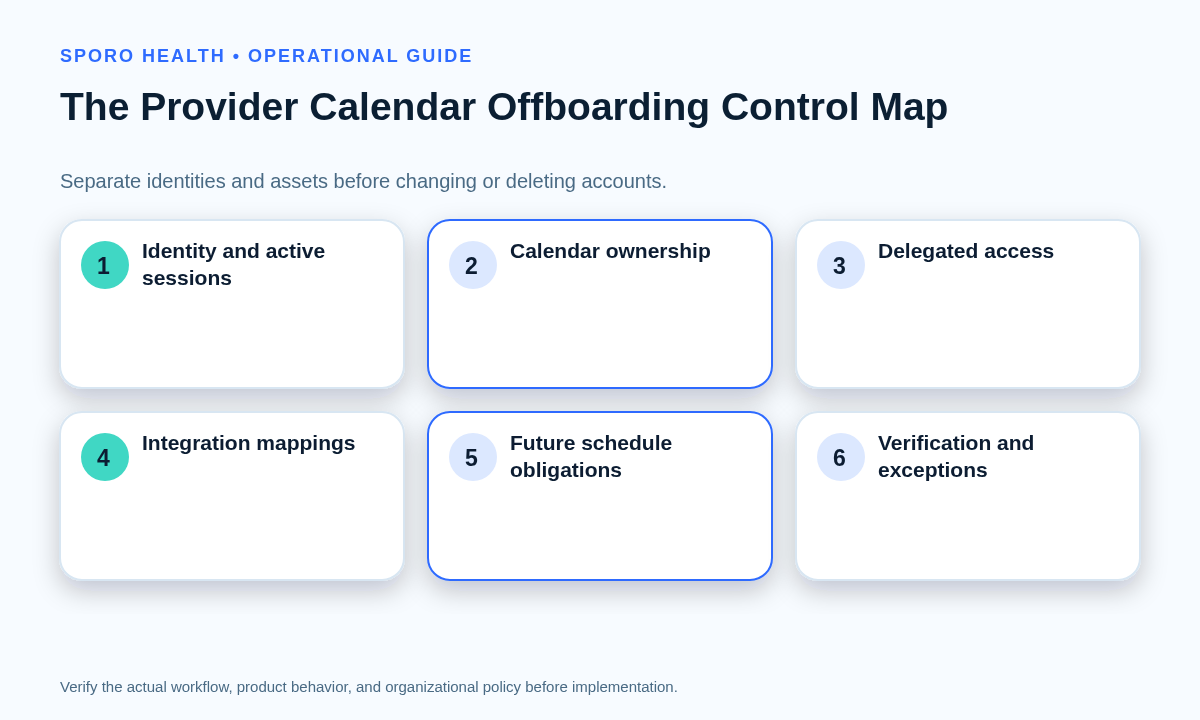
Access revocation, ownership transfer, integration disconnection, and schedule handoff must each be tested independently. Completing one does not prove the others occurred.
Use role-based Google Calendar sharing when reviewing delegates, but do not mistake shared access for ownership or integration removal.
- Access: Can the departing provider still sign in or use an active session?
- Ownership: Can an authorized successor edit, cancel, or preserve required assets?
- Integration: Is the correct provider-calendar connection paused, removed, or remapped?
- Schedule: Who can manage appointments, availability, cancellations, and exceptions?
Who should own each control?
Assign one coordinator and separate accountable owners for each specialist decision. The coordinator tracks the case; access administrators change identities, calendar administrators handle ownership, integration owners change connections, scheduling leaders direct patient-schedule actions, authorized privacy or records owners decide retention, and a verifier tests the final state.
What is the time-sequenced provider calendar offboarding checklist?
Run the workflow in four phases: pre-cutover inventory, controlled cutoff, schedule handoff, and post-cutover verification. Record the departure path, effective cutoff, declared scheduling source of truth, coordinator, owners, and exception-escalation contact at the top of the case.
What happens before the access cutoff?
Complete the inventory and approve every planned disposition before deleting, de-licensing, or repurposing an account. The coordinator should confirm the following:
- The access owner lists athenahealth, calendar, device, remote-access, and integration identities.
- The scheduling owner inventories future appointments, open slots, availability blocks, departments, and locations.
- The calendar owner identifies delegates, shared resources, recurring series, and events organized by the provider.
- The integration owner captures provider IDs, calendar IDs, mappings, and the current connection state.
- The authorized retention owner records whether data will be transferred, preserved, canceled, or deleted under policy.
Google’s current administrator guidance says secondary calendars must be transferred before their owner is deleted; deleting the owner also deletes those calendars and prevents later transfer. It separately distinguishes future event transfer from secondary-calendar transfer. Review the Google Workspace calendar offboarding guidance. Microsoft likewise directs administrators to secure sign-in, preserve required mailbox data, grant successor access where needed, and only then remove licenses or accounts in its former-employee workflow.
What happens at the cutoff?
End personal access when authorization ends, while keeping required organizational assets under approved administrative control. Execute only the steps approved for the selected path:
- The access owner blocks or narrows sign-in, sessions, and privileges.
- The calendar owner completes approved transfers, cancellations, delegation changes, or mailbox treatment.
- The integration owner pauses, disconnects, or remaps the provider-calendar connection and records the result.
- The scheduling owner announces the temporary edit path and controls changes during the cutover window.
Do not assume Google Workspace and Microsoft 365 behave alike. Google provides an administrator-controlled method to transfer an active secondary calendar within an organization. Microsoft documents a separate Remove-CalendarEvents process for previewing or canceling future organized meetings, including leave-of-absence scenarios. Tenant settings, permissions, holds, and mailbox choices still require platform-specific review.
How is the provider schedule handed off?
Authorized scheduling and clinical operations leaders—not IT alone—must decide how future patient appointments and coverage obligations are resolved. Assign a scheduling owner for future appointments, waitlists, open slots, availability blocks, cancellations, reschedules, recurring administrative time, and location coverage. Give front-desk users one declared edit path and an escalation route for ambiguous cases.
For each future obligation, record one disposition: retained under the existing provider, reassigned, rescheduled, canceled through the approved workflow, converted to another coverage arrangement, or escalated. IT should execute account and connection changes only after the operational decision is clear.
What happens after cutover?
Review the access logs, integration state, calendar assets, and future schedule before closing the case. The verifier should compare the final state with the worksheet, sample near-term and later dates, retest after any correction, and keep unresolved exceptions open with an owner and due state. A completed task without recorded evidence is not a completed control.
How do you test schedule integrity after offboarding?
Sample every consequential schedule state and confirm both the displayed result and the permitted edit path. The broader schedule-integrity evaluation checklist can help establish source-of-truth and reliability assumptions before this departure-specific test.
athenahealth’s current Appointment profile represents status, start and end time, scheduled provider, and location. Those are useful reconciliation dimensions, although they do not replace the practice’s operational offboarding procedure.
| Test | Sample | Pass condition | Exception owner |
|---|---|---|---|
| Future appointments | Multiple dates, types, departments, and locations | Provider and disposition match the approved handoff | Scheduling owner |
| Availability blocks | Near-term and later blocks | Bookable time reflects the approved coverage plan | Scheduling owner |
| Canceled and rescheduled items | Recent changes around cutover | Status and replacement records are consistent | Scheduling owner |
| Recurring events | Next occurrence and later recurrence | Organizer, resources, and edit rights are valid | Calendar owner |
| Delegated access | Former and successor delegates | Obsolete access is removed; approved access works | Calendar owner |
| Integration state | Provider-calendar mapping and authorization | No obsolete connection continues to change schedules | Integration owner |
| Permitted edit paths | Create, update, cancel, and block workflows | Only authorized roles can complete intended actions | Verifier |
What if a calendar transfer or integration disconnection fails?
Declare the source of truth, limit nonessential edits, log every cutover-window change, and reconcile before declaring completion. Use the more detailed calendar integration recovery runbook if the problem becomes a broader synchronization incident.
- Declare control: Name the incident owner and authoritative scheduling system.
- Contain: Pause nonessential edits and prevent repeated transfer or disconnect attempts.
- Capture: Record appointments, blocks, cancellations, and ownership changes made during the affected window.
- Recover: Restore approved administrative access, correct ownership, or re-establish the intended connection state.
- Reconcile: Compare both systems item by item for the affected providers and dates.
- Retest: Repeat the schedule-integrity test and document every remaining exception.
- For an incomplete transfer, preserve the source account or asset under controlled administration until ownership is resolved.
- For a disabled integration, do not reconnect it informally; require the integration owner’s approved mapping.
- For orphaned events, assign a documented transfer, cancellation, preservation, or recreation decision.
- For unresolved ownership, postpone deletion or de-licensing when approved policy permits.
- For edits made during cutover, reconcile the change log against the declared source of truth.
Frequently asked questions
Should a departing provider’s calendar be deleted?
A departing provider’s calendar should not be deleted automatically. First determine whether it owns future events, shared calendars, recurring meetings, schedule blocks, or other assets that must be transferred, canceled, preserved, or reassigned.
How should temporary leave differ from permanent offboarding?
Temporary leave should use a reversible pause with a defined start date, end date, access decision, scheduling owner, and return review. Permanent deletion can create unnecessary recovery work when the provider is expected to return.
Who should reassign future patient appointments?
Future patient appointments should be reassigned or otherwise resolved by authorized scheduling and clinical operations leaders. IT can change accounts and connections, but it should not independently decide how patient schedules are redistributed.
When should personal access end, and what happens to retained data?
The provider’s personal access should end when authorization ends, while calendar or mailbox data that must be retained should remain under approved organizational control. Authorized privacy, legal, contractual, records, and operational owners should determine its treatment.
Is disabling athenahealth access enough to complete offboarding?
No. Disabling athenahealth access does not prove that calendar ownership, delegates, integrations, recurring events, availability blocks, or future schedule obligations were resolved.
Can Google Workspace and Microsoft 365 use the same offboarding runbook?
No. Use separate platform runbooks because Google Workspace and Microsoft 365 have different ownership, delegation, mailbox, meeting-organizer, retention, and administrative controls.
Put the provider calendar offboarding checklist into practice
Use this provider calendar offboarding checklist for athenahealth practices as a controlled case record, not a memory aid. Do not close the case until access, ownership, integration state, schedule handoff, and verification each have a recorded result or an assigned exception.
If your practice is evaluating connected-calendar workflows, learn about Sporo Health, review its athenahealth and Google Calendar product page and athenahealth and Microsoft Outlook product page, or visit the Sporo Health listing in the athenaConnect Marketplace. Treat public product descriptions as vendor information and verify the exact offboarding procedure for your configuration.
Sources
- HHS HIPAA Audit Protocol
- Google Workspace: Cancel or transfer events or secondary calendars before deleting a user
- Google Calendar API: Calendars transferOwnership
- Microsoft 365: Remove a former employee and secure data
- Microsoft Exchange PowerShell: Remove-CalendarEvents
- athenahealth Appointment Profile

3 Comments
Comments are closed.

[…] redesign unless the combined change has been tested. If the provider is departing, use the separate provider calendar offboarding checklist; a departure requires access revocation and schedule handoff rather than identity […]
[…] revocation completes every step. See Google’s linked-app management guidance. Incorporate the provider calendar offboarding checklist into the approved lifecycle […]
[…] with the exit record and the actual provider calendar offboarding checklist. Do not assume that the recorded offboarding action was completed, remained unchanged, or can now […]