When athenahealth Calendar Sync Reverts a Newer Schedule Change: A Stale-Write Recovery Guide
The answer to “why does athenahealth calendar sync revert schedule changes” is usually a stale write: delayed or retried work applies an older state after a newer change was already accepted. For healthcare IT teams, the immediate response is to protect the affected interval, stop automatic replay for that identity, preserve evidence, reread both systems, and only then correct and release the queue.
Why does athenahealth calendar sync revert schedule changes?
A schedule change reverts when older work reaches a writable record after a newer state has already been accepted. The late work may come from a delayed notification, a duplicate delivery, a retry after an uncertain response, a reordered queue, a stale cache, or a payload prepared against an earlier target version.
athenahealth documents appointment schedule, reschedule, cancel, and update notification topics and points consumers to an appointment retrieval endpoint for current state. Google Calendar push messages do not contain the changed event body and can be dropped, while Microsoft Graph tells delta consumers not to assume response sequence and to expect replays. These signals should therefore trigger a fresh read; their arrival order does not prove state precedence. See the athenahealth notification topics, Google Calendar push-notification guidance, and Microsoft Graph delta guidance.
What should happen before anyone corrects the reverted state?
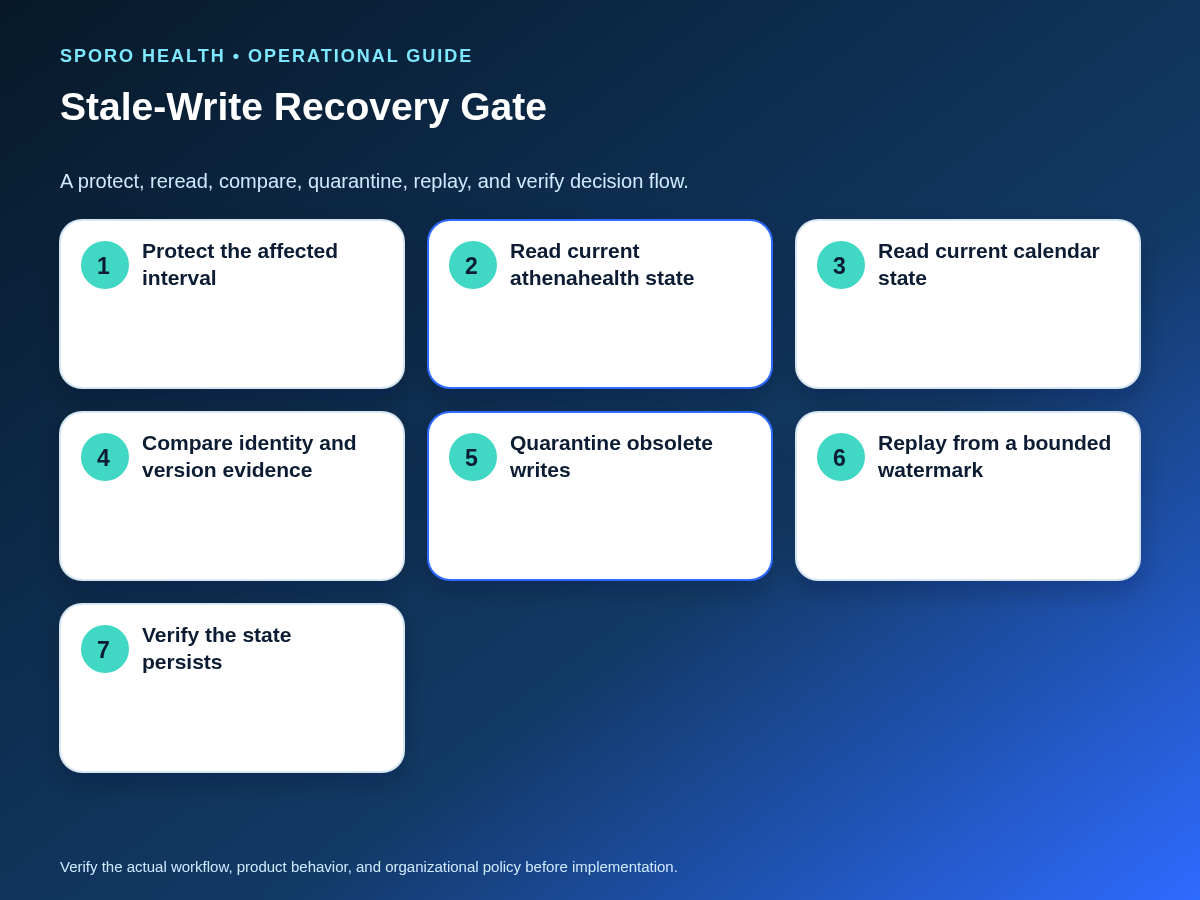
First protect the affected interval, pause or quarantine replay for the identified record, and preserve the evidence needed to reconstruct its lineage. Avoid broad edits until the team knows whether the incident affects one appointment, one event occurrence, a provider-day window, or a larger queue segment.
- Temporarily contain new booking in the affected interval if schedule integrity is uncertain.
- Pause automatic retries for the appointment-event identity when the integration supports record-level quarantine.
- Capture appointment ID, external event ID, recurrence identity, payload, source timestamps, ingestion time, attempted write, response, and readback.
- Record the last state that was verified and accepted before the reversal.
- If booked patient care may be affected, route disposition decisions to authorized practice owners rather than allowing technical recovery to move or cancel appointments.
For the broader containment and escalation model, use the guide to triaging athenahealth calendar-sync failures.
Which timestamps reveal a stale write?
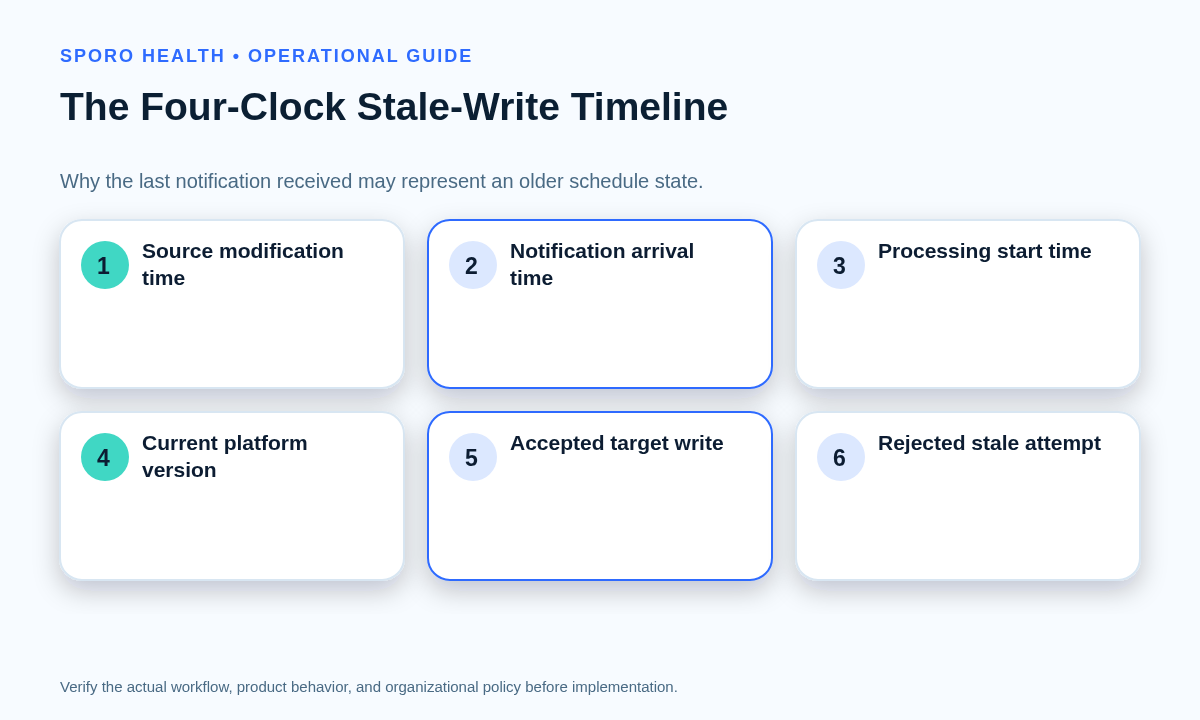
Use four separate clocks: source modification, notification arrival, processing start, and accepted target-write time. Combining these into one “event time” hides the ordering inversion that caused the regression.
| Clock | Question it answers | Do not confuse it with |
|---|---|---|
| Source modification | When was this source state created or changed? | When the integration learned about it |
| Notification arrival | When did the notification reach the receiver? | Which change is newest |
| Processing start | When did a worker begin this attempt? | When the source state was authorized |
| Accepted target write | When did the target accept and return the resulting state? | When the attempt first entered the queue |
Example: change A is modified at 09:02 but delayed. Change B is modified at 09:05 and accepted at 09:06. If A arrives at 09:07 and writes at 09:08, the last processed item is older than the state it overwrote. Preserve this evidence chain using the method for auditing provider calendar changes across systems.
How do you determine which schedule state is current?
Reread the athenahealth appointment and the mapped external event, then compare their current identities, versions, statuses, times, and recurrence scope. Do not decide from a cached payload, notification body, queue position, or an earlier user-interface screenshot.
For athenahealth, retrieve the current appointment referenced by the notification. For Google Calendar, fetch the event or reconcile through incremental synchronization; a push message only reports that the watched resource changed. For Outlook, retrieve the event and use the applicable event-delta state for the bounded calendar view. The practice’s approved authority rules determine which system may originate each type of change, but both systems must be freshly read before recovery.
What belongs in the version-lineage worksheet?
The worksheet must connect stable identity, recurrence scope, source evidence, attempted target version, write result, and the state ultimately accepted. Treat etags, change keys, and state tokens as opaque comparison evidence rather than values that can be sorted like timestamps.
| Evidence group | athenahealth | Google Calendar or Outlook |
|---|---|---|
| Stable identity | Practice and appointment ID | Calendar container plus event ID; use Outlook immutable IDs where the implementation has adopted them |
| Recurrence identity | Recorded transaction scope and appointment context | Google recurringEventId and originalStartTime; Outlook type, seriesMasterId, and originalStart |
| Version evidence | Current retrieved state and any version or modification field actually exposed to the integration | Google etag, updated, sequence, and status; Outlook changeKey, lastModifiedDateTime, and isCancelled |
| Processing evidence | Notification topic, arrival, ingestion, attempt, and result | Payload version used, target precondition, response, and post-write readback |
| Acceptance evidence | Last verified appointment state | Last verified event state and final disposition |
Google documents event IDs, etags, update time, recurrence fields, and deletion status in its event resource. Microsoft documents changeKey, event ID behavior, lastModifiedDateTime, recurrence identity, and cancellation state in its event resource. If an incident has created an extra copy rather than one regressed record, switch to the guide for diagnosing duplicate calendar events after athenahealth sync.
When should a queued write be accepted, rejected, or quarantined?
Accept a write only when current-state evidence proves that it is still applicable and its target precondition remains valid. A last-arriving payload does not receive automatic priority.
| Evidence | Outcome | Action |
|---|---|---|
| Source state matches the last accepted lineage and the target has not changed | Accept | Apply the bounded transition and verify by readback |
| Known source version or modification time predates the last accepted source state | Reject | Record an obsolete-write disposition; do not retry |
| Target version differs or a conditional write fails | Reread | Fetch the current target and recalculate the transition |
| Identity, recurrence scope, or deletion evidence is incomplete | Quarantine | Hold the item without advancing the watermark |
| Fresh states conflict and booked care may be affected | Manual review | Route to authorized practice owners |
| The intended state is already present | Deduplicate | Close as equivalent without creating another event |
Google supports conditional event modification with an etag in If-Match and returns a precondition failure when the resource changed after retrieval. More generally, HTTP conditional requests are designed to prevent lost updates. See Google’s version guidance and RFC 9110.
How should recurring events be scoped before recovery?
Identify the exact occurrence through its parent series and original occurrence time before changing anything. Do not repair an entire series merely because one moved or canceled occurrence is confusing the integration.
| Observed item | Required evidence | Recovery scope |
|---|---|---|
| Series master | Series identity and recurrence rule | Only use a series-wide correction when the intended baseline is proved |
| Normal occurrence | Parent series plus original occurrence time | One occurrence |
| Moved occurrence | Parent, original occurrence time, and current start | Protect both old and new intervals |
| Canceled exception | Parent and platform cancellation marker | Preserve the exception needed to suppress that occurrence |
| Deleted event or series | Deletion state and current parent existence | Remove only confirmed obsolete local state |
Google states that originalStartTime uniquely identifies an instance even after it moves and distinguishes canceled recurring exceptions from other deleted events. Outlook exposes seriesMasterId, originalStart, event type, canceled occurrences, and cancellation state. For a two-interval example, see recovering availability after a physician calendar event moves.
When is it safe to replay the calendar sync queue?
Replay only from a bounded watermark after every candidate has been deduplicated, reconciled against fresh state, and classified by the decision matrix. The watermark should represent the last verified accepted state, not simply the last dequeued message.
- Define the affected identities, time window, and last trusted watermark.
- Deduplicate queued work by stable appointment-event identity and recurrence scope.
- Reread current athenahealth and calendar state.
- Reject obsolete versions and quarantine ambiguous transitions.
- Apply only the smallest still-valid transition, using a target precondition where supported.
- Read back both systems and verify the accepted result.
- Advance the identity and queue watermark only after verification succeeds.
Google incremental synchronization returns changed and deleted entries and requires a full synchronization when a token becomes invalid. Microsoft Graph warns that delta responses can be replayed and should not be treated as ordered. Microsoft Graph webhooks may also retry failed notification delivery. Review the official Google synchronization guidance and Microsoft webhook guidance. For a broader queue incident, use the runbook for recovering a calendar-sync backlog after API throttling.
What if the stale update affects a booked patient appointment?
Freeze additional booking in the affected interval and route patient-impact decisions to authorized practice owners. Technical recovery should preserve evidence and restore system integrity, but it should not silently move, cancel, recreate, or communicate changes to a patient appointment. Record who approved the final disposition and verify every resulting schedule and communication dependency.
What proves that stale-write recovery is complete?
Close the incident only when fresh reads show the intended state in both systems and no older queued item can overwrite it. A successful write response without readback is not sufficient.
- Confirm the athenahealth appointment and mapped calendar event show the intended time, status, and scope.
- Confirm every older retry is rejected, deduplicated, or quarantined.
- Confirm the appointment-event mapping still identifies one surviving pair.
- Run targeted create, update, move, cancel, and recurring-exception tests.
- Observe the corrected identity through the practice-defined persistence window and verify it does not regress.
How should stale-write incidents be measured?
Measure both incident frequency and the strength of containment, quarantine, replay, and persistent recovery. Counts without synchronized-change denominators or affected booking scope can hide operational risk.
| Measure | Definition | Use |
|---|---|---|
| Stale-write rate | Confirmed stale-write incidents divided by synchronized changes | Track recurrence across comparable periods |
| Time to protect | First protection timestamp minus detection timestamp | Assess containment speed |
| Quarantined replay volume | Held items divided by replay candidates | Reveal ambiguity and obsolete work |
| Repeated identities | Stable identities appearing more than once in the recovery window | Detect retry or deduplication weakness |
| Recovery persistence | Corrections that remain intended through observation divided by corrections made | Detect reversion after repair |
| Affected booking intervals | Count and duration of intervals protected or exposed | Translate technical faults into schedule impact |
Use targeted reconciliation after correction rather than waiting for another visible reversal. The framework for detecting silent calendar-sync drift can support that follow-up control.
Where do connected-calendar options fit?
Product selection does not replace stale-write controls, but current destinations can help teams define what to test with a vendor. Review the Sporo Health overview, the athenahealth and Google Calendar product page, the athenahealth and Microsoft Outlook product page, and the Sporo listing in the athenaConnect Marketplace. Treat product statements as vendor claims and validate version handling, quarantine, recurrence, replay, and readback behavior in your own acceptance tests.
Practical conclusion
The practical answer to the question “why does athenahealth calendar sync revert schedule changes?” is that delivery order and state order can diverge. Protect the interval, reconstruct the four clocks, reread both systems, connect every version to one stable identity, quarantine obsolete work, and replay from a verified watermark. Recovery is complete only when the intended state persists and no older work can reverse it again.
Frequently asked questions
What causes a stale write in calendar synchronization?
A stale write happens when delayed or retried work applies an older schedule state after a newer state was accepted. Common triggers include queue reordering, retry after timeout, duplicate delivery, stale cache, and writes built against an outdated target version.
How can you tell a delayed update from a newer staff edit?
Compare source modification time and version with a fresh read from both systems. Notification arrival, queue position, and processing start time show delivery history, not which edit is authoritative or newest.
Which event IDs and version fields matter in Google Calendar and Outlook?
Keep the athenahealth appointment ID plus the platform’s stable event identity and recurrence evidence. For Google, record event ID, etag, updated, status, recurringEventId, and originalStartTime; for Outlook, record ID or immutable ID, iCalUId, changeKey, lastModifiedDateTime, type, seriesMasterId, originalStart, and cancellation state.
How do you recover a reverted reschedule or cancellation without creating duplicates?
Protect the interval, preserve the existing mapping, reread both systems, and correct only the stale state. Before replay, deduplicate by stable identity and verify that the surviving appointment-event pair reflects the intended reschedule or cancellation.
How should out-of-order updates in recurring calendar events be handled?
Identify whether the change concerns the series master, one occurrence, a moved occurrence, or a canceled exception. Quarantine the write until parent-series identity and original occurrence time prove the exact scope.
When is it safe to replay a calendar sync queue?
Replay is safe only after current-state reconciliation, a bounded recovery watermark, stable-identity deduplication, obsolete-version rejection, and readback verification. Advance the queue only after each accepted result persists.
How do you prevent older retries from overwriting newer schedule changes?
Store the last accepted version or equivalent state, require a matching target precondition where supported, and reject or quarantine work that predates it. Never let an unverified retry advance the recovery watermark.
Sources
- athenahealth: Event Notifications Subscription Topics
- Google Calendar: Get specific versions of resources
- Google Calendar: Push notifications
- Google Calendar: Synchronize resources efficiently
- Google Calendar: Events resource
- Microsoft Graph: Event resource type
- Microsoft Graph: Delta query overview
- Microsoft Graph: Webhook notification delivery
- RFC Editor: HTTP Semantics, RFC 9110