
Minimum Necessary Calendar Data for athenahealth Integrations: A Governance Worksheet
Minimum necessary calendar data for athenahealth integrations is the smallest field set that reliably supports an approved scheduling purpose. The review should be led by practice privacy leaders working with IT and operations to document each candidate field, its transformation or block decision, API dependency, destination visibility, lifecycle behavior, retention, owner, and test evidence before a pilot or material change. This worksheet turns that review into an auditable data contract.
How do you define minimum necessary calendar data for athenahealth integrations?
Start with the scheduling purpose, then approve only the fields needed to perform and verify it. When the HIPAA minimum necessary standard applies, HHS describes a purpose-based process that identifies who needs access, the categories of information needed, and the conditions for access; it also notes exceptions, including certain treatment disclosures. Use the practice’s authorized review process rather than treating this worksheet as a legal conclusion. See the HHS minimum necessary guidance.
The official athenahealth Appointment profile illustrates why selection matters: a source appointment can include status, service type, description, start, end, duration, and patient, practitioner, or location references. A field’s availability does not establish that a calendar workflow needs it.
Why should three control boundaries stay separate?
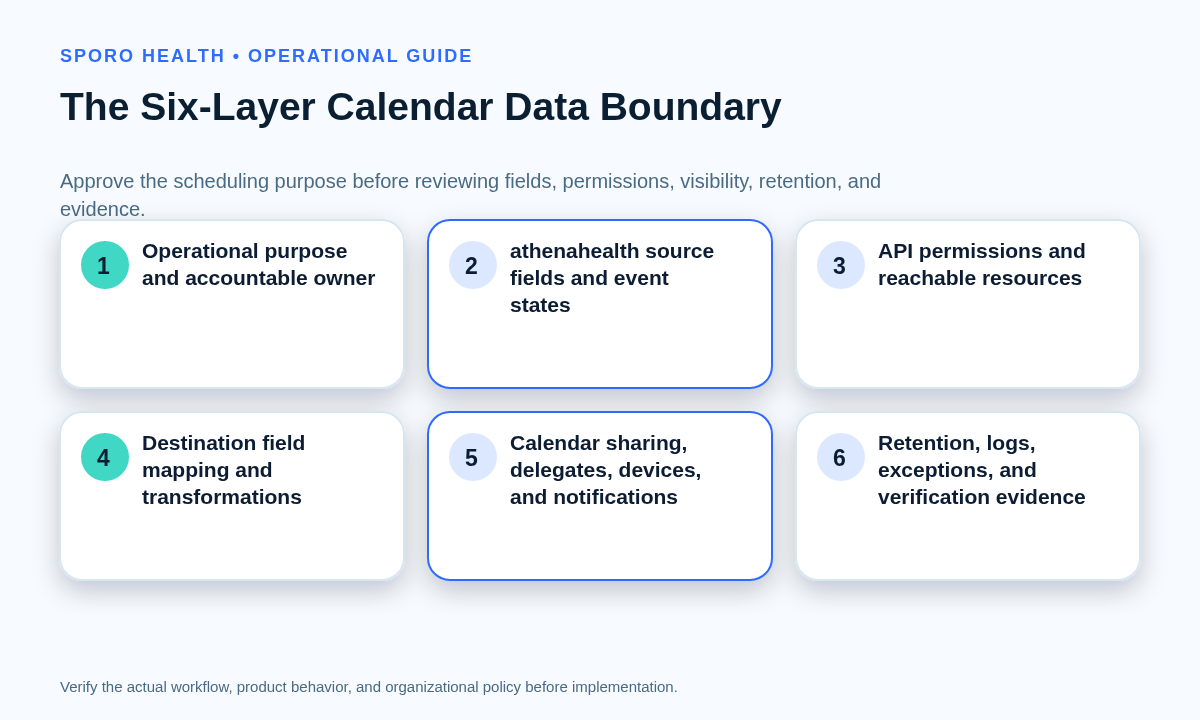
Review resource reach, field mapping, and viewer visibility as three independent controls. A narrow API permission can still expose unnecessary mapped fields, while a minimal event can still be overshared to delegates, devices, or notifications.
Use the broader schedule-integrity evaluation checklist to place this field review within authority, reliability, conflict, and rollout decisions.
| Boundary | Approval question | Required evidence |
|---|---|---|
| API and resource reach | Which identities, calendars, mailboxes, providers, and resources can the integration reach? | Consent record, scope list, resource inventory |
| Fields read or written | Which values are read, transformed, written, retained, or blocked? | Field matrix, payload sample, transformation test |
| People and surfaces | Who or what can view the resulting content? | Owner, delegate, device, notification, and export tests |
Approval at one boundary is not approval at the others. Name an owner for each boundary and require evidence from the actual pilot configuration.
How do you build the field-level worksheet?
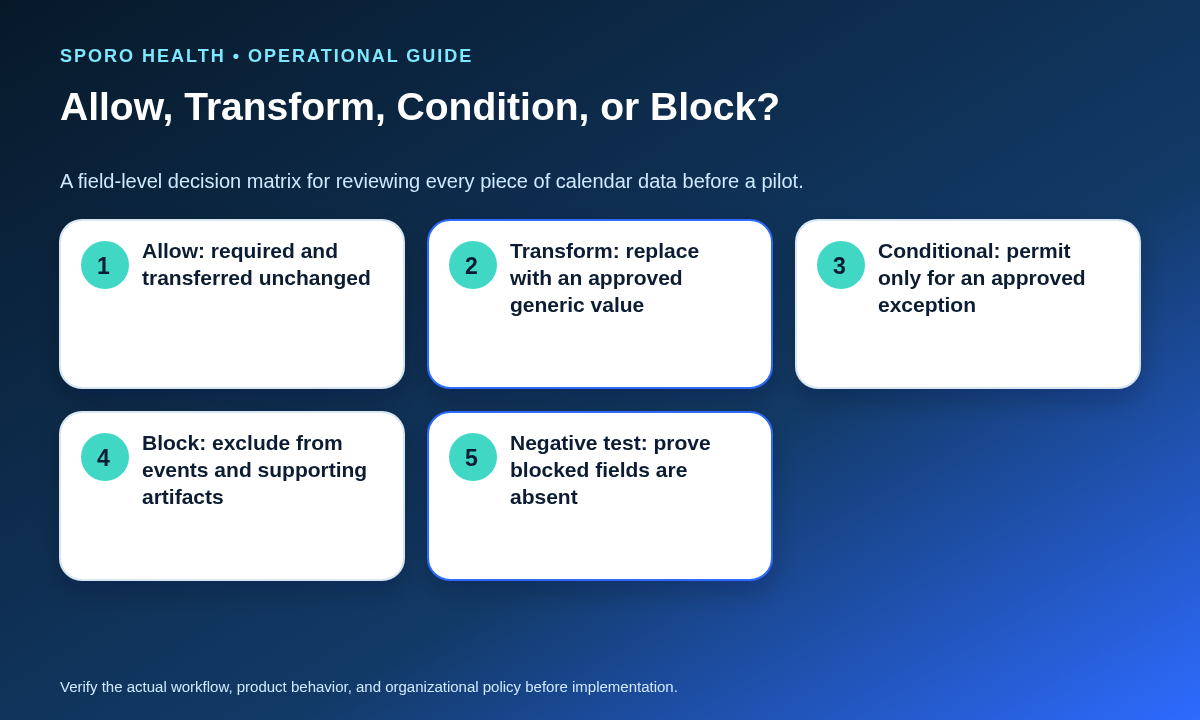
Create one row for every candidate source field and every lifecycle state in which its treatment could change. Record the purpose, source, destination, permission dependency, viewers, retention, accountable owner, and expected and blocked behavior.
Give each row one decision: allow unchanged, transform into a less specific value, permit only under an approved condition, or block it from the destination and supporting artifacts.
| Candidate data | Starting decision | Destination treatment | Proof to collect |
|---|---|---|---|
| Start, end, duration, time zone, status | Allow only as required | Exact interval or approved busy state | Create, reschedule, cancel, and time-zone tests |
| Visible title or label | Transform | Approved generic text | Inspect owner, delegate, mobile, and notification views |
| Stable technical identifier | Allow outside display | Backend or non-display mapping | Reconcile events without showing the identifier |
| Appointment type or location | Conditional | Generic category or omission | Document the role-specific operational need |
| Patient, chart, or other person identifiers | Block unless specifically approved | No visible calendar copy | Search events, exports, logs, and alerts |
| Descriptions, comments, attendees, attachments, meeting links | Block by default | Do not copy | Negative test every lifecycle path |
Add columns for transformation rules, exception approver and expiration, retention and deletion, rollback, and re-review triggers. Test whether time, duration, busy/free status, a generic label, and a non-display identifier satisfy the purpose before approving richer content.
When is free/busy enough?
Free/busy may be enough when the sole task is preventing bookings during unavailable time. Google distinguishes “see only free/busy” from access to event names, times, places, and descriptions in its calendar-sharing documentation. If staff need more context, document the purpose, exact added field, recipients, and retention before expanding the mapping.
Do not treat a private label as proof that details are inaccessible. Test the owner, relevant delegates, integration identity, mobile displays, and notifications. Then align the observed result with the practice’s Google Calendar sharing and visibility controls.
How should one policy translate to Google Calendar and Outlook?
Use one governance policy but create separate technical mappings and test evidence for each platform. Google and Microsoft expose different event properties, authorization models, recurrence structures, visibility concepts, and sharing or delegation controls.
Complete the field policy first, then use the Microsoft 365 preflight for Outlook calendar integration for tenant and mailbox readiness.
| Policy question | Google Calendar mapping | Outlook mapping |
|---|---|---|
| What can the app reach? | Document OAuth scopes and named calendar resources using Google’s scope guidance. | Document delegated or application permissions and mailbox reach using the Microsoft Graph permissions reference. |
| What fields can exist? | Map only approved properties from the Google Calendar event resource. | Map only approved properties from the Microsoft Graph event resource. |
| Who can see the result? | Test calendar sharing, event visibility, delegates, and displays. | Test mailbox ownership, calendar permissions, delegates, sensitivity, and displays. |
Do not infer equivalence from similar labels such as busy, private, subject, or summary. Record the actual source value, transformation, destination property, rendered result, and viewer test separately.
Which event lifecycle states need separate tests?
Test every state transition that can invoke different code, notifications, or recurrence behavior. A clean initial create test does not prove that blocked content stays blocked after an exception.
| State | Expected test | Exposure check |
|---|---|---|
| Create | Only approved fields appear | Blocked tokens are absent everywhere |
| Update | Changed approved fields replace prior values | Old details do not remain in views or logs |
| Reschedule | Time changes preserve event identity | No duplicate carries richer content |
| Cancel | Approved cancellation behavior occurs | Alerts do not reveal blocked fields |
| Delete | Defined deletion or retention rule runs | No orphaned event or export remains |
| Recurring exception | One occurrence changes correctly | Series and exception follow the same policy |
| Private item | Observed access matches the viewer matrix | The label alone is not accepted as proof |
| Notification or time-zone change | Messages and converted times remain accurate | No extra details appear in alerts or devices |
Run the matrix in both directions if the workflow reads and writes both systems. Include daylight-saving boundaries and a recurrence exception that is later canceled or deleted.
How do you test a calendar integration for unnecessary data exposure?
Seed synthetic blocked values, execute every approved lifecycle path, and prove those values never appear on any included surface. Use distinctive test tokens instead of real patient information so the evidence process does not create another sensitive-data store.
After launch, extend the same control with the calendar sync drift reconciliation framework.
- Place unique synthetic tokens in each blocked source field, including names, identifiers, comments, attendees, attachments, and links.
- Run create, update, reschedule, cancel, delete, recurrence, private-item, notification, and time-zone scenarios on each platform.
- Inspect payloads, visible events, owner and delegate views, mobile devices, notifications, exports, operational logs, screenshots, and escalation packets within scope.
- Record pass or fail, remediation, retest, redaction, access, retention, deletion, and evidence owner.
A passing test proves only the tested configuration and path. Preserve enough redacted evidence to support review without retaining unnecessary screenshots, payloads, or exports.
How should exceptions and changes be controlled?
Require every non-routine exception to state its purpose, approver, permitted data, expiration condition, test case, rollback step, and re-review trigger. Do not turn a temporary need into a permanent undocumented field expansion.
Connect access revocation and lifecycle closure to the practice’s provider calendar offboarding controls.
- Purpose and requesting owner
- Fields, resources, viewers, and platforms affected
- Approver and approval date
- Expiration date or measurable closing condition
- Expected and negative test cases
- Rollback owner and rollback steps
- Evidence retention and deletion rule
- Trigger for policy re-review
Re-review the policy when APIs, vendor scopes, use cases, calendars, roles, sharing settings, retention rules, ownership, or lifecycle behavior materially change.
What should the approval packet contain?
The packet should let an authorized reviewer trace each scheduling purpose to fields, controls, owners, and observed evidence. Keep technical details connected to operational decisions.
- Purpose statement and accountable owner
- Completed allow-transform-condition-block matrix
- API permissions and reachable-resource inventory
- Viewer, delegate, device, and notification matrix
- Google and Outlook lifecycle test results
- Negative tests, exceptions, retention, rollback, and approvals
Approval should be configuration-specific and time-bounded. It should not be represented as a general privacy, security, legal, or compliance verdict.
Frequently asked questions
What is minimum necessary calendar data for athenahealth integrations?
It is the smallest field set that reliably supports an approved scheduling purpose. Document the purpose, recipients, fields, access path, retention, exceptions, and authorized approval.
Is free/busy always enough for a physician calendar integration?
No. Free/busy can be enough when the task is only to prevent booking during unavailable time; additional context should be justified field by field.
Does a least-privileged API permission prove data minimization?
No. Permission scope controls what the app can reach, while field mapping controls what it actually reads, copies, transforms, and displays.
Should technical identifiers appear in calendar titles or descriptions?
Usually not. Keep reconciliation identifiers in non-display fields unless the workflow has a documented operational reason to expose them.
Does marking an event private prove its details are inaccessible?
No. Test the observed result as the owner, delegates, the integration identity, and each notification or display surface included in the workflow.
When should the field policy be reviewed?
Review it when APIs, vendor scopes, use cases, calendars, roles, sharing settings, retention rules, or lifecycle behavior materially change.
How should the approved worksheet be used?
Use the minimum necessary calendar data for athenahealth integrations worksheet as a gate before a pilot or material change. Do not proceed until purpose, field decisions, permission reach, visibility, lifecycle evidence, retention, exceptions, rollback, and accountable owners are documented.
If the practice is evaluating Sporo, begin with the Sporo Health overview, then compare the current athenahealth and Google Calendar product page, the athenahealth and Outlook product page, and the Sporo listing in the athenaConnect Marketplace against the approved worksheet.
Treat commercial descriptions as vendor claims until the actual configuration, mappings, permissions, viewer behavior, exceptions, and negative tests are independently observed by the practice.
Sources
Primary references consulted August 1, 2026:

2 Comments
Comments are closed.
[…] the access question separate from the data question. Use the field-level calendar data governance worksheet to decide what information may flow; use this review to decide who or what may reach it. This is an […]
[…] the minimum necessary calendar data worksheet to confirm that every retained field has an approved purpose. Retention does not justify collecting […]