athenahealth Scheduling Downtime: A Change-Capture and Recovery Playbook
For healthcare IT teams asking what to do when athenahealth scheduling is unavailable, the first steps are to confirm scope, appoint one incident owner, record the outage start, stop unlogged edits, and activate the approved downtime method. Treat external calendars as supporting evidence, capture every authorized change once, and reconcile the bounded outage window before normal booking reopens.
What to do when athenahealth scheduling is unavailable
Confirm the failure boundary before allowing more schedule changes. Name an incident owner, record the earliest observed failure time and time zone, pause unlogged edits, identify the protected scheduling horizon, and tell staff which approved fallback procedure is active.
- Test access from another authorized user, workstation, network path, and affected location where practical.
- Check the athenahealth public status page, but do not treat a green page as proof that the local workflow works.
- Record whether staff can read schedules, write changes, use other athenaOne functions, or reach external calendars.
- Stop retries or improvised dual entry that could obscure the original state.
- Route technical signals through the calendar-sync alert triage matrix when athenaOne itself remains accessible.
The 2025 ONC SAFER Contingency Planning guide recommends written downtime and recovery procedures, staff training, independent communications, and an orderly method for restarting interfaces. This playbook applies those principles to schedule custody; it is not medical, legal, privacy, security, or compliance advice.
Which outage state applies?
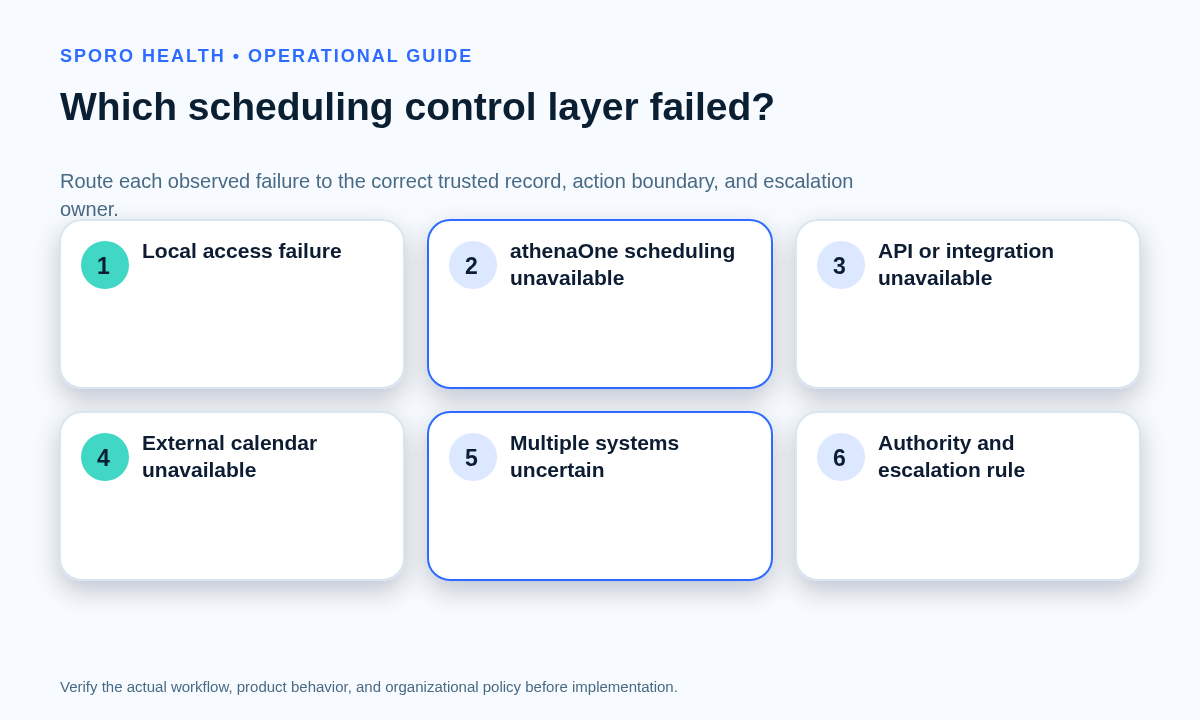
Classify the incident into one of five states before selecting the trusted record or permitted action set. The athenahealth status page lists Scheduling separately from APIs and integrations, so a schedule-access failure should not automatically be treated as a calendar-sync outage.
| Observed state | Temporary authority | Action boundary | Primary escalation |
|---|---|---|---|
| Local access failure | athenaOne through a verified unaffected access path | Use only the approved alternate path; do not declare broad downtime without supporting scope | Local IT and access owner |
| athenaOne scheduling unavailable | Approved snapshot or downtime method plus the transaction ledger | Execute only actions explicitly allowed by the contingency plan | Incident owner and athenahealth support path |
| API or integration outage | athenaOne scheduling | Keep source-system writes controlled; pause unsupported external-calendar changes | Integration owner |
| External-calendar outage | athenaOne scheduling | Continue approved EHR work; defer external-only edits and flag uncertain provider intervals | Google Workspace or Microsoft 365 owner |
| Multi-system uncertainty | Last verified baseline plus one ledger | Freeze risky writes, protect near-term capacity, and escalate until authority is established | Operations and technical incident owners |
If athenaOne remains readable and writable but calendar transfer has stopped, use the separate calendar integration outage response. Full scheduling unavailability creates a different problem: the practice must control transactions without treating a downstream calendar as the patient schedule.
Which schedule should staff trust when athenahealth is unavailable?
Use the authoritative fallback named in the practice’s approved contingency plan. A prepared schedule snapshot, controlled downtime application, or approved paper process may provide the baseline; Google Calendar and Outlook should remain supporting evidence unless the plan gives them a narrow, tested role.
An external calendar may show a provider commitment without showing the complete patient-scheduling transaction, current cancellation state, location dependency, or later edit. Do not infer missing appointments or rebuild a schedule solely from calendar event titles and times. The HHS Security Rule summary describes contingency procedures for restoring data and continuing critical processes involving ePHI. The actual fallback, information fields, access controls, and retention choices require authorized organizational review.
Which actions are permitted during athenaOne scheduling downtime?
Route every requested change to execute, record-only, defer, or escalate. The approved plan—not urgency alone—determines whether staff may complete an action through the fallback.
| Transaction | Execute through fallback when | Record-only when | Defer or escalate when |
|---|---|---|---|
| Create | The procedure authorizes creation, required information and authority are available, and a unique ledger record can be made | The request is valid but must be entered after restoration | Capacity, identity, location, or approval is uncertain |
| Reschedule | The fallback can preserve the original reference and approved destination | The requested old and new states can be captured without changing the source | The destination may conflict or dependent resources cannot be verified |
| Cancellation | The policy permits an effective cancellation and required communications can be controlled | The cancellation request and effective state are captured for priority entry | An imminent appointment requires operational escalation |
| Provider block | The plan authorizes a bounded availability restriction with approval and dates | The block must wait for athenaOne entry | Booked appointments or multiple locations may be affected |
| Same-day exception | Named authority approves and usable capacity is supported by the fallback | The request can safely wait in the ledger | Any schedule, resource, or approval fact is uncertain |
Avoid parallel unlogged entry in athenaOne, a fallback, and an external calendar. One owner should control each transaction until it has one final source-system disposition.
What belongs in the downtime transaction ledger?
Maintain one minimum-necessary schedule-custody ledger for every outage-window action. It should preserve enough identity, state, authority, and ownership to execute or reconcile the change without becoming a shadow EHR.
- Downtime transaction ID, event time, time zone, and request channel
- Provider, location, scheduling interval, and approved non-sensitive identity references
- Original known state and the source or snapshot used to establish it
- Requested action and requested effective state
- Approval source, temporary disposition, and accountable owner
- External-calendar reference when relevant to later comparison
- Reconciliation status, final athenaOne disposition, verifier, and verification time
Include only information needed to execute and recover the transaction, following approved privacy and records procedures. After restoration, unresolved rows can move into the daily schedule exception-queue process, but the original downtime transaction ID should remain traceable.
How should planned athenahealth maintenance be prepared?
Prepare the protected horizon, baseline, forms, staffing, communications, and restoration tests before the window begins. Planned downtime should reduce uncertainty rather than merely announce that the system may be unavailable.
- Confirm affected stacks, services, locations, providers, and local time conversion.
- Set a change freeze and define which same-day exceptions remain permissible.
- Generate the approved schedule snapshot and prepare controlled ledger materials.
- Assign incident, scheduling, technical, communications, and reconciliation owners.
- Verify an out-of-band staff communication method.
- Write the exact read, write, duplicate, residual-state, and sign-off checks required afterward.
The current athenaOne Service Description says athenahealth strives to conduct scheduled or emergency maintenance between 1:00 a.m. and 6:00 a.m. Eastern Time and post a Service Alert. Practices still need to verify their own affected stack, local hours, and operational exposure. Rehearse the decisions through a manual fallback tabletop exercise without creating production risk.
How should scheduling changes be reconciled after athenahealth returns?
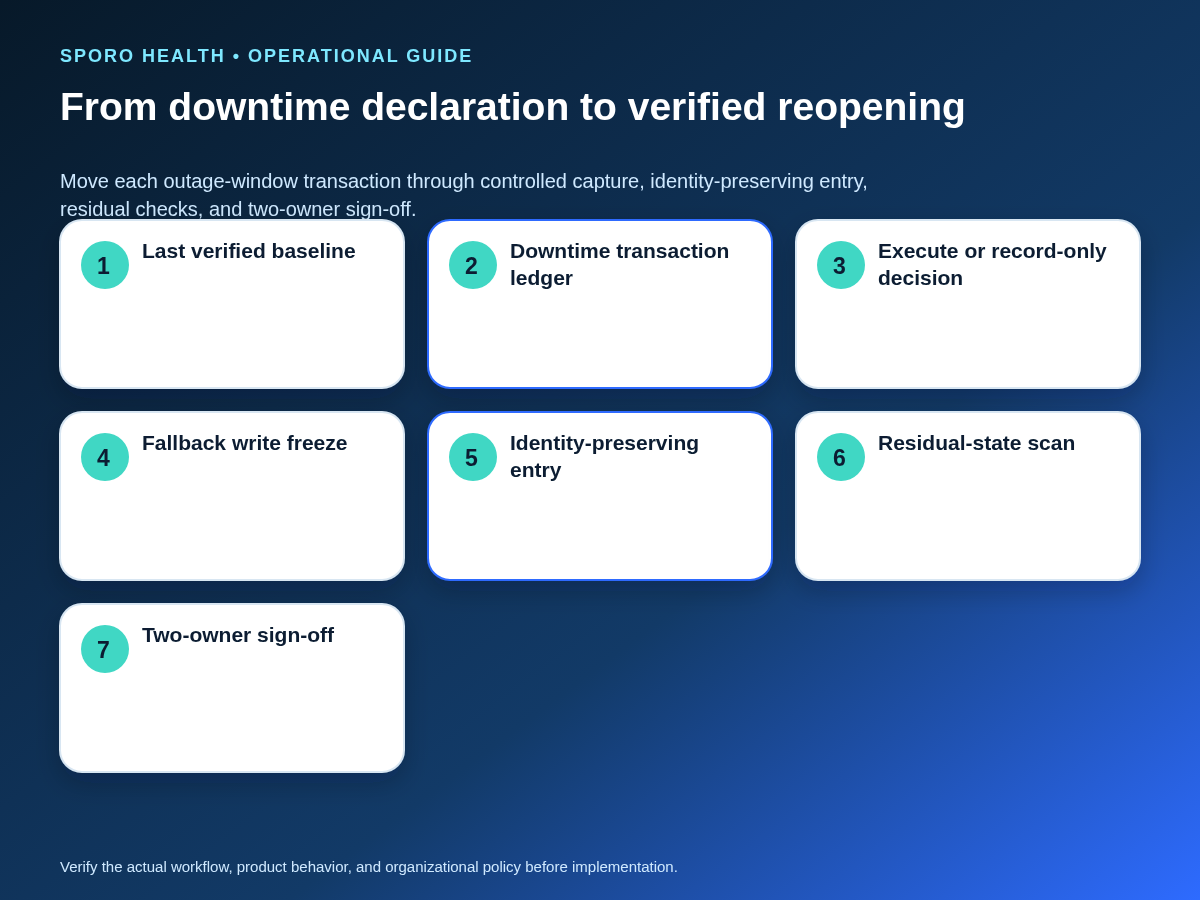
Separate read recovery from write reopening, freeze fallback activity, and apply every authorized transaction exactly once. A login screen or readable schedule is not enough to reopen normal booking.
- Confirm stable read access for representative providers, locations, dates, and user roles.
- Declare a fallback write freeze and record its exact timestamp.
- Bound the downtime window from the last verified baseline through the fallback freeze.
- Assemble the baseline, downtime ledger, current athenaOne schedule, and relevant external-calendar state.
- Sort transactions by original appointment identity and effective sequence, not by who reported them first.
- Resolve collisions, superseded requests, and uncertain capacity before applying writes.
- Enter each authorized transaction once, then mark its ledger row with the resulting source-system state.
- Scan for duplicates, stale blocks, orphaned calendar events, missed cancellations, and uncertain provider intervals.
This sequence follows the distinction between recovery and validated reconstitution described in NIST SP 800-34 Rev. 1. The ONC SAFER guide likewise recommends orderly restart and testing of system interfaces after downtime.
How should appointment identity be preserved?
Carry forward the original appointment reference and any authorized event identifiers instead of matching records only by visible text and time. The Google Calendar Events reference documents event IDs, iCalUID, recurringEventId, and originalStartTime; the Microsoft Graph event reference documents IDs, iCalUId, changeKey, seriesMasterId, and transactionId. Available identifiers depend on the actual implementation, so integration owners should use only verified fields.
When can normal booking reopen?
Reopen only after the schedule is both technically reachable and operationally trustworthy. Operations and technical owners should jointly confirm the following evidence:
- High-risk creates, reschedules, cancellations, provider blocks, and same-day exceptions have final dispositions.
- Duplicate, omission, stale-state, and residual-calendar checks pass.
- Representative provider-location schedules match the approved ledger outcomes.
- Fallback writes and forms are closed, secured, or retained according to approved procedure.
- Staff receive a clear reopening time and instructions for late-discovered transactions.
If any material interval remains uncertain, reopen unaffected scope only when the plan supports partial restoration; otherwise maintain the controlled restriction.
How should downtime integrity be measured?
Measure whether every outage-window action reached one verified disposition, not merely how quickly the login returned. Define denominators, risk tiers, review times, and escalation thresholds before the next incident.
| Measure | Working definition | Decision use |
|---|---|---|
| Logged-change completeness | Confirmed outage actions with ledger rows divided by all confirmed outage actions | Reveals missing capture |
| Unreconciled transactions | Open ledger rows by risk and age | Controls reopening and staffing |
| Duplicate recovery actions | Transactions entered more than once during reconstitution | Tests identity and sequencing controls |
| Uncertain provider intervals | Intervals whose usable or blocked state cannot be verified | Directs booking containment |
| Reconciliation aging | Elapsed time from restoration to verified row closure | Exposes persistent recovery debt |
| Time to verified schedule certainty | Outage declaration to two-owner confirmation of trustworthy scope | Measures the full operational event |
Where do connected-calendar products fit?
Connected calendars can support normal visibility and provide comparison evidence, but they should not silently become the downtime patient schedule. To review Sporo’s current vendor descriptions, visit the Sporo Health homepage, the athenahealth and Google Calendar product page, the athenahealth and Outlook product page, and the Sporo athenaConnect Marketplace listing. Evaluate any product’s actual configuration, contracts, data choices, permissions, failure behavior, and tested downtime role before relying on it.
Frequently asked questions
Does a green athenahealth status page mean scheduling works for every user?
No. A green public status page does not prove every user, location, network, stack, or workflow is functioning. Run local access checks and record the observed scope before declaring or closing downtime.
Can staff create a new appointment while athenahealth scheduling is unavailable?
Only when the approved downtime procedure permits it, the required authority and information are available, and the transaction can be uniquely logged for later reconciliation. Otherwise, record the request or defer it.
Should staff use Google Calendar or Outlook during athenahealth downtime?
No, not as an improvised patient-scheduling system. Make external-calendar edits only when the downtime policy authorizes that action and requires complete change capture.
How should cancellations and reschedules be recorded during downtime?
Keep the original appointment reference and requested effective state in the downtime ledger. Avoid recreating records from memory after restoration because that can create duplicates or lose context needed for reconciliation.
Which schedule should staff trust when athenahealth is unavailable?
Trust the authoritative fallback named in the approved contingency plan. Treat external calendars as supporting evidence unless the plan assigns them a specific, bounded downtime role.
When can normal booking reopen after athenahealth returns?
Reopen normal booking only after high-risk transactions have final dispositions, duplicate and residual-state checks pass, representative provider-location schedules are verified, and accountable operations and technical owners sign off.
Put the playbook to work
The practical answer to what to do when athenahealth scheduling is unavailable is to control authority, transactions, and reopening as three separate decisions. Adapt the classifier, action matrix, ledger, recovery sequence, and measures to the practice’s approved contingency plan; train the named owners; and test the procedure before it is needed. After a material incident closes, use the calendar-sync incident postmortem template as a starting point for a proportionate evidence review without delaying active recovery.
Sources