
Microsoft 365 Preflight for an athenahealth Outlook Calendar Integration
A Microsoft 365 readiness checklist for athenahealth Outlook calendar integration should prove five things before consent: who owns each mailbox, which calendar is targeted, what access is requested, which event rules must pass, and who can stop or reverse the pilot. Microsoft 365 healthcare IT administrators should treat unresolved ownership or scope as a no-go.
This preflight is also for practice managers and calendar integration owners who need a bounded pilot rather than an open-ended tenant change. It does not assume a particular product behavior; each expected result must be confirmed in current vendor documentation and demonstrated in the practice’s tenant.
What belongs in a Microsoft 365 readiness checklist for athenahealth Outlook calendar integration?
First identify each pilot provider’s Microsoft 365 identity, mailbox owner, target Outlook calendar, athenahealth schedule scope, and operational owner. Do not request consent until all five fields are complete and the named owners agree on what the pilot is meant to change.
Resolve schedule authority before tenant configuration. The practice’s schedule-integrity evaluation checklist can help settle which appointment and availability states require a defined owner. The Microsoft 365 preflight then translates those decisions into mailboxes, permissions, tests, and rollback controls.
How do you build the mailbox-and-calendar topology worksheet?
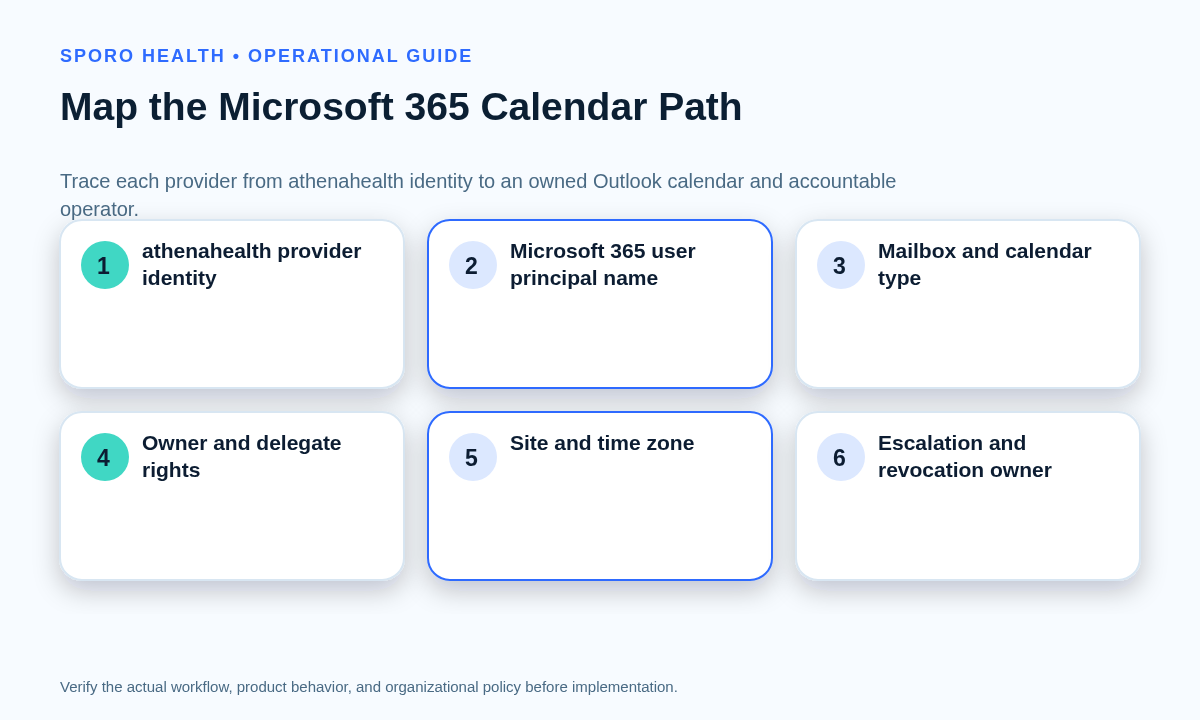
Create one row per pilot provider and do not combine identities merely because providers share a location or scheduling team. The worksheet should make every hop from athenahealth identity to Outlook calendar and accountable operator visible.
| Field | Record | Required evidence |
|---|---|---|
| Provider identity | athenahealth provider or user reference | Integration owner confirms the exact record. |
| Microsoft identity | User principal name and tenant | IT confirms the active identity object. |
| Mailbox | User, shared, resource, or other type | Exchange owner confirms its lifecycle. |
| Target calendar | Name, folder, and calendar type | Owner opens and identifies the exact calendar. |
| Ownership | Owner, delegates, and private-item rights | Owner approves the recorded relationships. |
| Operating context | Site, department, and time zone | Practice operations validates the mapping. |
| Daily responsibility | Operator and escalation contact | Named people accept their roles. |
| Lifecycle | Revocation and offboarding owner | Rollback owner confirms the path. |
When a pilot participant is new to the organization, reconcile this worksheet with the new-provider scheduling onboarding workflow so a temporary or incomplete account is not mistaken for the intended production identity.
Which Outlook calendar should an athenahealth integration use?
Use a calendar the practice can name, own, support, test, and revoke consistently. Primary, secondary, shared, delegated, and group calendars represent different ownership models, so do not assume that support for one proves support for the others.
Microsoft distinguishes ordinary sharing from delegation and exposes roles that can include read, write, delegate, and private-item access. Microsoft also notes that a user can share a primary calendar or select another created calendar. Review the current Outlook sharing and delegation model and Microsoft 365 calendar-sharing guidance beside the proposed topology.
| Calendar choice | Use only when | Preflight proof |
|---|---|---|
| Provider primary | The provider is the durable owner. | UPN, owner, delegates, and exit path are documented. |
| Provider secondary | The workflow intentionally targets a nondefault folder. | The exact folder is supported and selectable. |
| Shared mailbox | The practice owns the mailbox lifecycle. | Meeting, delegate, and private-item behavior passes testing. |
| Delegated calendar | Another user remains the owner. | The delegate role and private visibility are explicit. |
| Group calendar | The group is the intended operational owner. | The vendor confirms support and a lifecycle owner is named. |
If the exact calendar cannot be identified from the provider’s Outlook view and the tenant’s administrative records, pause rather than consenting against an ambiguous mailbox.
Are delegated and application permissions interchangeable?
No. Delegated access operates in a signed-in user context, while application access can operate without a signed-in user; the approver, reachable resources, and revocation method therefore differ.
The Microsoft Graph permissions reference defines both forms of calendar access and recommends requesting the least-privileged permissions needed. Tenant consent policy can still determine whether a user or administrator may approve a request, as explained in Microsoft’s application-consent guidance.
| Decision | Delegated model | Application model |
|---|---|---|
| Operating context | Acts for a signed-in user and that user’s accessible calendars. | Acts as the application without an interactive user. |
| Preflight focus | Identity, user rights, consent policy, and sign-in lifecycle. | Administrator approval, mailbox resource scope, and service-principal lifecycle. |
- Obtain the exact Microsoft Graph permission names and whether each is delegated or application access.
- Map every requested permission to a documented event operation.
- Identify the tenant role authorized to approve the request.
- Document who can revoke the grant and who can remove mailbox scope.
- Reject unexplained permissions or a model that cannot be constrained to the approved workflow.
The current Sporo athenahealth-to-Outlook product page is the commercial destination; the practice should still request a tenant-specific permission and calendar-support statement before enrollment.
How should pilot access be limited to named mailboxes?
Define the cohort as named providers, UPNs, mailboxes, and target calendars, then test one approved account and one control account outside the cohort. Also record who can expand scope and who can revoke it.
- Delegated pilot: document the signing-in users, assignments, consent grants, and calendar rights that create the boundary.
- Application pilot: document the service principal, Exchange resource scope, calendar role, and every mailbox expected to match it.
- Control test: prove the integration can reach an in-scope mailbox and cannot reach the out-of-scope account.
- Change control: require approval before adding a provider, mailbox, group member, or broader grant.
Exchange Online RBAC for Applications can pair application roles with mailbox resource scopes and provides an authorization test. Microsoft warns that separately granted, unscoped Entra permissions are additive, so they must be checked when validating the effective boundary.
For a cohort spanning several sites, use the multi-location athenahealth scheduling guide to separate location complexity from the mailbox boundary instead of piloting an entire region by default.
How should source-of-truth rules be written?
Assign authority by change type rather than saying one system owns everything. The operating rule should say where appointments, availability blocks, cancellations, deletions, and conflict decisions originate.
| Change type | Authority to name | Rule to verify |
|---|---|---|
| Appointment create or update | athenahealth scheduling workflow | Define the expected Outlook representation. |
| Reschedule, cancel, or delete | Named scheduling role | Distinguish cancellation from deletion. |
| Availability or out-of-office block | Chosen Outlook or athenahealth workflow | Define when the other system should change. |
| Private event | Calendar owner and approved policy | Specify busy-only versus detail access. |
| Competing edits | Named conflict rule and resolver | Record the winner, exception, and escalation path. |
Write the expected result before testing. Otherwise, a technically successful update can still leave staff unsure which state should govern the schedule.
Which event scenarios belong in the pilot acceptance matrix?
Test every material state transition, not just a successful event creation. The matrix should include ordinary changes, edge cases, access boundaries, and revocation.
Use the current athenahealth appointment API reference as a vocabulary checkpoint for the athenahealth side. Microsoft Graph supports recurring events and per-event time-zone data, but the integration’s treatment of those features must be demonstrated rather than assumed; see the Outlook calendar API overview.
| Scenario | Minimum test | Pass evidence |
|---|---|---|
| Create | Create each approved appointment or block type. | One correct mapped item; no unintended mailbox change. |
| Update | Change approved fields and duration. | Allowed fields match the written rule. |
| Reschedule | Move an item across a day boundary. | Old and new states reconcile correctly. |
| Cancel | Cancel through the authoritative workflow. | The counterpart follows the cancellation rule. |
| Delete | Delete an item separately from cancellation. | No duplicate or orphan remains. |
| Recurring series | Test master, changed occurrence, and canceled occurrence. | Exceptions remain attached to the intended series. |
| Private event | Test busy-only and approved detail behavior. | Observed visibility matches the approved model. |
| All-day and OOO | Cross working-hour and midnight boundaries. | Availability matches the written rule. |
| Time zone | Test provider, site, and daylight-saving boundaries. | Start and end times remain correct. |
| Delegate and competing edits | Edit as a delegate and make near-simultaneous changes. | The conflict rule and escalation path work. |
| Scope and revocation | Test in-scope, out-of-scope, then revoked access. | Only the intended access succeeds. |
For each row, record the tester, time, systems observed, expected result, actual result, evidence location, exception owner, and retest status. Keep sensitive content out of screenshots or logs unless authorized policy requires it.
How should private Outlook events be handled?
Decide whether the workflow needs busy status or event details, then test private items as their own scenario. A private label must not be treated as proof that every delegate or application is unable to read details.
Microsoft’s delegation model includes a canViewPrivateItems property, and its Exchange guidance documents configurations in which delegates can be allowed to see private items. Review the sharing and delegation documentation and Microsoft’s private-item guidance for shared mailboxes against the actual mailbox configuration.
- Test as the owner, each relevant delegate role, and the integration identity.
- Record which fields are required for the workflow and which must remain unused.
- Send the observed data flow for authorized privacy and contractual review; do not infer compliance from the private flag.
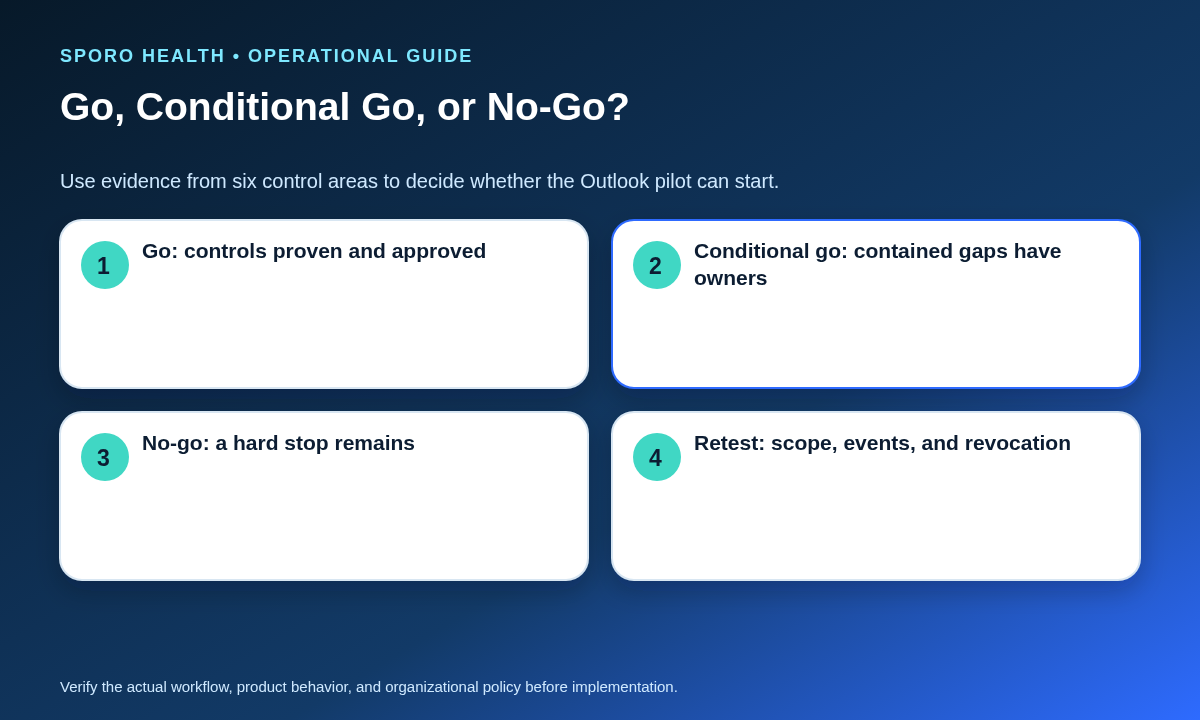
When is the Outlook pilot ready to go?
Score six control areas from zero to two, then apply hard-stop conditions. This is an operational decision aid, not a privacy, security, or compliance certification.
| Control | 0 points | 1 point | 2 points |
|---|---|---|---|
| Ownership | Unknown | Partial | Every identity, mailbox, calendar, and owner is approved. |
| Access scope | Unbounded | Documented, not proven | In-scope succeeds and control account fails. |
| Event evidence | Core tests fail | Exceptions remain | Matrix passes with retained evidence. |
| Escalation | No owner | Limited coverage | Stop and resolution roles are accepted. |
| Rollback | Not defined | Written, not tested | Revocation and reconciliation are tested. |
| Offboarding | No path | Owner named | Removal and continuity checks are tested. |
- Go: 11–12 points, no hard stop, and all required evidence is approved.
- Conditional go: 8–10 points, no hard stop, and each gap has an owner, containment step, and resolution date.
- No-go: 0–7 points or any unknown target calendar, permission model, private-event result, out-of-scope result, escalation owner, or revocation path.
How do you revoke access and roll back the pilot?
Prepare a mini-runbook before consent that names who can stop changes, revoke access, preserve evidence, reconcile the pilot window, remove artifacts, and restore normal scheduling ownership. The rollback test should be part of acceptance, not a document saved for a future incident.
- Pilot commander: declares the stop and records the final trusted change time.
- Microsoft 365 administrator: revokes the applicable consent, assignment, user grant, or Exchange application role.
- Evidence custodian: preserves authorized logs, test records, and failed-item references.
- Scheduling lead: announces which workflow temporarily controls appointments and availability.
- Reconciliation owner: compares creates, updates, reschedules, cancellations, and deletions across the pilot window.
- Calendar owner: removes approved test artifacts without erasing required evidence.
- Integration owner: proves former access now fails and normal scheduling responsibility is restored.
Microsoft documents tenant-wide consent revocation in its application-consent guidance; application-scoped Exchange assignments must also be handled according to the recorded RBAC model.
Use the fuller provider calendar offboarding checklist for lifecycle changes and the calendar integration outage recovery runbook for ongoing fallback and reconciliation operations.
When should the pilot start?
A Microsoft 365 readiness checklist for athenahealth Outlook calendar integration is complete only when ownership, calendar type, permission model, scope, acceptance evidence, escalation, and rollback are all explicit. If any hard stop remains, do not request consent merely to learn what the integration does in production.
If the gates pass, compare the worksheet with the current athenahealth and Microsoft Outlook product destination and ask the vendor to confirm every assumption in writing. Practices evaluating another calendar platform can review the athenahealth and Google Calendar product page. For broader context, visit the Sporo Health scheduling-integration overview and the current Sporo Health athenaConnect Marketplace listing.
Frequently asked questions
What should the pilot measure?
Measure schedule correctness, update completeness, duplicate or orphan events, exception volume, resolution ownership, and rollback success. Do not turn pilot observations into speed, savings, or outcome claims without separate evidence.
Can a shared mailbox calendar be treated like a provider’s primary calendar?
No. A shared mailbox calendar has a different owner and lifecycle from a provider’s primary calendar, so permissions, meeting handling, and private-item behavior must be tested separately.
Can a provider approve the integration without IT?
It depends. The requested permission type and tenant consent policy determine who can approve access, so identify the authorized approver before enrollment.
Should recurring events be tested separately?
Yes. Test the series master, one changed occurrence, one canceled occurrence, and a time-zone boundary; an unchanged series alone does not validate exceptions.
How should access be revoked?
Follow the documented access model. Revoke the applicable user grant, tenant consent, user assignment, or Exchange application role, then test a former in-scope mailbox and the control account.
What makes the pilot a no-go?
The pilot is a no-go when ownership, target calendar, requested permissions, event visibility, escalation, rollback, or offboarding remains unresolved. A small cohort does not make an undefined control acceptable.
Does a small pilot eliminate the need for scope controls?
No. A small cohort reduces operational exposure, but it does not replace named mailbox scope, an out-of-scope test, or a person authorized to expand and revoke access.
Sources
- Microsoft Graph permissions reference
- Role Based Access Control for Applications in Exchange Online
- Application consent management and evaluation of consent requests
- Outlook calendar API overview
- Share or delegate a calendar in Outlook
- Share calendar and contacts in Microsoft 365
- Private items in shared mailboxes
- athenahealth appointment API reference
- Sporo athenahealth and Microsoft Outlook product page

2 Comments
Comments are closed.

[…] ownership decision comes before tenant configuration. After choosing the model, use the Microsoft 365 preflight for an athenahealth Outlook integration to translate it into mailbox scope, permissions, tests, and rollback. Microsoft Graph exposes […]
[…] building this provider-level register, complete the Microsoft 365 preflight for an athenahealth Outlook connection so tenant identity, scope, and rollback assumptions are already […]