
athenahealth Schedule Template vs. Temporary Change: A Practice Manager’s Decision Guide
For practice managers deciding between an athenahealth schedule template vs temporary schedule change, update the template only when approved hours become the provider’s recurring default. Use a dated temporary pattern or one-date exception when the change has a boundary. Before editing, map future appointments and connected calendars, then verify both sides of the effective-date cutover.
How do you choose an athenahealth schedule template vs temporary schedule change?
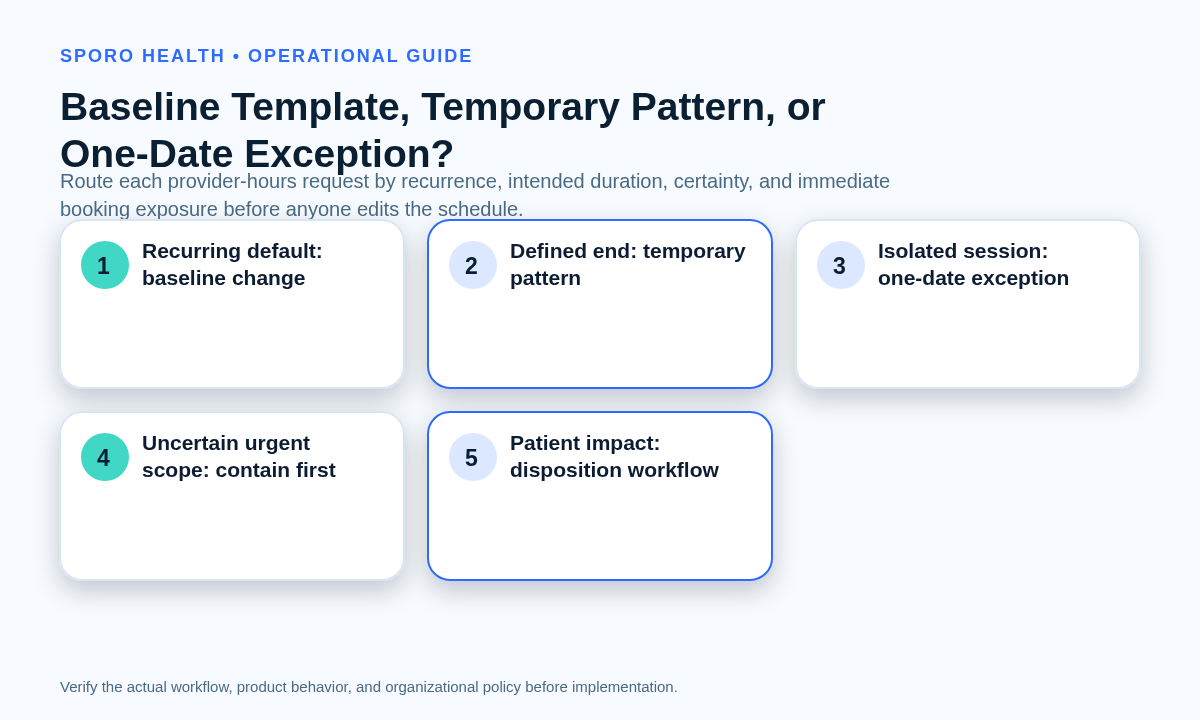
Use the smallest schedule layer that accurately expresses the approved intent. A permanent recurring default belongs in the baseline; a recurring pattern with an end date belongs in a bounded path; an isolated session belongs in a one-date exception; and an urgent request with uncertain scope should be contained before anyone makes a permanent edit.
This decision assumes the practice already has clear ownership and reasonably accurate templates. If not, start with broader athenahealth scheduling best practices. If the request is fundamentally an absence, route it into the physician out-of-office workflow rather than inventing a second process.
| Change path | Use it when | Required control |
|---|---|---|
| Baseline-template update | The new hours are approved as the recurring default with no planned restoration date. | Define an effective date, review future bookings, preserve known exceptions, and record approval. |
| Temporary dated pattern | The change repeats for a defined interval, such as seasonal or short-term hours. | Name the start, end, review date, restoration owner, and affected recurrences. |
| One-occurrence exception | Only a named date or isolated session changes. | Limit the edit to that occurrence and verify neighboring dates. |
| Emergency containment | Booking exposure is immediate but dates, recurrence, or approval remain uncertain. | Pause or protect the smallest known window, assign an owner, and complete classification before permanent editing. |
These are operating categories, not claims about exact athenaOne menu labels, permissions, or configuration steps. Confirm the available mechanics in the practice’s environment, but do not let interface terminology replace the underlying permanence decision.
What should the schedule-change impact-envelope worksheet contain?
The worksheet should describe every schedule surface the approved change can touch before an executor begins editing. It converts a verbal request into a bounded change unit that another person can review, execute, verify, and reverse.
If the provider’s first baseline was never stabilized, revisit initial provider-template calibration before treating repeated corrections as independent temporary changes.
| Worksheet dimension | Record before execution |
|---|---|
| Identity and pattern | Provider, current hours, proposed hours, local time zone, recurrence, certainty, and reason. |
| Boundaries | Effective date, end date if any, review date, future horizon, and dates explicitly outside scope. |
| athenahealth scope | Every provider-location-department combination and every affected appointment type. |
| Booking exposure | Booked appointments, self-scheduling or other booking channels, and any held or protected capacity. |
| Dependencies | Existing exceptions, external commitments, coverage, travel, rooms, or procedure dependencies. |
| Connected views | Approved Google Calendar, Outlook, staff, provider, and downstream booking views requiring verification. |
| Accountability | Requester, approver, executor, appointment owner, verifier, escalation contact, and rollback owner. |
Attach the approved request or decision record to the worksheet. The executor should not have to infer whether the request means every location, every appointment type, or only the provider’s most visible clinic session.
How should future appointments be handled before the effective date?
Choose an effective date only after identifying appointments already booked under the current pattern and assigning each one a disposition. Treat capacity configuration and patient-level transactions as two linked workstreams; changing availability does not, by itself, document what staff intend to do with each booking.
Use the front-desk reschedule and cancellation workflow when an approved hours change displaces individual appointments. Integration owners can also consult the official athenahealth appointment API reference when confirming which appointment information is available to an authorized connected workflow.
| Disposition | When it applies | Ledger evidence |
|---|---|---|
| Keep | The appointment remains serviceable without changing its booked state. | Reason, provider confirmation if needed, and verification status. |
| Reassign | Another approved provider can accept the appointment. | New provider, location, appointment type, owner, and patient-contact status. |
| Move | The same provider can see the patient at another approved time or location. | Old and new appointment identifiers or times, contact outcome, and verifier. |
| Cancel | No appropriate replacement is accepted or available under policy. | Authorization, communication status, follow-up owner, and closure evidence. |
| Escalate | Clinical priority, coverage, authorization, or operational constraints prevent routine disposition. | Named escalation owner, deadline, containment step, and current status. |
The ledger is complete only when every appointment in the impact window has a named owner and status. A count without patient-level accountability can hide orphaned work.
What should be verified after changing provider hours in athenahealth?
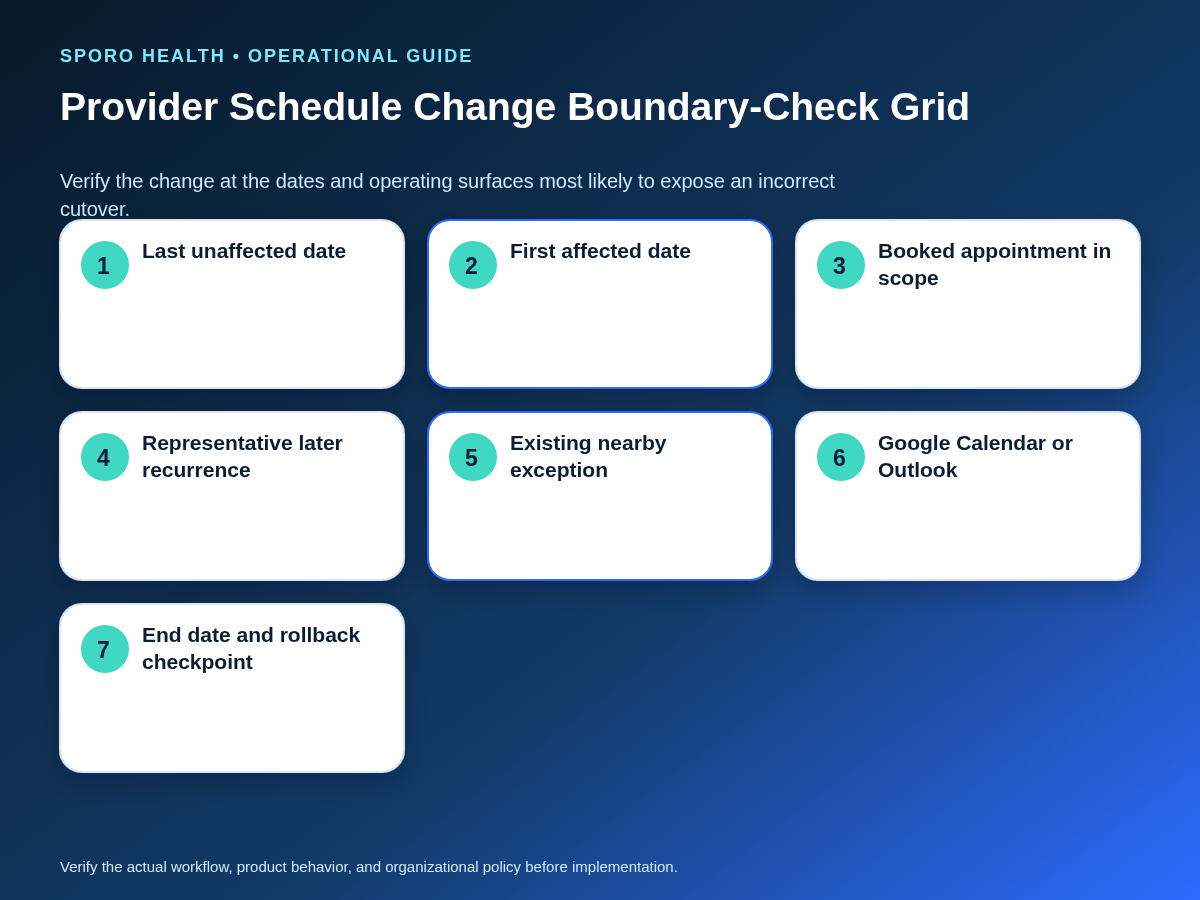
Verify the boundary, not merely one convenient date inside the new pattern. A representative sample should prove where the old state stops, where the new state begins, how recurrence continues, and whether existing exceptions and out-of-scope dates survived.
- Check the last unaffected date under the old pattern.
- Check the first affected date under the approved new pattern.
- Check a booked appointment inside the changed window and its disposition status.
- Check at least one later recurrence rather than assuming the first occurrence proves the series.
- Check a pre-existing exception near the boundary so that the broader edit has not overwritten it.
- Check the end or review date and one neighboring date outside the approved scope.
Record the expected state, observed state, view checked, verifier, timestamp, and evidence reference for each sample. If any sample fails, stop expanding the change. Determine whether the defect affects one occurrence, the recurrence rule, a location or department mapping, booked appointments, or a connected calendar.
How should Google Calendar and Outlook be checked?
Test each approved calendar platform separately and compare its observed state with the practice’s operating policy. Do not assume that a correct recurring change in one calendar proves the same series, exceptions, cancellations, time zone, or boundary in another.
Google documents recurring events as parent events with instances and exceptions, and warns against modifying many instances individually when the intended scope is the whole series or this-and-following instances. Its recurring-event guidance and calendar event model support checking both the parent pattern and altered occurrences.
Microsoft Graph exposes concepts including series masters, occurrences, exception occurrences, and canceled occurrences. The Microsoft event resource describes those relationships, while the list instances operation returns occurrences and exceptions within a specified time range.
For each platform, sample the same boundary dates used in athenahealth and compare provider, date, time, time zone, recurrence, exception, and cancellation state. Practices evaluating connected visibility can review Sporo’s vendor pages for athenahealth and Google Calendar and athenahealth and Microsoft Outlook, but should validate actual behavior in their approved configuration.
Who should approve, execute, and verify a provider-hours change?
Providers may request hours, but the practice should explicitly assign approval, execution, appointment disposition, verification, escalation, and rollback. A small practice may combine roles, but the executor should not silently declare their own complex change complete without an independent or documented second check.
- Requester: states the current pattern, requested state, reason, dates, and dependencies.
- Approver: decides permanence, scope, effective date, and acceptable appointment impact.
- Executor: applies only the approved schedule-layer change.
- Appointment owner: completes the disposition ledger and patient-level follow-up.
- Verifier: checks boundaries, neighboring dates, booking surfaces, and connected calendars.
- Rollback owner: restores the last verified state if acceptance criteria fail.
Unresolved post-cutover items should enter a named queue such as the daily schedule reconciliation process, not remain in email or memory.
What is the recovery flow when a schedule change is wrong?
Contain the affected window, compare it with the approved request, and restore the last verified state before attempting another broad edit. Roll back when the wrong provider, location, dates, recurrence scope, or booking state changed; appointments became ownerless; or approved schedule views disagree.
- Contain: pause conflicting edits and protect the smallest known booking window.
- Compare: preserve evidence and identify the first divergence from the approved impact envelope.
- Restore: return the affected schedule layer to the last verified baseline or bounded pattern.
- Reprocess: reconcile appointments and exceptions created, moved, canceled, or exposed during the failed change.
- Reverify: rerun the boundary sample in athenahealth and every approved connected view.
- Close: reopen normal edits only after owners, evidence, and any follow-up review are recorded.
If the change also altered protected specialty capacity, use the additional recurrence, release, and dependency checks in the recurring procedure-block controls. Avoid ad hoc reverse edits that create a second undocumented state.
How should schedule-change quality be measured?
Measure whether the change reached verified closure without leaving patient work, capacity defects, or recurring classification errors behind. Useful measures include affected appointments lacking a disposition, verification failures, boundary defects, unintended capacity changes, correction touches, time to verified closure, reopened exceptions, and repeated confusion between baseline and temporary paths.
Review measures by change type, provider, executor, and root cause rather than using one blended total. A recurring pattern of temporary requests later becoming permanent may indicate weak approval discipline; repeated boundary failures may indicate inadequate sampling. If the practice uses athenahealth Data View for retrospective auditing, account for its documented read-only design and refresh timing rather than treating it as a real-time correction surface.
How do you put the decision guide into practice?
Make the athenahealth schedule template vs temporary schedule change decision visible before anyone edits capacity. Require one classifier, one impact envelope, one appointment-disposition ledger, one boundary sample, and one rollback owner. That control set is small enough for routine use and specific enough to expose uncertain scope before it becomes a scheduling defect.
If connected calendar visibility is part of the operating model, review Sporo Health, the Sporo Health Google Calendar Sync listing in athenaConnect Marketplace, and the relevant product documentation. Treat vendor pages as evaluation inputs, then use the practice’s own approval, testing, privacy, and operational review before adoption or material change.
Frequently asked questions
What is the difference between an athenahealth schedule template and a temporary schedule change?
A schedule template is the provider’s recurring default availability. A temporary schedule change is bounded by named dates, an end date, or a single occurrence and should not silently redefine the baseline.
Should a two-week provider-hours change alter the baseline template?
A two-week change should normally remain date-bounded unless leaders have approved it as the new recurring baseline. Duration alone does not decide the path; document the start, end, owner, restoration step, and booked-appointment impact.
How should an effective date be chosen for a provider schedule change?
Choose the effective date only after reviewing appointments already booked under the old pattern. The plan must assign a disposition and owner to every affected appointment before capacity is changed.
What should be checked after changing provider hours in athenahealth?
Check the last unaffected date, first affected date, a later recurrence, nearby exceptions, and the end or review date. Also confirm that neighboring dates outside the approval remain unchanged.
How should future appointments be handled when provider hours change?
Keep schedule configuration and patient-level transactions separate. Record whether each affected appointment will be kept, reassigned, moved, canceled, or escalated, with a named owner and verification status.
Do Google Calendar and Outlook represent recurring changes identically?
No. Their recurring-event resource models differ, so test the approved Google Calendar and Outlook workflows separately rather than assuming the same series and exception behavior.
When should a provider schedule change be rolled back?
Roll back when the wrong provider, location, date range, recurrence scope, or booking state changed, or when appointments become ownerless or approved schedule views disagree. Restore the last verified state before reopening normal edits.
Sources

5 Comments
Comments are closed.

[…] the separate guide to choosing a baseline template or temporary schedule change when the request also changes general provider […]
[…] applying these zones, classify the requested schedule layer by choosing a schedule template or temporary change. A request to alter every future Monday is not operationally equivalent to closing one Monday […]
[…] the completeness gate, use the separate guide for choosing a recurring template update or bounded schedule exception. A temporary absence may also enter the specialized physician out-of-office availability-control […]
[…] appointment duration separate from provider working hours. The related guide to choosing between a recurring template change and a bounded exception addresses availability patterns; this playbook governs how much of that available time one patient […]
[…] ordinarily belongs in a date-bounded exception that can be verified and removed. Use the guide to choose between a recurring template change and a date-bounded schedule exception. If the event affects only one clinician, use the narrower individual provider absence […]