Scaling athenahealth Scheduling as You Add Providers: A Workload-Capacity Model
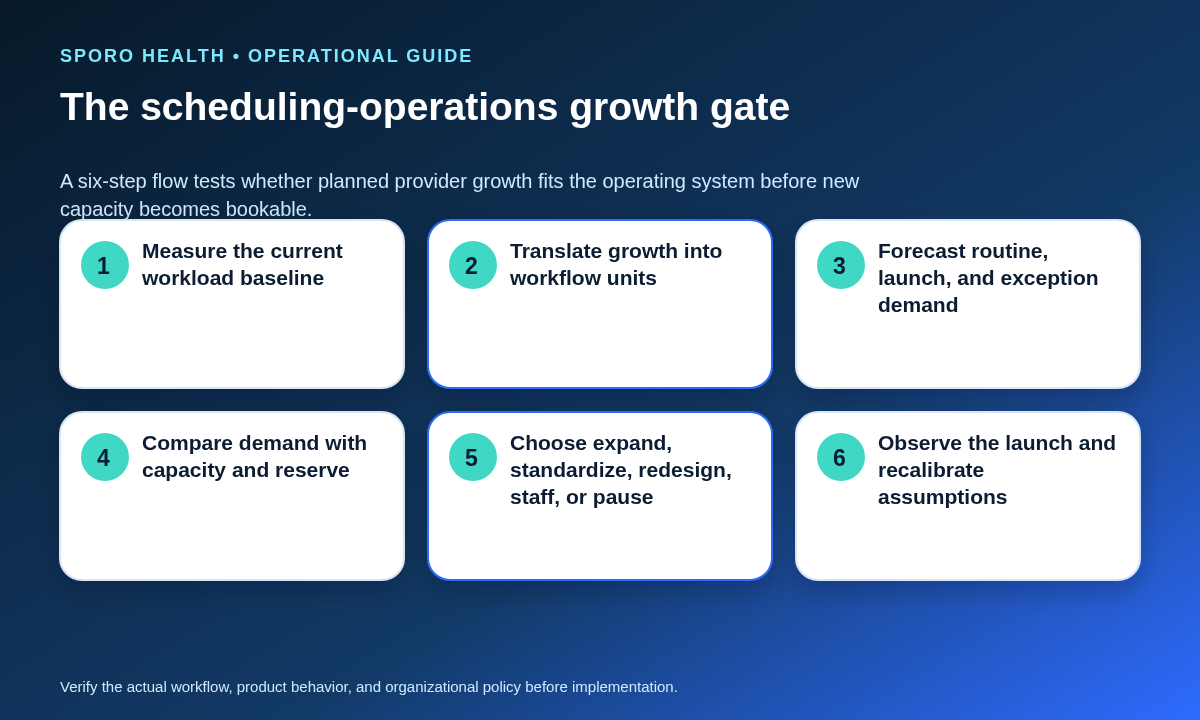
For growing medical-group leaders asking how to scale athenahealth scheduling when adding providers, the answer is to forecast work from provider-workflow units, not provider count alone. Measure routine transactions, exceptions, reconciliation, handoffs, lifecycle changes, and fallback work; compare those demand minutes with productive staffed minutes plus an operating reserve; then expand, standardize, redesign ownership, add capacity, sequence the launch, or pause.
This framework is for practice operations executives, practice managers, and athenahealth scheduling administrators. It measures the capacity of the scheduling operation—not clinician appointment capacity—and avoids assuming that every provider creates the same administrative workload. Use a recent representative period, preserve uncertainty, and complete the forecast before new schedules become bookable.
What should you count when scaling athenahealth scheduling?
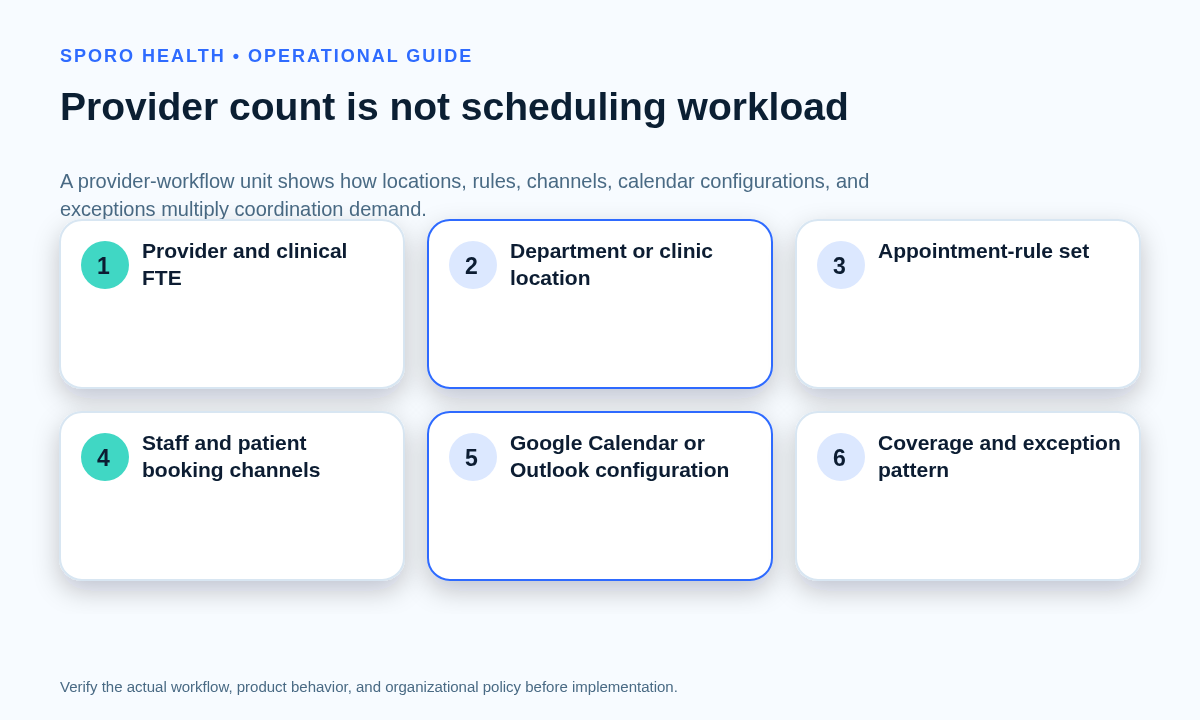
Count provider-workflow units, not providers alone. A provider-workflow unit is one provider operating within a defined department or location, appointment-rule set, booking-channel mix, calendar configuration, and coverage pattern. One provider working under three materially different configurations may create three units of scheduling work.
This boundary reflects how scheduling is configured. The current athenaOne service description explains that Schedule Builder can apply templates to provider groups, departments, and individual providers while supporting multiple appointment types, frequencies, and date ranges. Those distinctions can generate different maintenance, booking, testing, and exception requirements even when provider headcount is unchanged.
| Register field | What to record |
|---|---|
| Provider and clinical FTE | Named provider, planned start date, and recurring clinical commitment |
| Department or location | Every scheduling boundary in which the provider will operate |
| Appointment-rule set | Visit types, durations, release rules, resources, and recurring exceptions |
| Booking-channel mix | Local staff, central staff, portal, referral, or other approved surfaces |
| Calendar configuration | No connection, Google Calendar, Outlook, or another approved arrangement |
| Coverage pattern | Call, cross-site coverage, split days, leave, travel, or temporary assignments |
Keep this register separate from patient-facing capacity. The provider capacity allocation by clinic location may determine where appointments can be offered, while the provider-workflow register estimates the administrative work required to keep those offers correct.
How do you measure the current scheduling workload?
Build the baseline from actual transaction counts and sampled staff minutes across eight workload buckets. Keep routine work separate from exceptions so a deceptively low average booking time does not hide reconciliation backlogs, recurring defects, or difficult handoffs.
The athenahealth appointments documentation identifies workflows involving appointments, appointment types, slots, cancellation reasons, updates, and provider-related change subscriptions. Your study should include the operational work surrounding those transactions, not only the final system action.
| Workload bucket | Examples to count | Timing field |
|---|---|---|
| Routine transactions | Bookings, reschedules, cancellations, and appointment updates | Sampled active minutes per completed transaction |
| Schedule administration | Template maintenance, temporary changes, releases, and channel updates | Minutes per request or change package |
| Exceptions | Invalid destinations, competing edits, missing capacity, or recurrence errors | Resolution time plus waiting and escalation |
| Reconciliation | Queue review, mismatch comparison, correction, and closure evidence | Daily minutes and open carryover |
| Handoffs | Transfers between local, central, IT, vendor, or manager owners | Preparation, acceptance, and rework minutes |
| Lifecycle work | Onboarding, leave, role changes, mapping changes, and offboarding | Minutes per affected workflow unit |
| Incident fallback | Downtime capture, manual protection, replay, and recovery verification | Minutes by incident and affected unit |
| Management overhead | Training, quality review, reporting, meetings, and capacity planning | Recurring staffed minutes per period |
For each bucket, record volume, median handling time, a high-time observation for the stress case, owner, source record, and unresolved carryover. The daily athenahealth schedule reconciliation process supplies measurable exception and closure categories, while the provider schedule change request workflow provides a bounded transaction that can be sampled from intake through verification.
Baseline demand minutes = routine minutes + exception minutes + reconciliation minutes + handoff minutes + lifecycle minutes + fallback minutes + management overhead. Do not bury open exception debt inside a routine average. Report it separately as existing demand that the growth plan inherits.
Which growth assumptions create extra scheduling work?
Score each source of complexity separately, then translate it into minutes only when local observations support the relationship. A simple zero-to-two flag can show where risk is concentrated, but it should not become a universal workload multiplier.
| Complexity factor | Local evidence to capture |
|---|---|
| Cross-location work | Distinct departments, travel boundaries, time zones, and local resources |
| Variable rules | Appointment types, durations, release rules, and specialty exceptions |
| Multiple booking surfaces | Different staff teams, portal paths, referral paths, and authority rules |
| Recurring exceptions | Call, procedures, protected time, leave, and temporary coverage |
| Calendar mappings | Calendars per provider, write destinations, permissions, and monitoring scope |
| Weak standardization | Duplicate templates, undocumented variance, unclear ownership, and rework |
Research on an outpatient scheduling template found that EHR-derived timing data could reveal adherence problems and operational effects after implementation, while a separate outpatient specialty-clinic study modeled schedules against setting-specific constraints and competing objectives. These findings support practice-calibrated assumptions rather than a generic ratio or multiplier. See the EHR scheduling-template evaluation and the provider-schedule balancing study.
When complexity comes from unmanaged variation, use the evidence to standardize provider schedule templates across locations before converting every local difference into permanent staffing demand.
How do you build best-case, expected-case, and stress-case forecasts?
Forecast demand for each planned provider-workflow unit, add launch and known exception work, and compare the result with productive staffed minutes after a visible reserve is protected. Show three scenarios instead of presenting one precise-looking number.
Forecast demand = baseline minutes per comparable unit × planned units + launch and training minutes + known exception and fallback demand + inherited backlog.
Decision capacity = paid staffed minutes − meetings − breaks − leave − training − required non-scheduling duties − operating reserve. The World Health Organization’s Workload Indicators of Staffing Need method similarly connects workload components and activity-time standards with available working time. Adapt that logic to the scheduling operation rather than treating a nominal FTE count as fully productive time.
| Scenario | Assumptions | Decision use |
|---|---|---|
| Best case | Lower observed routine time, strong standardization, low exception recurrence, planned attendance | Shows upside, but should not be the approval basis |
| Expected case | Representative local handling time, planned workflow mix, normal leave and launch support | Primary operating forecast |
| Stress case | High sampled handling time, slower ramp, absence, recurring exceptions, or fallback demand | Tests reserve, containment, and sequencing |
Display demand, productive capacity, and reserve as separate values. If the expected case fits only by consuming the reserve, the operation does not have a genuine buffer. If the stress case creates an unrecoverable backlog, approve a smaller wave or another corrective action.
How should the five-outcome growth gate work?
The growth gate should produce one of five documented actions: expand, standardize, redesign ownership, add or reallocate capacity, or pause. Every decision needs a named owner, evidence threshold, fallback, and review point.
| Outcome | When it fits | Required decision record |
|---|---|---|
| Expand as planned | Expected demand fits decision capacity and the stress case has a credible recovery path | Approved units, launch owner, reserve, fallback, and review date |
| Standardize first | Variation, duplicate rules, or template drift creates avoidable work | Target standard, approved exceptions, migration owner, and retest threshold |
| Redesign ownership | Handoffs or fragmented authority cause delay, duplication, or unowned exceptions | Authority map, routing rule, local exceptions, and pilot boundary |
| Add or reallocate capacity | Necessary work still exceeds capacity after practical standardization and redesign | Role, productive minutes, training plan, coverage date, and contingency |
| Pause | Stress demand is unsafe, controls are unresolved, or exception debt is already worsening | Stop condition, remediation owner, evidence needed, and reconsideration date |
A capacity gap does not automatically mean hiring. It may indicate that the current centralized, decentralized, or hybrid scheduling model places repeatable work, local exceptions, or verification responsibility with the wrong owners. Conversely, ownership redesign should not be used to disguise a true shortage of productive minutes.
Do connected calendars reduce net scheduling workload?
Connected calendars may reduce selected double-entry and visibility work, but their net effect must include mapping, permissions, monitoring, lifecycle, reconciliation, and fallback controls. Evaluate each provider-workflow unit instead of assuming that every connection removes the same amount of labor.
Google Calendar’s incremental synchronization guidance describes stored sync state and full-resynchronization handling, while its push-notification guidance notes that watches are resource-specific and notifications can be missed. Microsoft Graph provides calendar-view delta tracking for added, changed, and deleted events, and its webhook documentation requires subscription lifecycle management and describes retry and drop conditions. These platform mechanics support explicit monitoring and reconciliation rather than an assumption that a connection is self-maintaining.
- Count avoided double entry and faster visibility as potential workload reductions.
- Count provider-calendar mapping, permission changes, notification coverage, exception review, onboarding, offboarding, and fallback as added work.
- Measure the net minutes and error exposure for each calendar configuration.
- Preserve a manual authority and recovery path for unobserved or disputed intervals.
The current Sporo athenahealth and Google Calendar product page and Sporo athenahealth and Microsoft 365/Outlook product page describe bidirectional connections. Treat those descriptions as vendor claims to validate against your own workload baseline, acceptance tests, and pilot evidence. Leaders can also review the broader Sporo Health overview and the Sporo Health Google Calendar Sync listing in athenaConnect Marketplace as commercial reference points, not independent proof of net workload reduction.
What should leaders measure after launch?
Compare actual demand with the expected forecast by provider-workflow unit and stop the next growth wave when exception debt or reserve consumption is worsening. Recalibration should distinguish a bad assumption from a temporary launch effect.
- Actual routine minutes versus expected minutes by transaction type
- Exceptions per 100 transactions and their median and oldest unresolved age
- Daily reconciliation carryover and repeated-exception share
- Handoffs returned for missing information or unclear authority
- Lifecycle or mapping work not completed by the required date
- Operating reserve consumed and consecutive periods below the approved reserve
- Forecast error by provider-workflow unit, location, and calendar configuration
Use a predefined observation period and record whether each variance should change the baseline, the complexity assumptions, the ownership model, or the next cohort. A wave-gate plan for provider rollout can sequence approved units so the organization learns before exposing the full growth plan.
How to scale athenahealth scheduling when adding providers
Scale the operation only after measured demand, productive capacity, reserve, ownership, and fallback evidence support the next provider-workflow units. Provider count is an input, not the workload model. When the forecast exposes a gap, correct the source—standardization, ownership, automation, capacity, sequencing, or unresolved controls—before schedules are released. Recalculate after launch instead of allowing temporary exception work to become permanent operational debt.
Frequently asked questions
How do you scale athenahealth scheduling when adding providers?
Scale athenahealth scheduling by forecasting provider-workflow units, measuring routine and exception minutes, comparing demand with productive capacity plus reserve, and applying a documented expand, standardize, redesign, staff, sequence, or pause decision.
What is a provider-workflow unit?
A provider-workflow unit is one provider operating within one defined department or location, appointment-rule set, booking-channel mix, calendar configuration, and coverage pattern. A single provider may create several units.
How many schedulers does a medical practice need per provider?
There is no defensible universal scheduler-to-provider ratio for this decision. Use local transaction volumes, sampled handling time, exception mix, service expectations, productive staffed minutes, and an explicit reserve.
Which scheduling metrics should be reviewed before adding providers?
Review routine transaction volume, exception rate and age, reconciliation minutes, handoffs, lifecycle changes, productive capacity, reserve consumption, and forecast error by provider-workflow unit.
When should a growing medical group centralize scheduling?
Centralize when work is repeatable across sites and shared visibility improves resilience; keep work local when exceptions require location-specific knowledge. Many groups will need a hybrid authority model.
How should connected calendars be included in the forecast?
Include connected calendars as both possible workload reduction and added control work. Count avoided double entry separately from mapping, permissions, monitoring, lifecycle changes, reconciliation, and fallback effort.
When should planned provider growth be paused?
Pause when the stress case exceeds productive capacity plus the approved reserve, critical ownership or access controls are unresolved, or exception debt is already growing without a credible recovery plan.
Sources
- athenaOne Service Description, athenahealth.
- Appointments documentation, athenahealth Developer Portal.
- Workload Indicators of Staffing Need: User’s Manual, World Health Organization.
- Evaluating and Improving an Outpatient Clinic Scheduling Template Using Secondary Electronic Health Record Data.
- A Method for Balancing Provider Schedules in Outpatient Specialty Clinics.
- Google Calendar incremental synchronization guidance.
- Google Calendar push-notification guidance.
- Microsoft Graph calendar event delta-query guidance.
- Microsoft Graph webhook change-notification guidance.