athenahealth Scheduling Across Time Zones: A DST-Safe Playbook for Medical Groups
To answer how to manage provider schedules across time zones in athenahealth, multi-location practice managers should assign every clinic an approved local scheduling zone, preserve an unambiguous source instant, and test each provider-calendar pair across ordinary dates and daylight-saving boundaries. Capacity should remain closed whenever the intended clinic-local hour, recurrence scope, or downstream display cannot be verified.
How to manage provider schedules across time zones in athenahealth
Use clinic-local time as the booking rule, preserve an unambiguous source instant, and require every connected view to prove the same moment. A provider’s home zone or a viewer’s device setting may change what the user sees. Google notes that calendar recipients receive events in their own time zone, so agreement on one workstation is not sufficient acceptance evidence. See Google’s time-zone guidance.
- Assign authority: name the approved scheduling zone for every clinic.
- Map each pair: connect one provider, clinic, athenahealth record set, and external calendar.
- Define expectations: write the intended clinic-local start, end, recurrence, location, and availability effect.
- Test before release: inspect athenahealth, the external calendar, and at least one alternate viewer zone.
- Gate uncertain capacity: pause affected slots until a named verifier closes the evidence gap.
Use the broader multi-location athenahealth scheduling fundamentals for location architecture, then apply this narrower clock-control standard to every cross-zone provider-calendar pair.
What should the time-zone authority matrix contain?
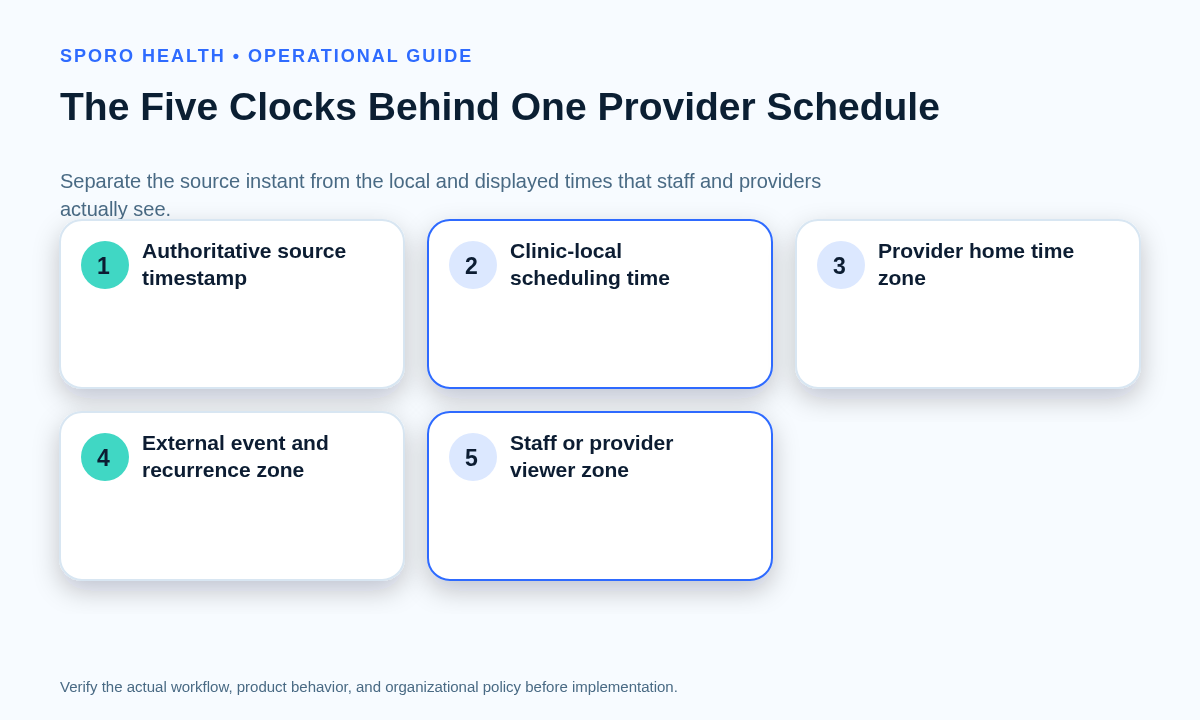
Record the source instant, clinic-local time, provider home zone, external event zone, recurrence zone, viewer zone, and accountable owner separately. Confirm the actual appointment and availability representations used by your implementation against the current athenahealth Appointment API reference; do not assume that a display label is an authoritative time-zone field.
| Clock or layer | Record | Acceptance check | Owner |
|---|---|---|---|
| Source instant | Record ID, stored date/time, status, update marker | Identifies the intended moment | Scheduling administrator |
| Clinic-local time | Approved zone and local start/end | Matches published clinic hours | Practice operations |
| Provider home zone | Normal working or display zone | Conversion is understood | Provider operations |
| External event zone | Event start, end, and zone | Represents the same instant | Integration owner |
| Recurrence zone | Series zone and exception scope | Occurrences survive DST correctly | Integration owner |
| Viewer display zone | Account, calendar, device, and application zone | Alternate viewers show the expected conversion | User or platform administrator |
Add this matrix to the new clinic location scheduling checklist whenever a site, department, provider, calendar, or regional operating model is introduced.
How should recurring provider schedules handle daylight saving time?
Expand and test recurring schedules by their intended local wall-clock time rather than copying one UTC offset across the series. RFC 5545 recommends local time with a time-zone reference when recurring instances should remain at the same local hour, while Google’s event resource requires a time zone for recurrence expansion. In most U.S. jurisdictions, the spring transition skips an hour and the fall transition repeats one; confirm current rules through NIST’s DST guidance and the applicable local jurisdiction.
What should the daylight-saving acceptance matrix test?
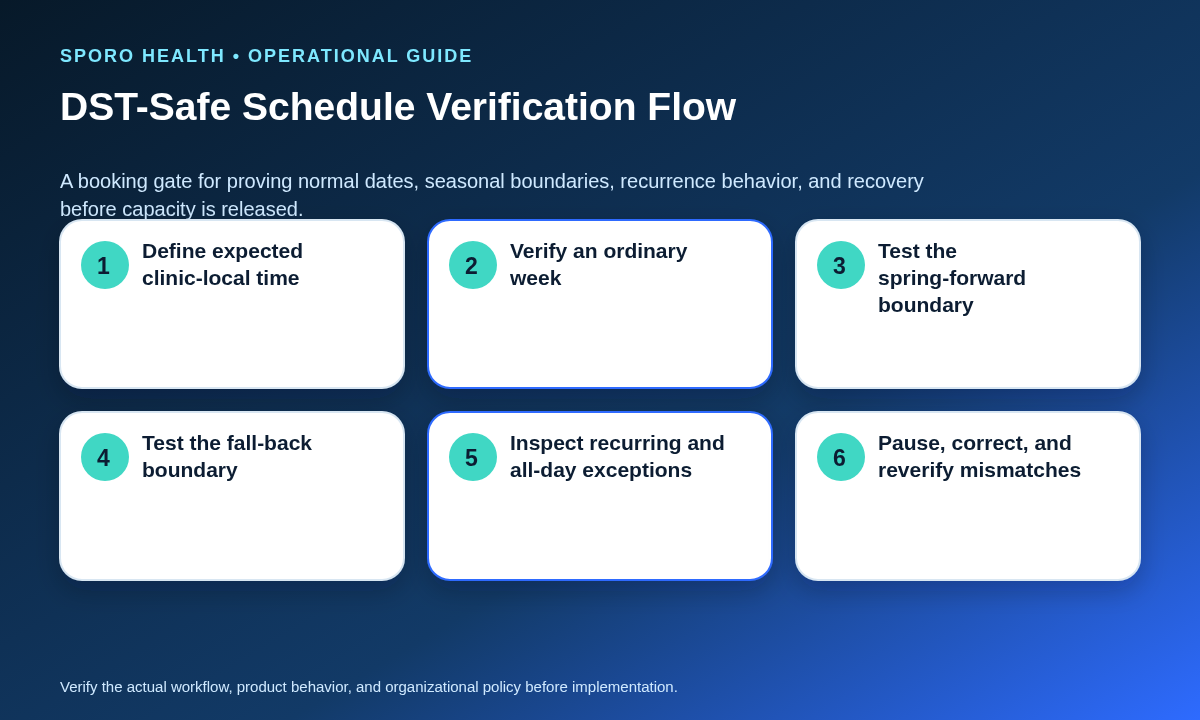
Test ordinary dates, both seasonal boundaries, recurrence behavior, date-bounded blocks, overnight intervals, lifecycle changes, and temporary coverage. Each case needs an expected clinic-local result and evidence from every production calendar platform.
| Scenario | Required proof | Pause condition |
|---|---|---|
| Ordinary weekday | Start, end, location, and availability agree | Any unexplained difference |
| Spring-forward boundary | Valid local hour and intended duration | Missing or shifted occurrence |
| Fall-back boundary | Repeated hour identifies one intended instant | Ambiguous or duplicate capacity |
| Recurring series | Occurrences before and after DST retain intent | Fixed-offset drift |
| All-day block | Correct clinic-local date boundaries | Adjacent date is constrained |
| Overnight interval | Start, end, and duration survive conversion | Duration changes unexpectedly |
| Reschedule | Correct occurrence or series scope changes | Unintended instances move |
| Cancellation | The same instance closes everywhere | Orphaned or bookable entry |
| Temporary cross-zone coverage | Coverage clinic hours render correctly for all viewers | Home-zone hours replace coverage hours |
Place these cases inside the broader calendar sync pilot acceptance matrix so evidence, defects, retesting, and release decisions follow one controlled method.
How should temporary cross-time-zone coverage be controlled?
Define the effective instants, coverage clinic, intended local working hours, appointment scope, buffers, mappings, and verifier before opening capacity. The provider’s home zone remains useful context, but it must not silently redefine the coverage clinic’s hours. Physical movement is a separate constraint; use the provider travel-time buffer playbook when a provider also travels between sites.
What belongs on the coverage transaction card?
The card should make one temporary assignment executable, reviewable, and reversible. Capture the following fields before anyone edits bookable capacity:
- Provider and assignment identifier
- Home clinic and home time zone
- Coverage clinic and approved local zone
- Effective start and end instants
- Local working hours and appointment scope
- Travel, preparation, and closeout buffers
- athenahealth department or location mapping
- Google Calendar or Outlook mapping
- Recurrence and exception scope
- Approver, executor, verifier, and rollback owner
- Evidence links and reopening decision
Require a different verifier when practical. The card is incomplete until the start boundary, end boundary, external views, and restored baseline have all been checked.
How do you diagnose and recover from one-hour calendar drift?
Pause affected capacity, capture both the intended and displayed times, identify the first layer that diverges, correct the authoritative layer, and reverify every downstream view. Record the clinic-local expectation, corresponding UTC instant, source and event identifiers, time-zone values, recurrence scope, location, status, last edits, viewer settings, and screenshots before changing evidence.
Which branch of the drift diagnostic applies?
Start at the source and move outward so a display problem is not “fixed” by corrupting an otherwise correct schedule.
- Source record wrong: correct the authorized athenahealth schedule or availability record, then verify downstream updates.
- Event zone wrong: correct the external event’s explicit zone through the approved workflow.
- Viewer zone wrong: repair the account, calendar, application, or device display setting without changing the event.
- Recurrence exception wrong: determine whether one occurrence, future occurrences, or the series should change.
- Mapping stale: validate the provider, clinic, calendar, and identity mapping before replay or reconstruction.
- Rendering stale: refresh or re-query the downstream view and preserve evidence if the stored event is correct.
Reopen booking only after the affected occurrence, adjacent occurrences, both DST sides, and at least one alternate viewer zone agree. If the cause remains uncertain, keep the narrowest affected capacity contained and escalate with the captured evidence.
Which measures show time-zone control is working?
Measure wrong-hour outcomes, test failures, affected capacity, recovery speed, recurrence exceptions, and repeat causes—not only successful requests. A successful transport response does not prove that every user sees the intended clinic-local hour.
| Measure | Method | Use |
|---|---|---|
| Wrong-hour incidents | Count by clinic and provider-calendar pair | Find concentrated risk |
| Affected slots | Count bookable or booked intervals exposed | Size operational impact |
| DST failure rate | Failed cases divided by executed cases | Gate seasonal readiness |
| Recurrence exceptions | Unexpected moved, missing, or detached instances | Detect series instability |
| Containment time | Detection to protected capacity | Assess response speed |
| Correction time | Containment to verified recovery | Improve the runbook |
| Repeat-cause rate | Incidents repeating an established cause | Test corrective action |
How do Google Calendar and Outlook testing differ?
Use one operational expectation but separate platform test evidence. Google events can carry IANA time-zone names, and the recurrence zone controls expansion; its recurring-event guidance also distinguishes parent series, instances, and exceptions. Microsoft Graph represents event start and end with date-time and time-zone objects, retains original start and end zones, and distinguishes series masters, occurrences, and exceptions.
For Google, test account and event zones, alternate viewer zones, instance identity, cancellations, and recurrence exceptions against the Google Calendar Events API and recurring-event guide.
For Outlook, test supported zone names, original event zones, series and exception behavior, and alternate display settings against Microsoft’s dateTimeTimeZone resource and event resource.
Use the athenahealth and Google Calendar evaluation checklist for Google-specific operating questions and the Microsoft 365 Outlook integration preflight for tenant and calendar readiness.
How should the playbook be put into practice?
The practical answer to how to manage provider schedules across time zones in athenahealth is to release capacity only after the clinic-local hour and connected views agree. Begin with one provider-calendar pair, one ordinary week, the next spring and fall boundaries, and one temporary coverage case.
- Approve the time-zone authority matrix.
- Complete the DST acceptance suite.
- Rehearse containment and one-hour drift recovery.
- Set release and pause authority in writing.
- Review measures after each transition or incident.
For a measured next step, review Sporo Health scheduling resources, the athenahealth and Google Calendar product page, the athenahealth and Microsoft 365/Outlook product page, and Sporo Health’s athenaConnect Marketplace listing. Ask any vendor to demonstrate the practice’s own time-zone matrix and DST cases rather than inferring behavior from a generic synchronization test.
Frequently asked questions
How do you manage provider schedules across time zones in athenahealth?
Assign each clinic an approved local scheduling time zone, preserve an unambiguous source instant, and verify the same appointment or block in athenahealth and every connected calendar before releasing capacity.
Should every location use one national time zone?
No. Keep each clinic’s approved local scheduling time, then use explicit time-zone conversion and verification so every viewer is looking at the same instant.
Which time zone should a traveling provider’s event use?
Use the coverage clinic’s intended local working time as the operational target, then verify how that instant appears in the provider’s home calendar and the staff scheduling view.
How should recurring schedules be interpreted across DST?
Test each occurrence against the intended local wall-clock time; do not assume one fixed UTC offset remains valid for the entire series.
Can an all-day event safely block a provider across time zones?
Only after the practice defines the intended local date boundary and proves the block in every connected view; otherwise use a timed interval with an explicit zone.
When should cross-time-zone booking be paused?
Pause affected capacity whenever the intended clinic-local time, location, recurrence scope, source record, or downstream display cannot be verified before staff or patients rely on it.
Do Google Calendar and Outlook handle time zones identically?
Do not assume parity. Test timed events, recurring instances, all-day blocks, moved occurrences, cancellations, and both DST boundaries separately on each platform.
Sources