Recovering an athenahealth Calendar Sync Backlog After API Throttling: A Schedule-Safe Runbook
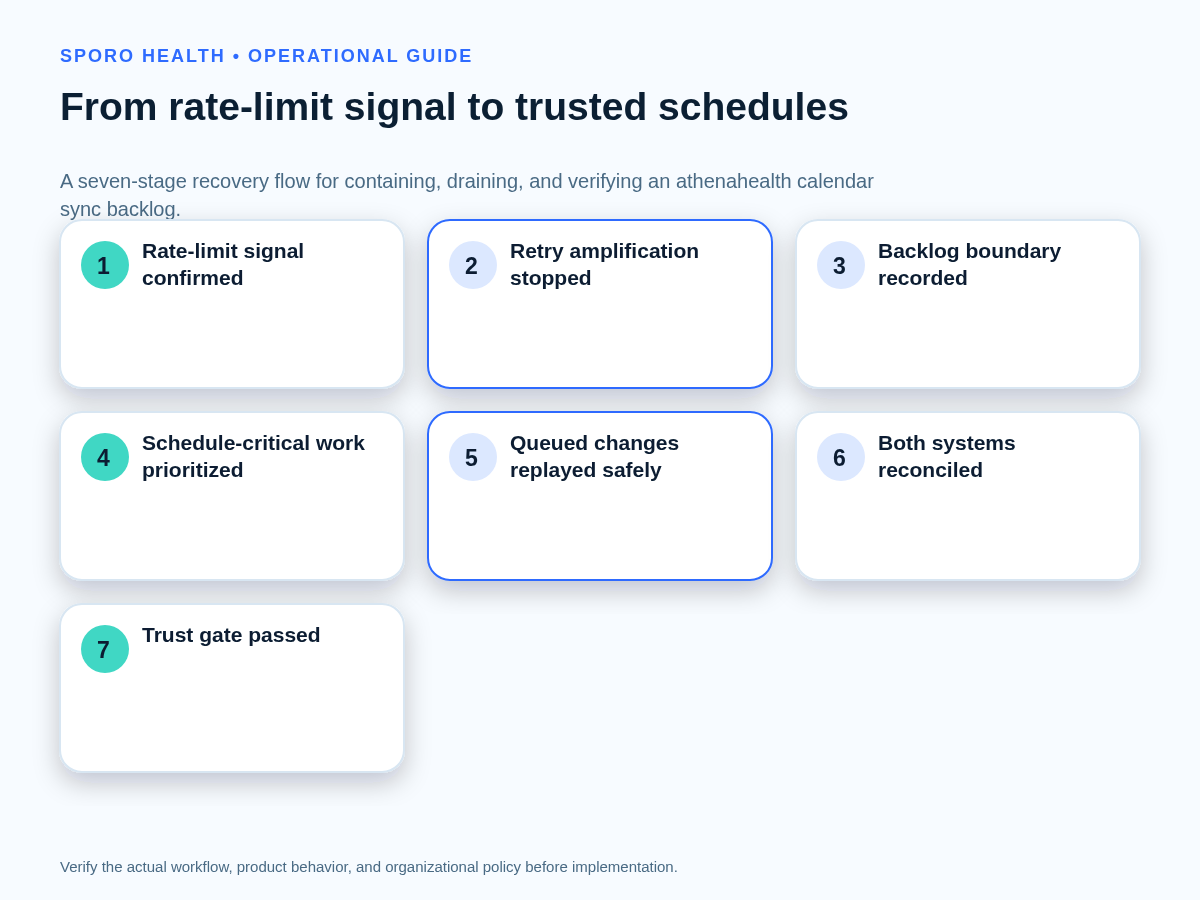
For healthcare IT teams, how to recover an athenahealth calendar sync backlog after API throttling is a containment problem before it is a replay problem. Stop retry amplification, preserve evidence, bound the uncertain schedule window, protect near-term availability, prioritize high-harm transactions, replay only after identity and state checks, reconcile both systems, and reopen normal synchronization through a documented trust gate.
How do you recover an athenahealth calendar sync backlog after API throttling?
Contain the request pressure, establish the uncertain scope, and protect schedule-critical work before draining the queue. An API-throttling backlog is a queue of schedule changes delayed after a connected platform rejects or defers requests because request volume exceeded a limit. Treat every affected provider-calendar pair and schedule interval as uncertain until queued records are replayed and reconciled.
A queue item might represent a request that failed, a request that succeeded but lost its acknowledgement, or a transaction superseded by a later change. Queue depth alone therefore cannot tell you which writes remain necessary.
What should happen in the first 15 minutes?
Stop immediate retry amplification before trying to make the queue smaller. Preserve the evidence needed to distinguish throttling from authentication, request, notification, and outage failures.
- Pause the affected retry lane. Stop rapid retries, overlapping workers, batch schedulers, and automatic full-sync jobs for the bounded scope.
- Preserve evidence. Retain timestamps, request IDs, endpoints, methods, status codes, response headers, error bodies, worker identity, and retry count.
- Name one recovery owner. Route changes, fallback decisions, vendor contact, and reopening approval through that owner.
- Find the earliest uncertain transaction. Record the last state verified in both systems immediately before it.
- Bound schedule exposure. List affected provider-calendar pairs and the highest-risk near-term interval before staff edit either system.
Do not let separate technical and operations teams replay, manually recreate, or delete the same records independently. One recovery ledger should control every disposition.
How do you confirm throttling before recovery?
Confirm throttling from the actual status code, error reason, headers, and traffic pattern rather than from queue growth alone. Each failure class needs a different correction.
| Observed signal | Likely class | Immediate disposition |
|---|---|---|
| athenahealth “Developer Over Rate – Forbidden” or matching error-volume spike | athenahealth rate limit | Pause amplification, preserve requests, inspect athenahealth API support guidance and the usage, error, and peak-rate analytics. |
Google Calendar 403 or 429 with usageLimits or rateLimitExceeded |
Google usage limit | Use randomized exponential backoff and reduce traffic as described in Google’s Calendar API usage-limit guidance. |
| Microsoft Graph 429, usually with Retry-After | Graph throttling | Wait for the stated interval and retry only unresolved requests under Microsoft Graph throttling guidance. |
| 401 or an authorization-specific error | Invalid or expired credentials | Repair authorization; do not treat credential failure as a backlog-drain problem. |
| Malformed, missing, conflicting, or unauthorized resource request | Permanent request error | Correct the request, identifier, scope, or permission. Google’s Calendar API error guide separates retryable limits from permanent errors. |
| Invalid sync or delta state without active rate-limit responses | Incremental-state failure | Open a separately controlled resynchronization path rather than repeatedly submitting the same incremental request. |
| Failures across unrelated endpoints, accounts, or services | Notification gap or broad outage | Contain schedule risk and investigate service health, subscriptions, and connection state before replay. |
If the signal remains ambiguous, first triage a calendar sync failure signal; this runbook begins after throttling and backlog scope are sufficiently confirmed.
How do you record the backlog watermark?
The backlog watermark is the control record separating trusted history, uncertain recovery work, and new normal traffic. Record it before changing queued data.
- Last trusted state
- The latest timestamp or sequence verified in athenahealth and the connected calendar.
- Earliest uncertain transaction
- The first failed, deferred, or acknowledgement-unknown queue item.
- Affected scope
- Provider-calendar pairs, transaction classes, locations, and workers involved.
- Risk horizon
- The near-term schedule interval that operations cannot yet trust.
- Drain position
- The highest sequence whose final state has been verified in both systems.
- Normal-traffic cut line
- The exact timestamp or sequence after which new requests use the restored normal lane.
Keep recovery traffic and new traffic logically separate until the high-risk horizon is reconciled. Advancing the watermark requires evidence, not merely a successful HTTP response.
Which queued changes should move first?
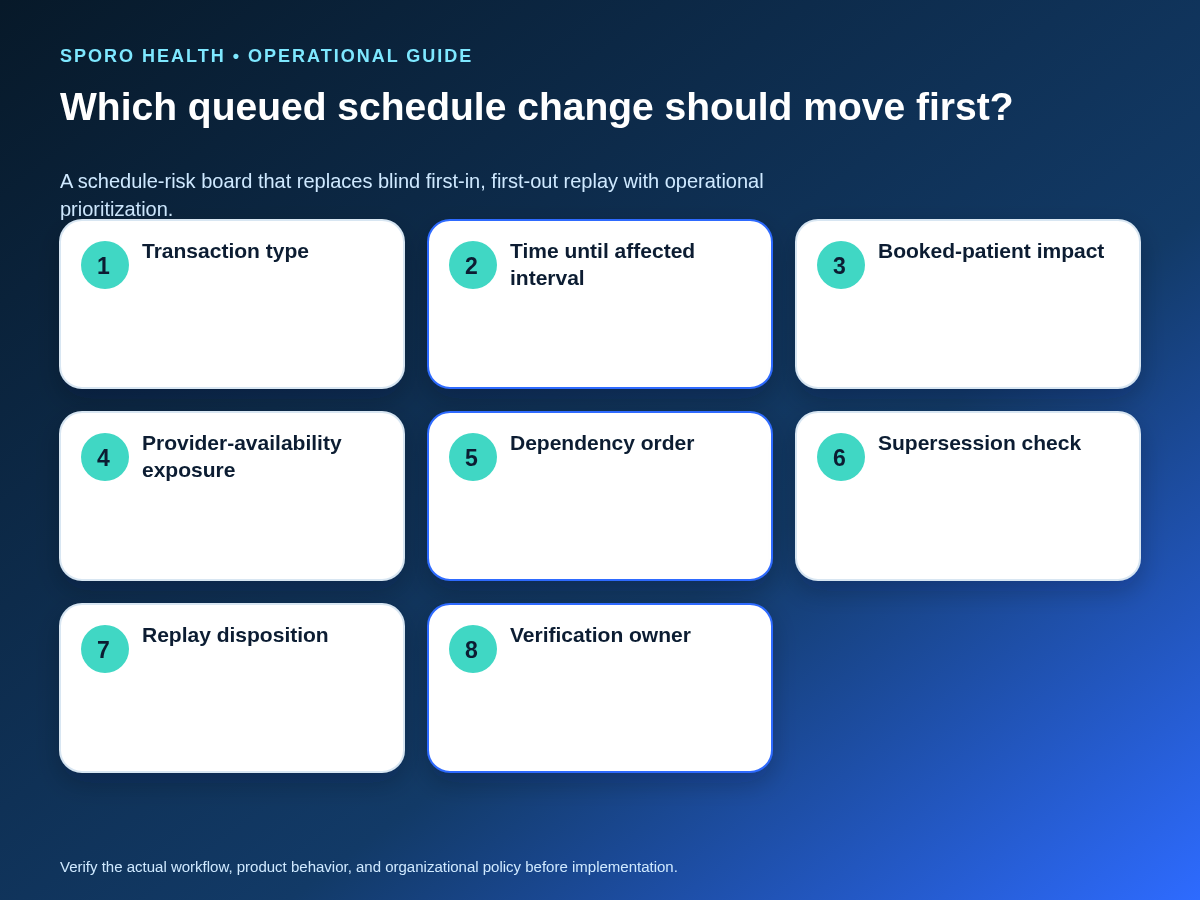
Prioritize queued work by operational harm, appointment horizon, availability exposure, dependency, and supersession—not arrival time alone. Use first-in, first-out only within the same risk and dependency class.
| Factor | Scoring rule | Operational meaning |
|---|---|---|
| Time until affected interval | 0 for beyond 7 days; 2 for 2–7 days; 4 for 48 hours or less | Near-term uncertainty receives more weight. |
| Booked-patient impact | 0 for none; 3 for a material update; 5 for cancellation or reschedule | Changes affecting an existing appointment outrank informational updates. |
| Provider-availability exposure | 0 for none; 3 if the change opens or closes bookable time | False-open and false-blocked intervals can affect additional transactions. |
| Dependency | Add 2 when another queued item depends on this final state | Predecessors must close before dependent writes. |
| Supersession | Do not score if a later transaction already defines the intended final state | Verify the current state, then close the older item as superseded without replay. |
Process the highest score first while preserving transaction order inside each dependency chain. A near-term cancellation or availability restriction will generally outrank a far-future create with no booked-patient or capacity impact.
When should manual fallback begin?
Begin a bounded fallback when backlog age or affected scope crosses a practice-approved risk threshold, or when staff cannot verify near-term availability. The threshold should come from established schedule-risk service levels, not an improvised incident decision.
Do not automatically make Google Calendar or Outlook the schedule authority. Select one authoritative schedule for the fallback window, log every permitted change in one ledger, and prohibit untracked double entry. If the queue becomes a broader continuity problem, activate the calendar integration outage and fallback runbook.
How do you replay delayed calendar updates without duplicates?
Pass every queued item through a replay-safety gate before issuing a write. The gate should confirm identity, current state, supersession, write scope, and verification ownership.
- Retain the original athenahealth record ID, calendar ID, event ID, recurrence identity, request ID, and queue sequence.
- Read the current authoritative state immediately before replay.
- Determine whether a later transaction supersedes the queued instruction.
- Use an idempotent create key or client-controlled identifier where the platform supports it.
- Prefer the smallest update, cancellation, or create needed to reach the intended final state.
- Exclude items already confirmed successful from every retry batch.
- Limit concurrency by provider-calendar pair and preserve dependency order.
- Close the item only after both systems show the intended state.
Google documents that a client-supplied event ID can help prevent duplicate creation after uncertain execution in its event-creation guidance. Microsoft Graph exposes a client-supplied transactionId for avoiding redundant create operations in its event resource. These mechanisms support replay safety but do not replace current-state comparison and two-system verification.
If extra copies appear or are discovered during recovery, stop that pair’s drain and repair duplicate events after replay before continuing.
How should the backlog drain be controlled?
Drain the backlog through small, observable units with bounded concurrency and per-item outcomes. Do not resubmit a partially successful batch in full.
- Partition the queue by provider-calendar pair, transaction family, and dependency chain.
- Hold superseded, permanently invalid, and identity-uncertain items outside the active drain.
- Process prerequisite cancellations, reschedules, or availability changes before dependent creates.
- Use a low concurrency ceiling that can be reduced immediately if throttling returns.
- Honor platform retry guidance, including Retry-After or randomized exponential backoff.
- Record success, permanent failure, retryable failure, superseded, and manual-review outcomes individually.
- Verify both systems, exclude successful items, and advance the backlog watermark only for closed work.
Google advises excluding successful and definitely failed batch items before retrying unresolved work, while Microsoft notes that batched Graph requests are evaluated individually and throttled items require their own retry handling.
What if recovery keeps failing?
Stop the drain when repeated failure makes the recovery process itself a source of load or schedule uncertainty. Use the failure-specific path below instead of increasing retries.
| Failure during recovery | Required response |
|---|---|
| Recurring 403 or 429 | Pause the affected lane, reduce concurrency, verify that no parallel worker or full-sync job remains active, and follow current platform delay guidance. |
| Invalid incremental state | Open a scoped resynchronization plan. Google states that an invalid sync token can require a fresh full sync in its incremental synchronization guidance; Microsoft Graph documents full and incremental calendar-view synchronization in its event delta guidance. |
| Partial batch success | Mark completed items closed, remove permanent failures from automatic retry, and resubmit only unresolved retryable items. |
| Duplicate creation | Freeze the provider-calendar pair, preserve both identities, determine the surviving event, repair its mapping, and test another create before resuming. |
| Stale cancellation or update | Compare the current authoritative record and later transactions; use the smallest write needed for the present intended state. |
| Queue grows during recovery | Stop the active drain, widen operational containment, reassess the risk horizon, and activate bounded fallback if thresholds are crossed. |
| Vendor escalation required | Send timestamps, request and correlation IDs, endpoints, methods, response headers, redacted samples, retry history, queue depth, oldest-item age, affected pairs, last trusted state, and attempted containment. |
A full resynchronization is not the default cure for throttling. Bound it to the smallest invalid state and schedule window possible so it does not deepen rate limiting or duplicate records already present.
When is the backlog fully recovered?
Normal synchronization can reopen only after the retry storm has stopped and the defined high-risk schedule window is trustworthy again. A falling queue count or green service status is not sufficient by itself.
- The oldest high-risk queued transaction has a verified final disposition.
- Every in-scope provider-calendar pair is reconciled across the risk horizon.
- Representative create, update, reschedule, cancellation, and availability tests pass.
- New traffic beyond the normal-traffic cut line is processing without renewed amplification.
- Duplicates, stale states, and missing records are resolved or assigned to named owners.
- The recovery owner records reopen, conditional reopen, or continued containment.
What should the recovery scorecard track?
Track whether uncertainty and operational exposure are shrinking, not merely whether the worker is processing requests. Review:
- oldest queued transaction age;
- total and high-risk queue depth;
- affected provider-calendar pairs and schedule horizon;
- replay success, repeated failure, and superseded-item counts;
- duplicate and stale-state findings;
- reconciliation completion by pair;
- unresolved exceptions with owners and due points; and
- time to restored trustworthiness for the defined scope.
After the drain closes, use reconciliation sampling for silent calendar drift to test for mismatches outside the obvious error queue. The scorecard is an operational control, not a promise of performance, savings, or clinical outcomes.
Where do connected-calendar options fit?
Product pages can identify a candidate workflow, but they are not incident evidence or a substitute for recovery testing. Review the Sporo Health homepage, the current athenahealth and Google Calendar connection, the athenahealth and Microsoft Outlook connection, and the athenaConnect Marketplace listing. Treat product statements as vendor descriptions and verify behavior, responsibilities, and recovery evidence for your configuration.
How do you put the recovery runbook into operation?
The practical answer to how to recover an athenahealth calendar sync backlog after API throttling is to restore trust in a bounded schedule scope, not simply empty a queue. Preapprove the recovery owner, risk horizon, fallback threshold, replay gate, concurrency control, scorecard, and reopening authority. Test the process with synthetic throttling or a tabletop scenario before a live backlog forces those decisions.
Frequently asked questions
What should a medical practice do after calendar API rate limiting?
Pause automatic retries and bound the affected schedule window first. Preserve request evidence, name one recovery owner, identify the earliest failed transaction, and protect near-term scheduling while the queue is classified.
How should calendar sync transactions be prioritized during a backlog?
Prioritize by operational harm, appointment horizon, provider-availability exposure, dependency, and supersession—not arrival time alone. Near-term cancellations, reschedules, and availability restrictions usually move ahead of far-future low-risk updates.
How do you replay delayed calendar updates without duplicates?
Compare the current authoritative state before every replay and preserve the original record and event identifiers. Exclude already successful items, detect superseding transactions, use an idempotent create mechanism where supported, and apply the smallest write that reaches the intended final state.
When should a calendar sync backlog trigger manual fallback?
Begin a bounded fallback when backlog age or affected scope crosses a practice-approved risk threshold, or when staff cannot verify near-term availability. Use one authoritative schedule and one logged change ledger for the fallback window.
How do you reconcile schedules after Microsoft Graph throttling?
Honor Retry-After guidance, retry only unresolved items, and verify the resulting event state against the authoritative schedule. Reconcile each affected provider-calendar pair across the defined schedule window before closing the backlog.
How do you recover from Google Calendar API quota errors?
Stop immediate retries, use randomized exponential backoff, and spread or reduce request traffic. If incremental sync state is invalid, treat a scoped full synchronization as a separate recovery path rather than the default response to throttling.
When is an athenahealth calendar sync backlog fully recovered?
Recovery is complete only after retry amplification has stopped, the high-risk window is reconciled, representative create, update, reschedule, cancellation, and availability tests pass, and every unresolved exception has an owner.
Sources
- Google Calendar API: Usage limits
- Google Calendar API: Handle API errors
- Google Calendar API: Synchronize resources efficiently
- Google Calendar API: Create events
- Microsoft Graph throttling guidance
- Microsoft Graph: Incremental changes to events in a calendar view
- Microsoft Graph event resource
- athenahealth API support
- athenahealth Developer Portal usage analytics and error dashboard